3ds Max | Scripts

FCpreview

2 votes

Creates a frame sequence of viewport grabs to use as a preview with Iridas' FrameCycler. A replacement preview function if you will.

Quick Change Viewports

5 votes

My one of the first scripts :)

Powerful Rendering and Scene Operating Script RDFactory

4 votes


RDFactory v1.0 for 3dsmax 2009-2014

Introduction

Hi, my friends

It's a good news. RDFactory is published. It's powerful sexy and easy to use.

Wise Rendering

One-key test rendering. One-key GI rendering. One-key final rendering. One-key color channels rendering. One-key specific channel rendering. One-key high quality z-depth channel rendering.

Auto save files after rendering and auto path the path.

Easy Scene Operation

Simple Generator Splines v1.1

8 votes


V1.1 Now you can specify the path.

________________________

V1.0

Generator of abstract patterns of splines.

________________

Other scripts here.

Render Info Strip

13 votes

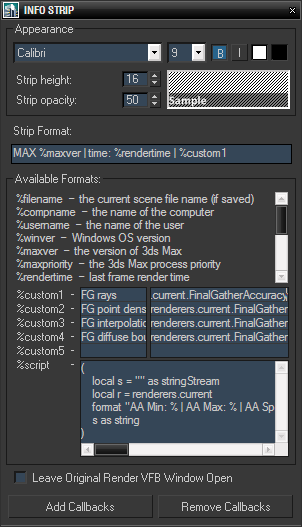
This script was created upon request as a vray frame stamp replacement, intended for mental ray and scanline rendrers.

It allows custom information to be displayed in the rendered image, with user defined font size, style, colors and opacity of the strip background. In addition to predefined keywords, there are five custom expressions and one script value. Original render frame buffer can either be closed or kept open. The settings and callbacks are saved in the .max files.

KISS Utility Suite

0 votes

Utility List
1. Common Tool Rollout
Creates a window list of commonly used tools that includes:
Extrude: Creates a new set of mesh connected to the selection that can then be manipulated.
Bridge: Creates a face connecting two selected edges.
Connect: Creates a bridging edge between two vertices.
Reset X Form: Removes all Rotation and Scale values from selected objects and places those transforms in an X Form modifier.
Bevel: Adds thickness to a selection of edges.
Convert to Poly: Turns objects into an editable polygon.
Delete Selection: Removes whatever is selected.

Override -Selection Mode- & -Convert Selection- in EditablePoly/UnwrapUVW

19 votes

This script override selection mode in EditablePoly/UnwrapUVW AND allow to Convert subobject selection to an another in EditablePoly and Unwrap

Hit 1 or 2/3/4/5 ==> go in vertex/edge/..() mode
Re-hit 1 or 2/3/4/5 ==> go in object mode and you can select another object!
I have added a line, with "Max modify mode", like this, if your are not in "modify panel" when you select an object and hit 1 to set vertex mode, the script go automatically in the panel "modify"

Install:
Go in Customize User Interface, Group "Main UI", Category "zOffTy Tools" and set
1 for epoly_vertex

Silhouette Tool

3 votes

Silhouette Tool

This tool is intended for animators.

It changes the geometry display to a white mask, showing their silhouette only, and thus making the posing stage more effective.

VertsColorMgr

2 votes

With this simple tool you can easily set or swap certain vertex color of EditablePoly object.
Requested by airbrush

ResizeAfterZBrush

0 votes

Hi,
this is a little Script I made 10 month ago ...
And from then to now it was indispensable for my 3ds-Max <-> Zbrush Workflow.

It's a rough version so use it carefully -> save your scene before you use it until you get how to use it ... maybe I'll upload an easier understandable version ... but it should be selfexplainable enough.

What it does? I scales you Mesh to the correct size (in cm's!) like my character is 1,65 cm tall ...
well even a few more features are there too
like the *10 scale and the /10 scale button and so on

Syndicate content