3ds Max | Scripts

Hierarchy Guardian

0 votes

Hierarchy Guardian 3ds Max plugin

Lace Maker

3 votes

Procedural shoelace generation, done right. Create realistic, fully-detailed lacing for any model. from eyestays to aglets, all from a single mesh strip. No more painstaking manual lace modeling. Define your shoe opening, pick a pattern, and let Lace Maker handle the rest.

What It Does:

ArborSway

0 votes

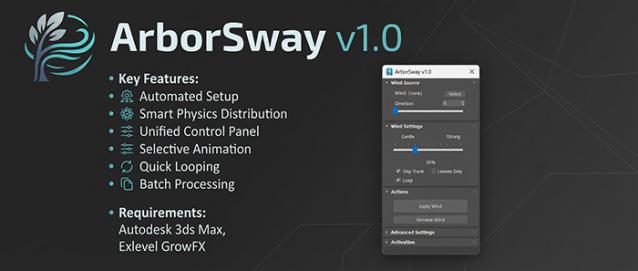
ArborSway: One-Click Wind Setup for GrowFX

Overview

Adding wind to GrowFX trees in 3ds Max usually involves repetitive manual work: selecting individual paths, adding modifiers one by one, linking Wind Helpers, and trying to guess the correct stiffness values for different branches.

ArborSway is a utility MaxScript that handles this repetitive setup for you, allowing you to add natural-looking wind to your vegetation assets in seconds.


Inner Chamfer

4 votes


Inner Chamfer (maxscript) is the tool for creating chamfers in the inner corner topology of Editable Poly objects. 3ds Max’s vertex Chamfer works only for outer corners, so this tool complements it by making it possible to create chamfers in inner corners.

Update: 1.1.0

PolySorter

0 votes

PolySorter: The Ultimate 3D Asset Auto-Organizer

Stop wasting time manually unboxing files and dragging textures one by one. PolySorter is a specialized automation utility built to take the manual labor out of organizing your 3D asset downloads. It handles the entire "Download to Library" workflow, ensuring your assets are perfectly structured and production-ready in seconds.

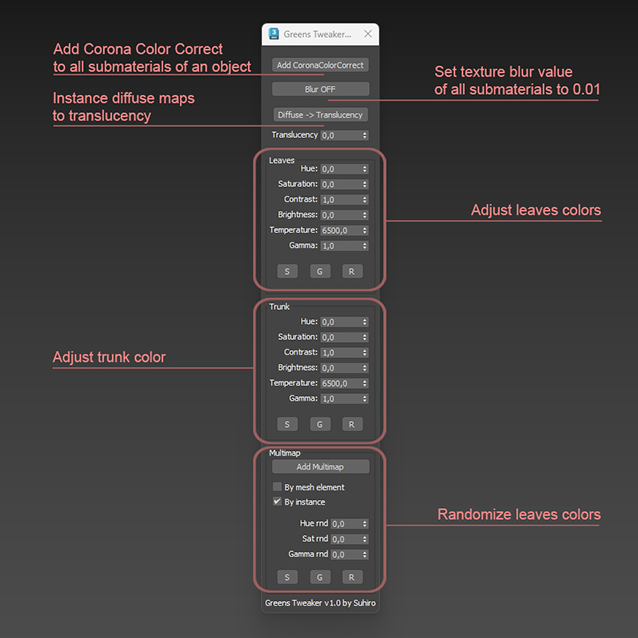
Greens Tweaker for Corona

0 votes

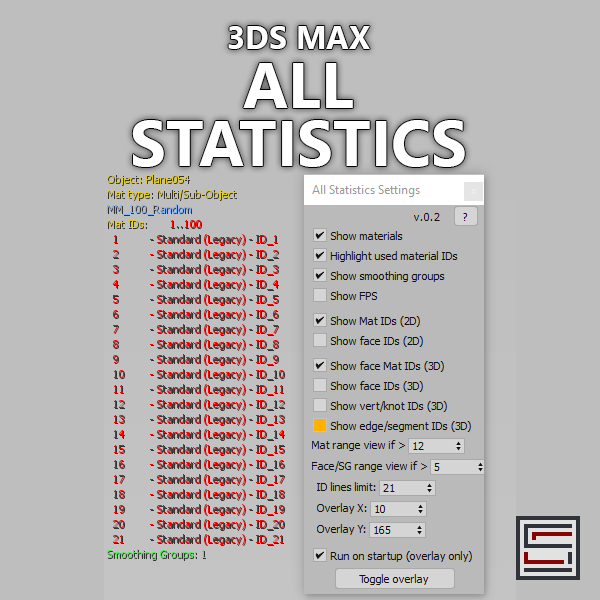
All Statistics

2 votes

Description: Displays different statistics in real-time. 

Procedural Posters and Paintings

0 votes

Description:
VizEasy Procedural Posters & Paintings for 3ds Max is the ultimate tool for architectural visualization. Stop wasting time on manual frame placement and instantly create stunning, custom compositions!

ProceduralFrames

Features:
- Instantly place frames with height control and 12 ready-made composition presets.

Align2FrozenObject

1 vote

A small maxscript that makes it able to use the Align tool selecting frozen objects to align to.
It unfreezes quickly the selection to adjust the alignement and freezes it immediately automatically back.

Install Align2FrozenObject
Step 1 :
Drag and drop the Align2FrozenObject.mzp in your 3dsmax viewport

Step2 :
Add Icon in Toolbar :
-Cutomize> Customize User Interface
-Toolbars Tab > Category: Ced-Tools

Bulk Editor

3 votes

Unlock unparalleled efficiency in 3ds Max with Bulk Editor, the essential tool for artists and designers looking to streamline their workflow. Bulk Editor allows you to effortlessly edit properties across multiple objects, saving you time and enhancing your creative process.

Syndicate content