3ds Max | Scripts

Sal Pose Manager

7 votes

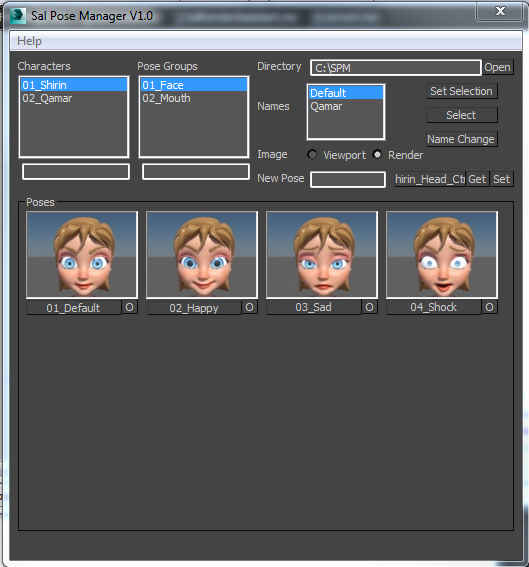
Sal Pose Manager V1.0

download and unzip the script files
copy them to 3Ds Max startup script directory
like this one
C:\Program Files\Autodesk\3ds Max 2014\scripts\Startup
or this one
C:\Users\--User Name--\AppData\Local\Autodesk\3dsMax\2014 - 64bit\ENU\scripts\startup
For help and more visit the script main page

V1.0 Features:
-Create poses for your rig, and organized them in Character folders and Pose Group folders
-Add, Remove, Edit your poses and take their images form viewport or render


csLayerExplorerExtension

1 vote

Finally 3ds max 2015 introduced nested layer and Scene Explorer based new Layer Explorer.


I think it is one of the the most important update for years. Of course being the first version. it has some rough edges. I hope this script smooth out the rough edges a little bit.


Some of scripts are for old layer manager functionality. Some of scripts are for nested layers. Some of scripts are for frequent user request items.

Script List

FumeFX System Scale

0 votes

I made this to easily manipulate, and keep track of the systemScale of my Fume grids

It's great if you're scared of Maxscript or just want a more straightforward way to manipulate your grid scale

miauu's Live Measure Pro

12 votes

Quick Z-Depth (mental ray)

1 vote

With this useful and simple script, you can create a non-destructive quick map Z-Depth in mental ray.

rollout Quick Z-depth

Enjoy!!


Camera Image Plane

2 votes

Maya-style image plane.

Installation:
-just copy the script in scripts startup folder and you will find the image plane inside target or free camera rollouts

Cam Chain

1 vote

Simply switches between cameras in the scene. Update the scene's cameras list using the specified button and switch using "<<" and ">>" button or enter number of a cam

Quick Ambient Occlusion (Mental Ray)

1 vote


Cam CvT

1 vote

A Simple script wich converts between Vray Physical and Standard Target Cameras with their: main position, FOVs, targets position


Advanced Bend Modifier

6 votes

A maxscript that gives the user more control over the bend modifier
It lets the user input a width and the script will move the center to get the correct width

features:

- uses smart snap to snap to a custom grid
- easily choose angle and direction
- apply new bend modifier with correct offset
- auto update current bendmodifier with selected settings
- realtime update of all settings!
- support for all 4 directions and 4 angles (90 180 270 360)
- choose your final width
- modify multiple selections at same time
- snap position to grid

Syndicate content