3ds Max | Scripts

Clay Switch

2 votes

A small macro I often use to switch between Clay and Default Shading modes. I use the Tab button as the hot key for it.

Customize User Interface > D95 DESIGN > Clay Switch.

Hotkey Editor > Clay Switch.

Auto Light

4 votes

A tool for quickly add and place lights in scene with many automatic tools. It is especially suitable in the design work of interior lighting – architecture as well as other complex lighting; and will help you save time when adding lights in 3dsMax.

QuickAttach Suite

0 votes

QuickAttach Suite v2.0

THE CORE FEATURE: This script features Dual-Mode Workflow. Use a standard Click for an instant, Undo-supported merge of small selections. Use Shift + Click for the Heavy Duty Mode: it temporarily disables the Undo stack, clears your RAM incrementally, and safely merges millions of polygons without freezing or crashing 3ds Max

VertexColor Blend Material

0 votes

Shows DX material with textures blended by vertex color in viewport. Has interface that allows user to switch between Standard and DX versions and also toggle display of ARGB channels.

VertexColor Blend Material

1 vote

Shows DX material with textures blended by vertex color in viewport. Has interface that allows user to switch between Standard and DX versions and also toggle display of ARGB channels.

Graph Transform

5 votes

a 3dsMax Script for Applying Transform to Objects By Controlling Graph Curve.

Puzzle Maker

1 vote

Puzzle Maker is a 3ds Max tool that can generated customizable puzzles for any 3d artists. After installing the tool, assign it to a shortcut, toolbar, or menu bar. Then launch the tool and begin creating.

Features v1.0

- Supports 3ds Max 2018 or newer
- User specified number of pieces per row/column
- Mix-n-match peg shapes to
- Specify the puzzle piece size

MultiMatte Tamer

1 vote

This script makes it very easy to apply Object ID's and store the MultiMatte Render Elements.

Objects are selected within the grid table. If objects and layers in your scene are not recognized by its name this script will not be much use.

  • Add Button will add another additional numbered ID button.

Collaborative Copy Paste Update: Copy to Older Versions

1 vote


The Cross-Computer & Local Copy-Paste script for 3ds Max, is designed to streamline your workflow and enhance productivity. This script allows you to easily copy and paste elements between scenes on a local machine, as well as across different computers connected to the same file server and across different versions of 3ds Max

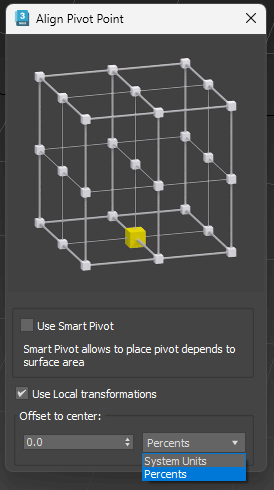
Align Pivot - set of scripts to managing pivots

2 votes

 Align Pivot (Smart/Standart) with Interface
Set Pivot by specifying the location point
Has multiple modes
Standard mode (Smart Mode is off ):
Pivot is set depending on the bounding box of the object. 
Smart Mode:
Pivot is set based on the surface of the object, not just its dimensions 
Use Local Transformations:
Pivot is set to the object’s local coordinates
If disabled – in world coordinates 
Offset to Center:
Offset Pivot to the center. Can be specified in percentage or system units. Supports positive and negative values.

Syndicate content