3ds Max | Scripts

Advanced Bend Modifier

6 votes

A maxscript that gives the user more control over the bend modifier
It lets the user input a width and the script will move the center to get the correct width

features:

- uses smart snap to snap to a custom grid
- easily choose angle and direction
- apply new bend modifier with correct offset
- auto update current bendmodifier with selected settings
- realtime update of all settings!
- support for all 4 directions and 4 angles (90 180 270 360)
- choose your final width
- modify multiple selections at same time
- snap position to grid

Bisector Constraint

1 vote

The DAS_Bisector maxscript is a custom scripted LookAt Constraint in which the source node looks at 2 other objects but always perfectly bisects the angle between them. The common 3ds Max LookAt Constraint has the source node looking at the midpoint between the 2 targets which is not the same if the targets are different distances away from the source node (see the image below). This is the script you need if you are creating heliostat solar panel arrays or things that always need to stay angled precisely between 2 objects.

Time Bandit 2.0

0 votes

A revision to the original Time Slider Control Maxscript (called "Time Bandit" in-house). The new "Time Bandit" Maxscript not only allows you to quickly and interactively control the timeline range with precision like the old script but adds the ability to save preset time ranges and recall them later. The ranges saved within the script are also saved with the scene. As with the previous version, the script still has a low profile so it can stay open while you work without taking up valuable screen space.

Time Bandit 2.0

1 vote

A revision to the original Time Slider Control Maxscript (called "Time Bandit" in-house). The new "Time Bandit" Maxscript not only allows you to quickly and interactively control the timeline range with precision like the old script but adds the ability to save preset time ranges and recall them later. The ranges saved within the script are also saved with the scene. As with the previous version, the script still has a low profile so it can stay open while you work without taking up valuable screen space.

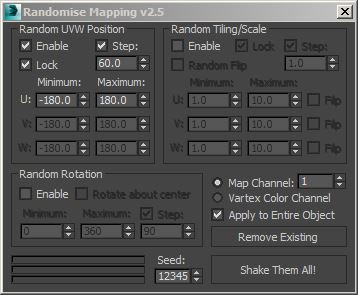
Randomise Mapping

1 vote

This script allow you to randomise mapping of group of objects. Work perfectly with instance objects.

FumeFX Dimension Copy

0 votes

FumeFX Dimension Copy

This macroscript takes a selected Box and then copies it's dimensions and creates a Fume grid with the same area. I got sick of having to drag out a real-world scale Box and then dragging out a fume grid to match. This just takes the extra step out of it.

Populate Vray Materials

0 votes

WHAT IT DOES:

Resets Material Editor Slots with Vray Materials

Options:

  • Gray base materials
  • Random color materials
  • Keep materials used in scene

Stairs Creator

2 votes

This is a simple tool to create stairs using 2 inputs (number of steps, stairs width)
It is my first trial to create a tool, it also apply 2 different VRay material, to the stair for further modification and hold it in one group.

FindOpenVertex

3 votes

The script allows you to find open vertex in editable splines/shapes

-very useful if you want to fix extruded shapes not closing.

Render Still Cameras

1 vote

VERY QUICK & SIMPLE BATCH RENDERER for STILL IMAGES. Just 2 clicks and ready to go!

This script is very useful to render many views from a single model or scene when you have already placed still cameras.

It combines many still cameras into one single animated camera that shows all those views sequentially, one per frame.

Then you just need to render the new camera to a sequence of images.


HOW IT WORKS:

The script lets you first select the still cameras to combine into one.

Syndicate content