3ds Max | Scripts

ShowBoneAxis

0 votes

-- Show Bone Axis
-- 2013/03/26 by SaiZyca
--for 3dsmax 2012 (should work above 5 )
--This tool can toggle the display axis for your bone collection.
--main function is based on showBoneAxis by M. Breidt (http://scripts.breidt.net/)

UniRing-Loop Tools [URLT]

8 votes

The Ring-Loop selection and the edges and vertices of a single hotkey.

Universal Ring-Loop selector, works with Edges and vertex (on vertex works with bugs)

Выделение Ring-Loop и рёбер и вершин единой кнопкой

Универсальный Ring-Loop селектор работает с рёбрами и вершинами (на вершинах работает с ошибками)

Prime Automatic LipSync Tool

4 votes

Prime AutoLipsync is text to animation Engine olso Audio Animation engine , Auto/manual timing systems and new Voice Recognition System .
 

mcloth script for character animation

1 vote

Mcloth with characters is so limited you can always use ragdoll but its limited to some situations and will never act in all cases , the tool is just simple work around problem.
http://4.bp.blogspot.com/-rEL0Zh6qXXU/UU_pIRIC1FI/AAAAAAAAAAc/IWJIzaEXCdM/s1600/mcloth_.jpg
the script use polygons as collision for accuracy

support Editable mesh and Editable poly
-- a Tutorial added "English"

multi-path animation tools

2 votes

multi object path deform
just make some splines and choose object to follow and it will make it looks great
timing control , random timing

Prime passes

0 votes

automated workflow for product rendering

in order to speed up your workflow in product rendering , avoiding long time rendering process, this script is for you.

auto passes available

--color pass
-- diffuse pass
--rim pass
--reflection
--blurry reflections
--AO

Particle Flow Auto Cache

0 votes

Script to make a cache automatically on all PFlow systems

Particle Flow - Random Seed

0 votes

Script to assign a random value to all the "seed" particle flow operators present in the scene

SpaceWarps Selector

0 votes

Script to quickly select SpaceWarps present in a scene

- Click on a spacewarps in the list, select it in the scene
- Double-click on a spacewarps in the list, select it and display its settings in the panel "Modify"

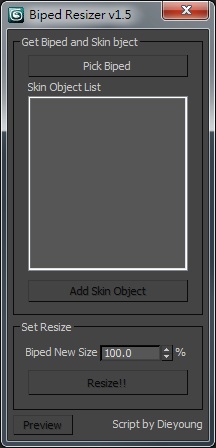
Biped Resizer

3 votes

Script for quick resizing Character rigging with Biped and Skin.

biped_resizer_v1.0

Just drag and drop in your viewport.

Syndicate content