3ds Max | Scripts

autoscale_UVW

16 votes

Automatic scaling elements of unwrapUVW rather each other.

Detriangulate all editable meshes

16 votes

This is a handy script for artists working on imported scenes where there is a need to convert each editable mesh to poly and detriangulate it one by one.

The script is actually the modification of "Detriangulator" by InTools.

It creates the list of all Editable_Mesh type geometry in the scene, converts it to Editable_Poly and then detriangulates it with InTools algorithm one by one. Good for imported scenes with several hundreds meshes what are tedious for manual detriangulation.

In interface manager you may find it under "InTools" category.

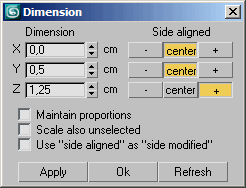
Dimension

16 votes

Dimensionize the current vertex-selection of your object, undo is possible.

Round Text

16 votes

Round Text Version 0.2

* Creates text in a circular shape
* Fully interactive UI : Spin the spinners and see the changes
* Tested with 3dsMax 9
* Free for any kind of use and modification
* By Psan, Distributed through Oormi Creations

Room

16 votes


very simple primitiv ROOM with doorways and windows opening

--version 1.2
--remove bad faces
--generate mapping coords
--add axis marks to checkbox

FFTMAX

16 votes

This Script makes a 3D graphic equalizer type effect. The Script runs with a small program written in C++, the program reads an audio file and passes the data into a fft algorithm then outputs data to a text file the  max script then reads the data file and makes a  set of objects it then animates them. so you end up with a set of objects dancing to the music if your audio file was a music track.

Add Inbetween

16 votes

Adds an inbetween key at the time-slider time. The value of the new key is a mix of the previous and next keys' values. The mix percentage can be controlled with the "Change In-Between Percentage" tool.


This tool is a macroscript (see this article on macroscripts and how to install them). After you run the script file, the 2 macroscripts will be available in max's customize window under "Os Tools" category.


paint cloner

16 votes

the purpose of this script is to place objects by painting with mouse. like advanced painter, but advanced painter uses max's paint interface which is somewhat slow on complex models. my script paints objects over the active grid. after you place objects, you can put them down to ground, apply random transforms, apply random materials (all these things with other scripts). so you can quickly make landscapes.

Find Modifier Type

16 votes

Choose the type of modifier you wish to find in your scene and this tool will return to you a list of every object that has the modifier, the object's name, it's class and the layer it is currently in. You can then select whichever objects you want.

The modifier list includes every modifier that is default to max.

Stereo Cam Creator

16 votes

Stereo Cam Creator v2.0

Creates the cameras already correctly positioned, with automatic adjustment for moving the target point keeping the correct distance between the cameras.

Install: copy the script to your 3dsmax\scrip

Syndicate content