Tagged 'ies'

CoreLink

0 votes

CoreLink - AI-Powered Asset Library Manager for 3ds Max

CoreLink is a fast, lightweight asset manager designed for 3ds Max artists. It allows users to browse, preview, and drag assets directly into a scene without heavy viewport plugins or complex database setups.

All features are included for free, and users only need to upgrade when their library outgrows the standard limit.

Project Manager

597 votes

After a long stretch of development, Project Manager 4 is officially out — the biggest release in the product's history, and now with full 3ds Max 2027 support.
The headline is AI Asset Classification.
Your library gets sorted automatically — by object type, material, and style — no manual tagging.

Project Manager 4 — What's New Since v3

Changelog · 3ds Max 2016–2027

AI-Powered Asset Classification

  • Automatic categorisation of 3D models by object type, material, form, and style — no manual tagging required
  • Runs entirely on your machine — no cloud, no subscription, your assets never leave your computer
  • GPU-accelerated background processing at low priority — won't interfere with rendering or active work
  • Reclassify specific folders or categories on demand — no need to reprocess the entire library
  • Scale across a team: multiple workstations share the same database and classify in parallel

Colour Tools

  • Find assets by colour — pick from a palette and instantly see matching models or textures
  • Perceptual colour similarity search — finds visually related assets, not just exact hex matches
  • Find Similar by Colour in the right-click menu for models and textures

Find Similar

  • Find similar by content — AI matches 3D models by style, shape, and visual look
  • Find similar by colour palette — matches assets to a reference image or mood board by dominant colour proportions

Smarter Search & Filtering

  • Multi-keyword search: "Chair, Glass" finds a file named Chair.max described as "glass"
  • Category filter correctly includes all subcategories — filtering Furniture also returns Furniture → Chairs → Dining
  • Combine category and material filters: find glass-and-metal tables, or wooden ones, in one click
  • Categorised / Uncategorised quick filters — see which assets still need attention

Gallery & 3D File Browsing

  • Three gallery tabs for .max files: Models, Materials, and External Links
  • Drag materials directly from the gallery into your open 3ds Max scene
  • 3D viewport preview for FBX, 3DS, OBJ, and other formats — inspect geometry before importing
  • Edit external links inline — fix or replace missing textures without opening the .max file
  • Zoom & Pan for images — inspect textures at full resolution inside Project Manager

Migration & Compatibility

  • v3 and v4 share the same database format — point v4 at your existing library and go; no rebuild required
  • Run v3 and v4 side by side on the same team; supported from 3ds Max 2016 through 2027

Performance & Other Fixes

  • Significantly improved overall performance — faster navigation, filtering, search, and file/folder operations
  • Live sync in shared database mode — changes by colleagues appear automatically without reloading
More about new features   Project Manager version 4
 

FilePathFinder Pro & Light versions

410 votes

Using the FilePathFinder you can be sure that you have complete control over external links into your scenes.

Asset tracking features include support for XREF files and easy linking with external files.

Using the FilePathFinder (and Batch Render&Relink), you can search for missing assets and relink external files.

In addition, files that are linked to selected objects are displayed in Interactive Mode, and bitmap textures can be toggled and placed within the Material Editor.

Also with this tool, you can easily make an archive a 3ds Max scene.

Note that FilePathFinder supports the highest number of asset types of any plug-in.
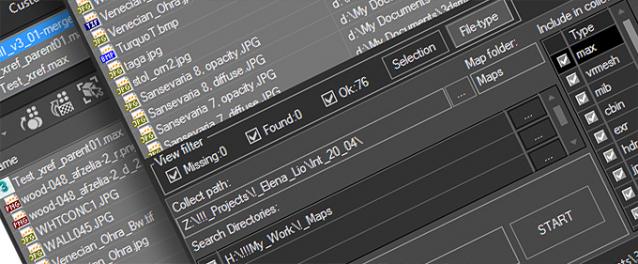
 

The Batch Render&Relink tool helps manage your asset files into the 3D model and material libraries in Batch Mode.

BR&R is capable of rendering thumbnails for 3D models, materials, and IES photometric files.

Batch Mode makes for an easy way to gather and compile many assets at once.


The new version of FilePathFinder is released with support to 3ds Max 2026

and many new features that improve managing scene assets

FilePathFinder Pro version 4.17.01

  • Adds support to 3Ds Max 2026
  • Play IFL, and animated GIFs directly in the list view
  • Play IFL and animated GIFs in the external Asset Viewer
  • Ability to change selected assets directly from the Asset Viewer using keyboard shortcuts
  • Adds an ability to include/exclude search directories by filename
  • More accurate material/texture placement in SME
  • Drops support to light theme
  • Fixes an issue with including/excluding search directories by filename
  • Fixes an issue with searching, relinking, collecting, and archiving the content of IFL files
  • Fixes an issue with relink assets in batch mode for Demo version [Batch Render&Relink]
  • Fixes an issue with renaming external scene links with status #Found
  • Fixes some issues with relink assets using exclude directories
  • Fixes a bug with relinking assets in huge scenes
  • Fixes a bug when using the tool together with Materials Manager and Models Manager
  • Some other optimizations, fixes and speed improvements

Strip Paths

0 votes

A FAST Script for Stripping All Paths (Bitmaps, IES, Proxies ....) Without Changing Render Paths .

ZOA Path Editor

39 votes

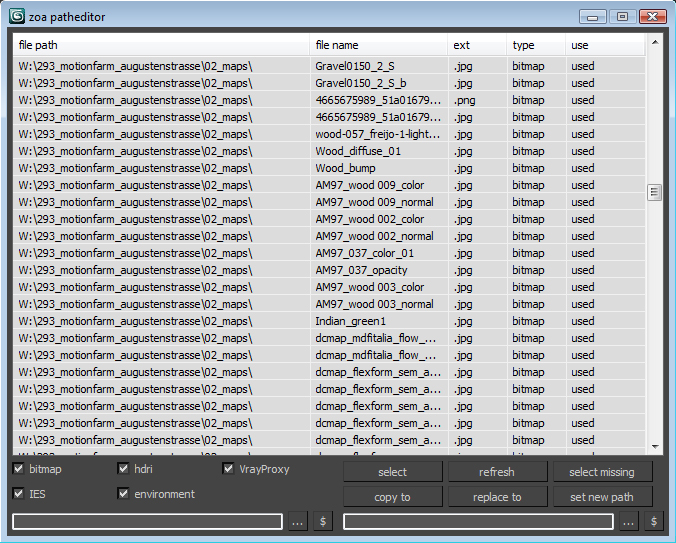
Simple Path relinker application for maps, ies, hdri corona proxy and vrayproxy objects. Features are: path text replacing and copy functions. The two text fields below each section are for "original" and for "future" paths. $ stand for string. Use it to copy a map path of a selected map to the desired text field.

User interface for the maps section. Others look the same.

VrayIES Presets

5 votes

This is my own script, it help lighting with vray ies more easy and faster.

Key features:

- Quick assigned 30 nice IES to vray light.
- IES folder browser and quickly assign to vray light.
- Change VrayIES and Vraylight settings as a group or individually.
- Fast create VrayIES light use geometry shape.
- Create VrayPhysical Camera from Perpective view.

Hope you guys enjoy, I'm still using it and it help me alot!

Install: Extract & copy all file to Script folder. Run script VrayIES_Presets.ms or just drag and drop it to max viewport.

IES from Caustics Generator

4 votes

The script for easy render of the caustic from the lamps. Calculation of caustic takes a long time.

I have decided that you can bake a caustic in IES-files and thus make the caustic effect it deceptive for a large number of fixtures in the scene.

Relink Assets

38 votes

Hi this is my version of a tool for relinking (missing) bitmaps which can not be found for whatever reasons (changed paths, moved files etc.). It is pretty straightforward and works with almost any type of asset (maps, HDRIs, IES files) as long as it can be referenced and seen in the asset browser. Due to copyright restrictions I can not publish the code right now but I hope that it can help you anyways until max itself has a better management for assets.

Instructions

Syndicate content