3ds Max | All

Visibility Controller

3 votes

Hi

This is a very simple script ,to control the visibility of an object

I saw some people looking for that,

Hope come in handy for someone

Select Similar Spline

1 vote

this script works like select similar faces in polyboost or gmt, but with splines. so feel free to test it an post some suggestions :)

it have two modes:
by segments - selects by spline segments and their lengths (most precise)
by length - selects by overal length of the spline (useful in some cases)

new in v2.1
by type - selects by knot type (bezier,corner,etc)

SOP : S.pit O.ut P.roperties

32 votes

SOP - displays the children names, parent name & properties of 1 selected item in semi-dynamic rows based on the available screenEstate. Also draws poly lines from the selected object to it's hierarchical kin. Basically, this just posts all properties of the selected object so that we can visually check an object's props. - This works with most classes.
[ Thumbs are linked to larger images ]

MCG Preserve Components

2 votes

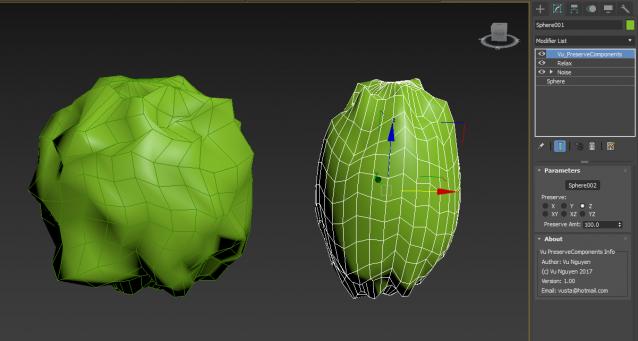
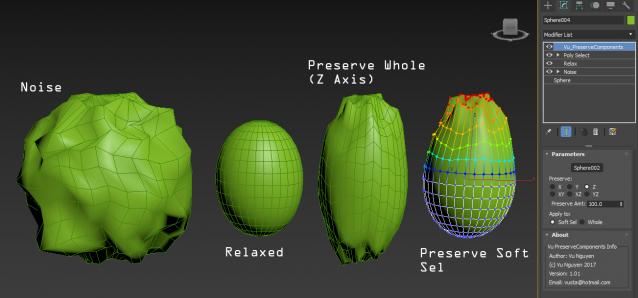
Preserve (aka. Restore) Components of your geo. Like Preserve but with Axis controls.

Use this above a Relax is effectively a Relax with Axis controls.

ver 1.01: added Soft Sel option

Import .OBJ only

1 vote

[DESCRIPTION]
The script does the following actions:
1) Allows to import .OBJ's only;i.e. .objs file type is already present in the file type list.
2) Resets Material 01
3) Applies Material 01 to imported obj
4) Applies black wireframe colour
5) Converts to Editable Poly
6) Applies single smoothing group (SM 1) to the entire model.
7) The name of the imported object will actually what you exported as with an obj prefix and not "objgroupx" blah blah-which i freaking hate.

[CREDIT]

Archiver

6 votes

Allows you to archive your VIZ file and all textures needed. Works similar to File/Archive - which is not working in VIZ R3.

Pass Tools

6 votes

-visibility tool : make an object only visible between certain keyframes (optionally with fades)

-material tools: assigns full white material to the selected objects and full black to rest of objects.

assigns matte/shadow material to selected objects.

assigns a material for Ambient Occlusion to selected objects.

RGBA Vertex Color Editor

0 votes

This script split the 3D model in 4 sub-meshes which are each vertex color Channel (R,G,B,A).

You can edit each Channel and then save the changes to the original mesh.

And bellow i put the Polycount forum thread about develop the tool and some example about how works

https://polycount.com/discussion/204662/maxscript-split-vertex-color-in-...

KeepVrayLightIntensity

2 votes

Works only (for now) with VrayLight Type:Plane.
Set the Vraylight half-length and half-width of the plane and the multiplier will be set automaticly to preserve the VrayLight intensity.

GTVFX-ANM_cameraBaker

1 vote


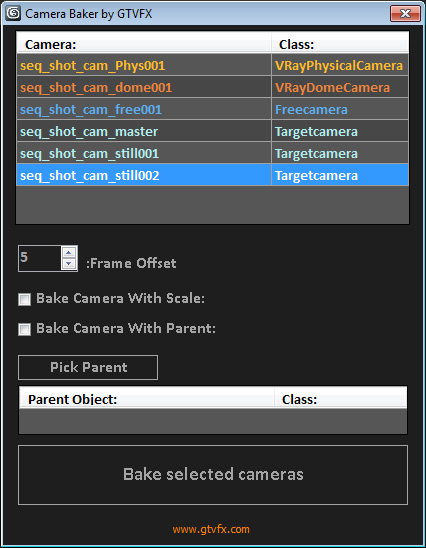
Bakes cameras per frame with optional transform, and optional frame range buffer.

By default this bakes the camera in World Space which is generally what you want. There is an option to bake the camera in Parent space if you check the box "Bake camera in selected objects space".


02/01/2014:

Syndicate content