3ds Max | All

Quick Naming

1 vote

A simple script, useful when your scene have a lot of objects and you want to match the material name to your object's name. Simply download and run maxscript *Terms of use: The use of the script is an "As is". The author assumes no liability with regard to any kind of damage (hardware and software) caused by the use of this script. Are not responsible for any damage or cancellation or modification of the work, files, crash and or any problem in 3dsMax or computer.

LOD Mover

4 votes

A script used on Ultima On-Line to check the popping of LOD's. Also has some other little features.

Poly2Spline

7 votes

This script convert poly objects to spline and back.

MCG Animate Visible To Camera

1 vote

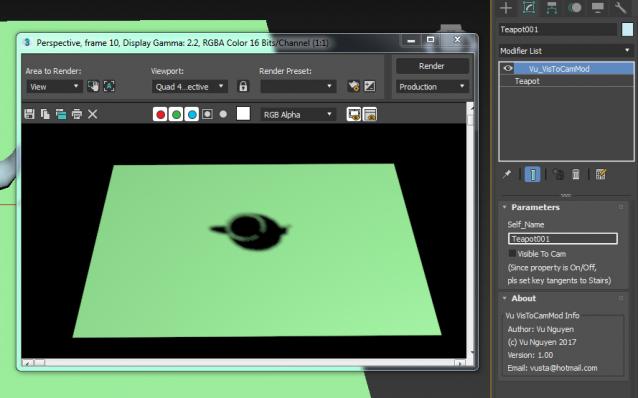
Since you can't animate the Visible To Camera property...(well not that I know of a way...) use this to 'control' it. Watch the vid.

Eureka !!!!!!!!!!!!!!!!!!!!!!!!!!! At last, an MCG modifier that modifies SELF NODE !!!! This may open a whole giant can of giant worms....

 I suggest you use the modifier version, VisToCamMod, IMO is the most userfriendly..

tweetMax

3 votes

Select By Face Area

2 votes

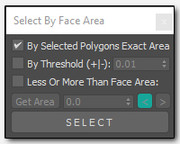
sfba
Simple tool for selecting polygons by area with a few options

Brazil Material Converter

2 votes

Converts Brazil Advanced Materials <--> Standard Materials. The new version should also handle multi-sub materials - blends - shellacs - double-sideds - top-bottoms - etc. The mass converts of multiple objects doesn't work quite right on larger scenes yet - so save your file if you are going to use them - but converting single materials/material trees in the material editor still seems stable.

Gimbal Fix

2 votes

An elaborate rollout that contains easy tools to help overcome gimbal lock. Use in conjunction with the Curve Editor to apply simple rotations to all or selected keys. It’s never been so easy to add an extra 360 degrees to a bunch of keys!

MCG Hologram

0 votes

What good is a picture gonna do ?...just watch the video.. and don't write in and say...well, technically this and technically that...I like my world weird and wacky...

ver 1.01:

- Changed View Plane to Depth Axis.

- The Depth Axis is also in Local mode rather than World mode so it works with hologram facing any direction in the world.

- Added Depth Offset so you can place the hologram behind the frame.

0-255 to % Converter

11 votes

Calculator for converting percentage values to 0-255 values and back. Includes a color swatch that updates with the grayscale value equivalent.

Syndicate content