3ds Max | All

SelectByNoMaterial

4 votes

Checks every object in your scene - if no material is applied the object is selected.

Organise Scene Selection Sets

4 votes

This tool creates a floating window listing all of the selection sets in your current scene. You can then toggle the visibility of each set by checking the appropriate check. If you decide to add more selection sets simply re-run the script and the dialogue box will update to reflect the changes. This makes managing large files much easier!

ViewCamera

2 votes

Lets you change your active view to any camera you wish. This has several advantages over the current change viewport to camera options in max. First - the list it offers is alphabetical. There's also more room horizontally to see the full name of the camera. And it also resizes itself to the number of cameras present - so avoiding unnecessary scrolling.

3DS Max - Script - Import Obj And Keep Duplicate Names

0 votes

This script will allow you to import OBJ files and keep the incoming names even if the current scene contains objects with the same names

my Layer

9 votes

"Advanced display organize / Layer manager tool - Hide/ show/ freeze/ select objects in a click (on object base or whole layer) whithout switching panels or having the big display floater in screen all the time. Organize your objects into layers - just like you would do in photoshop [To make sure you get the best out of this tool - read the HTML helpfile]

Align Modifier

0 votes

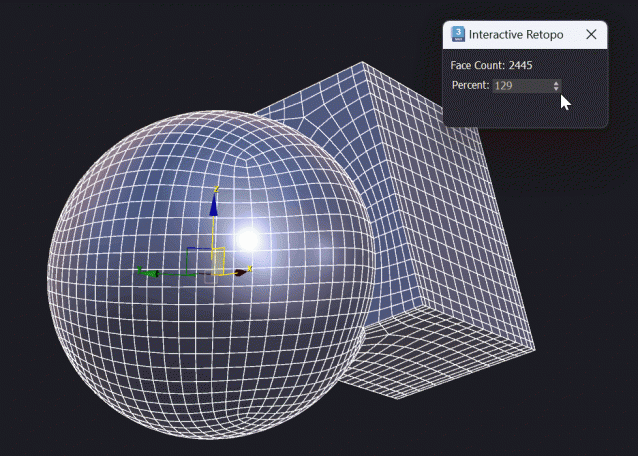
Interactive Retopo

1 vote

This script assigns the Retopology Modifier and interactively updates it.
Works well up to 10.000 polygons, depending on your machine.

Features
- Interactive Retopology based on percentage of the original polygon count.

Install: Drag and Drop to the Viewport
Tested in Max 2024, 2025


Multi AI Importer

0 votes

Written for the purpose of importing multiple AI (Illustrator) files coming out of Photoshop (paths) along with corresponding JPG images as textures. The script imports all, or selected, ai files, converts to polys, applies UVW maps, points to corresponding texture map, and collapses if needed.

JPG textures should be named the same as the AI files to work correctly.

(used extensively on Zack & Quack)

Replace_Object_Parent_And_Name.ms

2 votes

Uset this script to replace the selected object with a picked object. Copying its' name and parent then delete the original object.

SelectArea

3 votes

Selects faces with a specified size

Syndicate content