3ds Max | All

One-Step Copy & Relink (Bitmap Path Manager)

0 votes

One-Step Copy & Relink is a workflow utility that consolidates two tedious texture-management tasks into a single operation. It scans your scene for all bitmap-based maps — standard BitmapTexture, VRayBitmap, and VRayHDRI — then copies the source files to a destination folder of your choice while simultaneously relinking the materials to a different target folder using a new file extension.

Master Scene Cleanup (Empty Nodes, Zombie Tracks & Memory Flush)

0 votes

Master Scene Cleanup is a single-dialog utility that bundles four common 3ds Max scene-maintenance tasks into one toolbar button. Bloated .max files, mysterious slowdowns, and inflated save times are often caused by leftover empty geometry, dormant Track View managers ("zombie tracks"), and unflushed memory — this script targets all of them in one pass, with checkboxes so you can pick exactly which operations to run.
What it cleans:

dwAssignIDs

0 votes

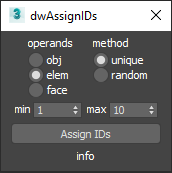
UI screenshot

Allows you to assign random/unique material IDs to objects/elements/faces.

Expects selection of one or more Editable_Poly objects.

MW Tiles - Procedural OSL Tile Map Collection for 3ds Max

1 vote

99 Dimensions by Sherif Hany

0 votes

99 Dimensions | v1.1 Release Notes

V-Ray to Standard Converter (Materials & HDRI Maps)

0 votes

V-Ray to Standard Converter is a lightweight scene-migration script that strips V-Ray dependencies out of a 3ds Max file in a single pass. It scans the scene for every VRayHDRI map and VRayMtl material, then replaces them with their native 3ds Max equivalents — BitmapTexture and Standard material — while preserving names, file paths, and the most common texture slot assignments.

Align2FrozenObject

1 vote

A small maxscript that makes it able to use the Align tool selecting frozen objects to align to.
It unfreezes quickly the selection to adjust the alignement and freezes it immediately automatically back.

Install Align2FrozenObject
Step 1 :
Drag and drop the Align2FrozenObject.mzp in your 3dsmax viewport

Step2 :
Add Icon in Toolbar :
-Cutomize> Customize User Interface
-Toolbars Tab > Category: Ced-Tools

Set Edge Length

0 votes


Description:
  Set selected edge length, total chain length, round edge lengths, increment/decrement selected edge groups,
  space selected chains equally, and align selected chains without spacing.

MaxBatch - Advanced Batch Render Manager for 3ds Max

0 votes

ForestPack Manager Cover

MaxBatch is a comprehensive batch rendering utility for 3ds Max. It provides a structured interface to queue and manage multiple rendering tasks, whether you are rendering multiple cameras within your active scene or processing a list of external .max files sequentially. It is specifically optimized for V-Ray 7 and Corona 14.

ForestPack Manager

0 votes

ForestPack Manager Cover

FPManager is a powerful MaxScript utility, specifically designed to optimize workflow when using iToosoft Forest Pack in 3ds Max.

Key Features:

Global Scene Management: Instantly select all Forest Pack objects in the scene (visible or hidden) and force a global refresh/rebuild to update distributions.

Syndicate content