3ds Max | Scripts

3-Point-Align

44 votes

Macroscript that allows you to precisely align an object by aligning three points on the object to any another three points in space.

New: Modeless dialog; support for groups; automatic snap

Random lights

1 vote

Simple script for randomizing selected lights intensity temperature and delete percentage of lights.

Mesh Muscle

7 votes

Similar to the CAT Muscle Strand object, only mesh-based and accepts modifiers.

MeshMuscle primitive

VRayProxy Animation Control

36 votes

For the new support for animated deforming meshes to VRayProxy object in VRay 1.50.SP2

How to control large numbers of proxy animated objects, randomly altering their values speed, frame offset and scale. Besides controlling all the parameters of VRay Proxy (display, playback, meshfile and selections)

Use with copies of proxies and work on selected objects.

3D R.n.D | MaxScript | road offsetter

2 votes

This Script will Automatically create main road lanes based on selected spline

Flow Bridge

2 votes

Flow Bridge 1.1!


HQ Proxy Tools

0 votes

HQ Proxy Tools is a free 3dsMax script that helps you to adjust some settings of proxy objects. This script supports Vray render and Corona render.

Highlight features:

MAKE INSTANCES SIMILAR PROXIES: proxies have the same .vrmesh file or .cgeo file will be made instances. It will save memory and render faster.

INSTANCES TO VRAY/CORONA PROXIES: convert objects to vray/corona proxy and maintain their instances (The original proxy export from Vray will convert objects to proxies but also make them unique objects, which will increase your file size and render slower)

Align vertices to a mesh

2 votes

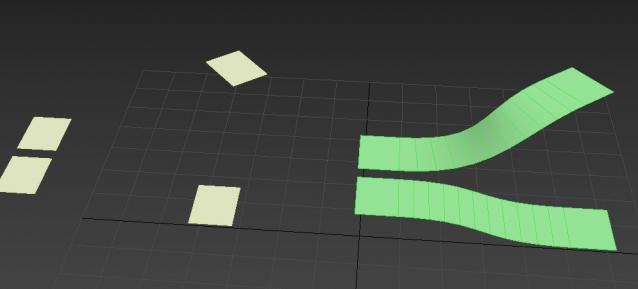
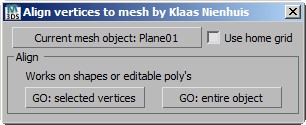
Align vertices to meshes with this script. Aligning objects is pretty standard in 3dsMax, but if you want to align, or move, vertices to a mesh it starts to get messy. This script does exactly that for you. You can project vertices of a shape including bezier handles or vertices of a poly downwards on a mesh.

DWG Cleanup

2 votes

A minor edit to the original script by Jon Seagull, providing major speedups.

Original script here:
http://www.scriptspot.com/3ds-max/scripts/dwg-cleanup

Mine just disables viewport and modify panel refresh, and disables undo. The result for me was this took a few seconds rather than minutes.

Doom Vraylight Portal Enabler/Disabler

2 votes

DoomLightPortal
By Vin Carbone (doomgrave)

This script will allow to Enable/Disable the Portal/Portal Simple option for Vraylights.
The option has been hidden in Vray 5.2 but it's still working.

USAGE
1. Open the rollout,
2. Make a selection of all the Vraylight you want to set
3. Press selected function:
Disable - to disable Vraylight portal option
EnableLP - to enable Vraylight portal option
Enable LP Simple - to enable Vraylight Simple Portal option

It works with any selection and any Vraylight shape

.ms file just run once and it will open

Syndicate content