3ds Max | Scripts

Object-Bound Camera Clipping

1 vote

Description

Adds additional controls to the selected camera for driving clipping planes using objects in the scene.

Object-Bound Camera Clipping 3ds Max script

Features

Camera Clipping Pro

0 votes

Camera Clippping Pro 3dsMax plugin by SplineDynamics

DESCRIPTION

Camera Clipping Pro adds special controls to the camera for driving clipping planes using objects in the scene and auto-adjusting the focal length to retain the same framming while you move the camera closer or further away from the target.

MaxCopyPaste

4 votes

MaxCopyPaste Poster

"Copy-paste on steroids" with some extra features such as clipboard history, drawing and placing objects on top of your geometry, and copying objects between 3Ds Max instances. You can choose whether to duplicate materials when you paste an object. Instancing is supported now. Return the missing functionality that makes your workflow intuitive and fast. Watch the video for more details.

Extractor

2 votes

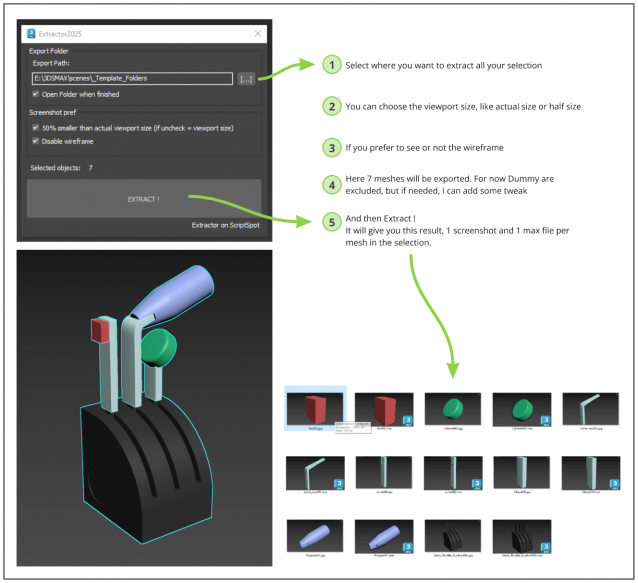
Script allowing you to extract into separate Max file and Screenshot all selected meshes in your Max scene.

Just Select, and Extract.

Import Illustrator Files

2 votes

This Script imports multiple Illustrator files in one click, it attaches splines and weld vertices. you can add an extrude modifier by Shift Clicking the button.

Make sure to save your .ai files to illustrator 8 as 3dsmax can't import more recent version of illustrator files.

Install by drag and dropping in the viewport, then go to customize, customize user interface, tool bar, category "SimonScripts", create a new toolbar if you haven't got one already, then drag "Import AI" inside the toolbar.

CoronaColorCorrection-Auto

1 vote


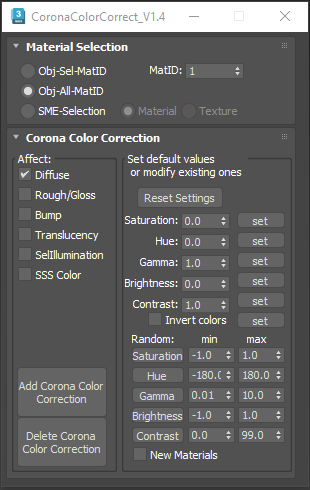
This script is intended to add and tweak settings of Corona Color correct nodes.

You can add some Corona Color correct with any specified values on any selected material slot (Diffuse, Bump, Roughness, Translucency, Self Illumination),the existing bitmaps will be kept inside the color correct.

Pivot & Align Tools

10 votes

Pivot & Align Tools (PAT) are a set of macros bundled into a quad menu that allow you to perform various object alignment, pivot alignment and object snapping functions... among others. Most of the functions can operate on a selection of multiple objects at once, including grouped objects as part of the selection (open or closed).


NOTE: This script now handles quad setup for both 3dsmax 2025 and above, as well as previous versions of Max.


See online guide in links section. 

rBStair

2 votes

rBstair

Simple tool for extruding stair. Create flat stair from your plan, convert to poly, select start step and click . Most of stair scripts around are dependent of polygon number order. When you create stair from attaching multiple spline without orderly fashion you will get random polygon order in your editable poly object. This script will sort adjacent polys and save the number in an orderly array before extruding polygons.

Select Vertices by Bone

0 votes

Selects vertices affected by current bone.
Difference with max native method is that this one will ignore hidden parts of your mesh.

TimeLine Control

5 votes

Version: 1.0.6
If you have several animations in 1 file and want a quick way to switch between them, this script might be useful for you.
TimeLine Control lets you create a list of named time ranges. Also add, remove, rename and sort items in this list. List is stored in INI and automatically loaded on next opening of your max file.
Docks above max timeline for quick and easy access.

UI screenshot

Syndicate content