3ds Max | Scripts

OBJDimension

2 votes

This is a simple script what shows you the dimension from the corrent selected objects, or the lengh of a shape.

You need to use it as a button, with them you can activate the script or deactivate it.


Have a good time!


Project folders

18 votes

Stay organized with project folders. You can set the root folder where you save all your projects, set what are your default subfolders when you start a project and finally type your projects name.

*** export and import presets option / set as "Set Project Folder..." 25.03.09
*** rename function added 19.03.09

Swatches

16 votes

Swatches 'loads' .ase files created from the Adobe Kuler website (http://kuler.adobe.com/).

Here's a screenshot of the UI:

swatches


Ignore the 'save name.. folder.. save.. indexr..?' buttons - they were added for personal use.

Bevel Switcher

0 votes

This is a quick and simple script that lets you set the bevel type with a hotkey so you no longer need to open up the bevel settings dialog. Works with any Editable Poly object or with any Edit Poly modifier.

Install the macroscript and you'll find it listed under the Burke Studios category. Assign this macroscript to a hot key so that you can access it quickly. The script uses a timer to determine which bevel mode to enable:

1. Hit the hot key ONCE and the bevel type will be set to -Local Normal
2. Hit the hot key TWICE quickly and the bevel type will be set to -By Polygon

displaceMgr

1 vote

•••••••••••••••••••••••••••••••••••••••••••••••••••••••••••••••••••••••••••••••••••••••••••••••••••••••••• VERSION 1.1

This tool automate tedious process of adjusting object and displace (height or vector) map
imported from sculpting packages for accurate displacement using modifiers.

Slicemodeller-Script V1.0

4 votes

Take a look at our little script, which we gave birth to recently. The whole idea came up when we had to model some 100% planar-cut bodies, which is a task 3ds-Max is actually not too good at. Our tool should be quite useful for various technical stuff, crystalline objects or freeform-concrete-shapes (for our architectural friends out there).

scripted in Max 2011, should work on previous versions as well

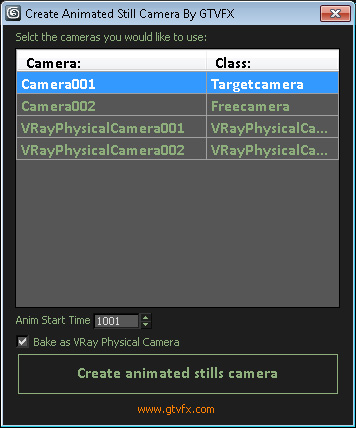
GTVFX-ANM_createAnimStillsCam

2 votes


Creates a single camera that is baked frame by frame to each camera that is selected in the list.

Useful for creating production stills and sending a single camera off to be rendered.


Updates:

2014-02-07: Support for baking to VRay Physical Cameras.


Some issues I saw while putting this together:

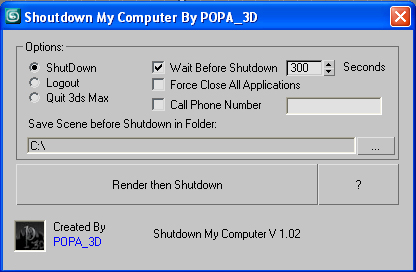
Shutdown Computer after render with automatic phone call

4 votes

If you have a render that take a long time and you want to go to sleep or to go out your office this script will shutdown your PC after the render is completed.

- Shutdown will shutdown the computer

- Logout will Log off the user

- Quit 3ds Max will exit 3ds Max

- Force Close All Applications will forces running applications to close without warning

- Wait Before Shutdown will let you Set a given time for shutdown, in seconds


Addtional Notes:

 

Multi Primitive

9 votes

plugin script, Multi Primitive

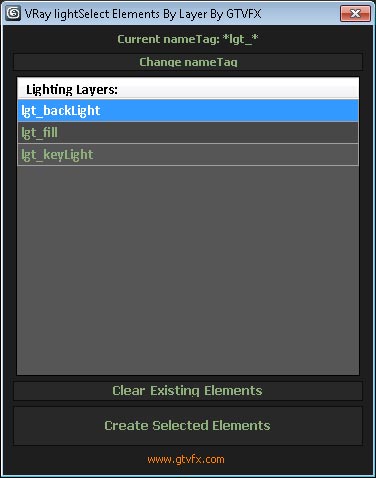
GTVFX-SCA_createLightSelectElements_ByLayer

1 vote


Manages the creation of VRay Light Select Elements based on a layer naming convention.

All lights on a layer will be included in that Light Select Element.

Layers are found by matching the pattern of the nameTag variable. You can change this variable if necessary for your pipeline by using the slender button at the top of the dialog.

Default nameTag = "*lgt_*"  (fe: lgt_sun, lgt_key, etc...)


 Updates:

Syndicate content