3ds Max | Scripts

3DS Max - Plugin - MatchMaterialAndUVs v2 0

0 votes

This script I created allows the user to match a source's material, UVW Maps, and Unwrap UVW(you can choose what you like to apply from those 3), with the possibility of preserving the targets existent similar modifiers or replacing those with the source's ones.
Please whatch the video to see all the features present in the dialog box that opens up, and how to use the script.

Note: This script is a major upgrade for a script I've done before: https://youtu.be/_Cl0L-6iyIs?si=ZoMj4x-qSSykWDmI

Material Texture Loader

7 votes

Description
  The Material Texture Loader loads in textures and instantly creates advanced materials.
  Use pre-defined or customized map and material settings to build re-usable material setups.
  Fully supports Vray, Corona, Redshift, Arnold, FStorm, Physical, Octane, and Standard map and materials.
 
Main Features

  • Automatic texture channel recognition 
  • Parameter linking for all texture mappings
  • Predefined Color-spaces: ACEScg - sRGB - linear-sRGB - Raw - Gamma - Auto
  • Mapping: Tiling - Real-world - Tri-Planar -  Random Rotation - Spherical
  • Live edit settings and disable channels
  • 2-Sided materials
  • MaxScript commands
  • UDIM map loading
  • Drag and Drop
  • Presets

Get it on Gumroad
Latest version: 1.830

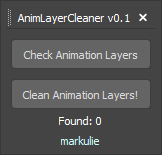
AnimLayerCleaner

1 vote

Bugged Animation Layer Cleaner for 3ds Max

xCalc

1 vote

Simple Calculator with History Feature

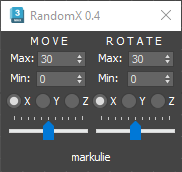
RandomX

1 vote

Transform Randomizer for 3ds Max

Move To Surface

2 votes

What this script do:

This script allow you to place (or place and align) objects on the surface of another object or on the grid under the cursor and snap to 3D Grid if grid snapping is enabled.

There are two scripts included in a single *.ms file:

Move to Surface - allow you to place selected objects near the cursor on another objects or on the grid.

Snap to Grid

0 votes

What this script do:

Just snapping the object's pivot to a grid. Nothing fancy.

How to use it:

Select and object call the script - the object will be snapped to a grid.

Tested on 3ds Max 2023 and 2024

Installation:

Drag/Drop the script on 3ds max viewport or run it via 'Scripting-> Run Script...'. Go to "Hotkey Editor" or "Customize User Interface", search for category called 'Custom', there will be 'Snap to Grid'. Assing a hotkey to it or put it on your custom Toolbar.


Sub-Materials ID

0 votes

Sub-Materials ID - это скрипт для 3dsmax, открывает всплывающее окно со списком материалов и их id в Multi/Sub-Object материале примененном к выделенному объекту и возможностью быстро применять материалы по id на выделенные полигоны.
пока работает только в editable poly.
- кнопка Apply - теперь копирует материал с первого выделенного объекта на остальные.
- кнопка Apply - теперь если объект не в Edipable Poly, или не в режиме subobjectLevel, то применяется модификатор Material с выбранным id материалом, если модификатор уже есть на объекте то меняет его id.

Grid Spacing Tool

0 votes

What this script do:

This script allow you to select grid type and manage its size.


How to use it:

There are three scripts included:

Copy Transform to Unreal Engine

1 vote

Copy Transform to Unreal Engine of selected object in 3ds max scene.
Open Customize window in 3ds max and select Hardway category and drag toolbar item into toolbar.

Usage

To copy transform from 3ds max:
* Select object and press button on toolbar.

To insert transform for selected object in Unreal Engine
* Just Shift + Left Click in Transform rollout caption or paste via context menu.

Syndicate content