3ds Max | Scripts

ProOptimizerLOD

0 votes

This script creates up to three LOD-objects from the geometry of the scene and shows the right one regarding given camera distance.
It does it via the ProOptimizer modifier and preserves the original objects by hiding them.

This is the first version of the script. It works fine but needs revision of the LOD-object showing part.
It could as well be improved by allowing to customize more options of the ProOptimizer modifier and animated camera.

Any suggestions are accepted.

Nitrous Set Texture Size Limit

8 votes

UI

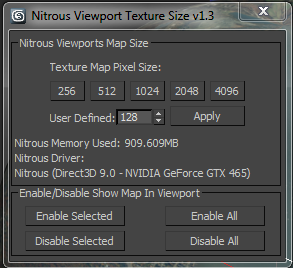
This is a simple script to set the Nitrous viewport texture limit size.

To run it just open the script and evaluate it (Ctrl-E). v1.1 now adds a "Kelly's Tools" category in UI customize which I will start using for all future scripts."

Kelly Michels
kelly.michels at autodesk.com
Senior 3ds Max QA
3ds Max Beta Manager

RappaTools

60 votes

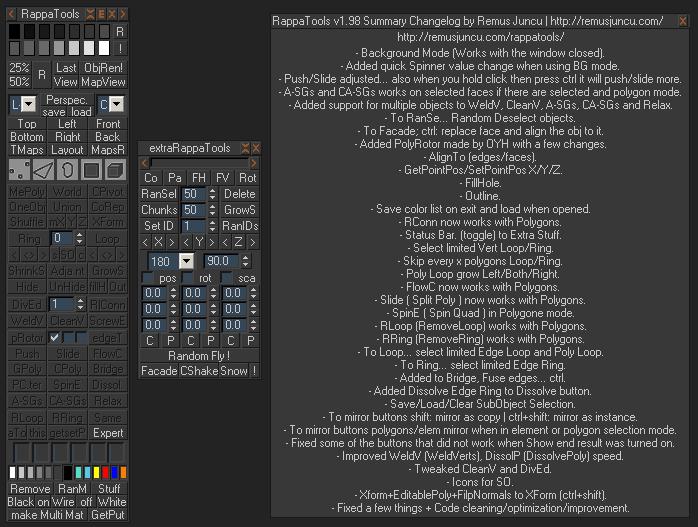
RappaTools is an modeling toolset for 3ds Max (9 Sp1 +), that offers a wide range of tools for creating various types of subobject selections as well as a set of modeling tools which will make any tasks in everyday modeling a lot easier and faster. It also has a lot of other options like 50%/25% Render, Quick Light/Cam select, Toggle maps display in viewport, Random Material/Wirecolor, Make multi material from textures in a folder, and many more...

Simple Key Shifter

1 vote

Frame Shifter 1.0


It's a macrosocript,You can find it under Category: Walid

This simple script shifts transformation keyframes for animated objects by given delay

Instructions are given in the help button

Enjoy

Sort Render Elements

14 votes

This script will place your Render Element files in named subfolders according to where the main pass is stored and what the name of the Render Element is.

Example:

Main pass is set to render to:
C:\myProject\renderoutput

Rendered Elements like Alpha, Specular, Diffuse etc. will be placed at:
C:\myProject\renderoutput\Alpha
C:\myProject\renderoutput\Specular
C:\myProject\renderoutput\Diffuse
etc.

Enable this script as a Pre-Render script:
Render Setup Dialog -> Common Tab -> Scripts -> Pre-Render -> browse for the script file

SEA3D

3 votes

An open-source cross-platform file format for games

Export entire scenes to Web with just one click

CamLister

4 votes

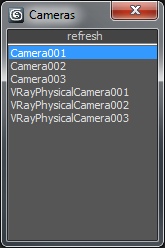
A very simple Camera Lister which allows to select and assign cameras by clicking it in the list.

Leftclick: Select the camera
Rightclick: Assign to current active Viewport

Very simple one but still my most used Script for daily work ;)

Spline Geo import (kml, GPX and csv geographic coordinates) to 3ds MAX

1 vote

Import CSV and import Geo (kml, GPX) to 3ds MAX

Importing data to 3ds max is fundamental to try to reproduce the real world in3d environment.
I made two scripts spline CSV IO (Import/Export) and Import Geo.

Install: Copy files to /scripts/startup
Use: go to “utilities” tab (hammer) –> MAXscripts->Utilities

The script import Geographic coordinates (longitude,latitude and Altitude).
The coordinates are decimal format (40.446195, -79.948862) Altitude is in meters.

Helix Opener

-1 vote

with this script you can roll out every object in 3ds max
It's very useful for creating animation logos and for ad logos.
It's very is to use.
This script will publish in few days by HG

background realtime update

0 votes
Syndicate content