
Isolation Levels
Date Updated:
05/15/2014 
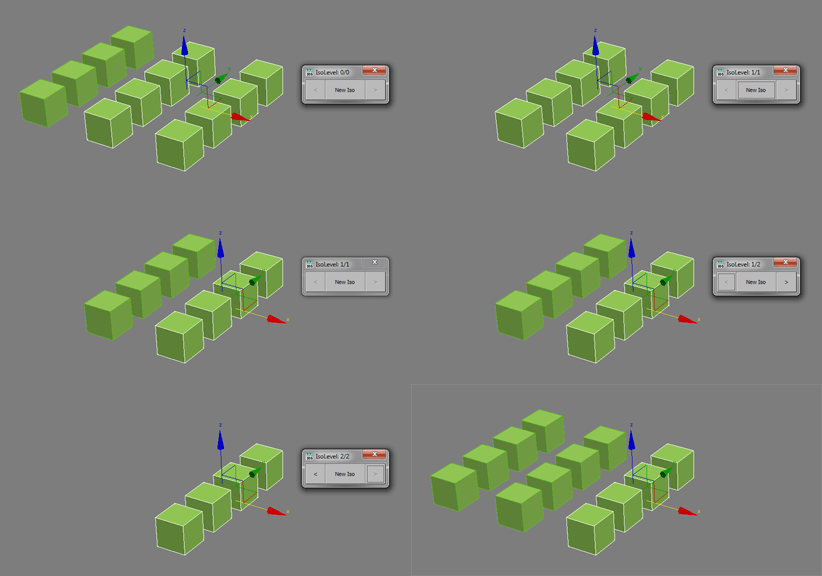
Create nested isolations, go back and forth between them. Hope it helps.
Additional Info:
installation:
- close all open 3ds Max instances
- remove old versions of this script
- copy scriptfile "isolation_levels.ms" into 3ds Max startup folder (example: "C:\Program Files\Autodesk\3ds Max 2012\Scripts\Startup")
- copy imagefiles "IsoLevels1_16i.bmp, ..." into 3ds Max usericons folder (example: "C:\Users\Username\AppData\Local\Autodesk\3dsMax\2012 - 64bit\enu\UI\usericons")
- start 3ds Max and open menu Customize > Customize User Interface > Toolbars (Category: # Scripts)
- create a new toolbar and drag and drop the commands "Isolation Levels - Backward, ... Forward, ... New Iso, ... Exit Iso" to it
- restart 3ds Max, enjoy
features:
- works as fast as the standard isolate
- number of isolations: infinite
- unlike the standard Isolation Mode, this script hides Xrefs while rendering in isolation
- hint: I find it very useful to put this script on the Alt+Q button and replace the old isolation function of 3ds max
- you can find the current isolation level in the title of the 3ds Max window, behind the scenename
script at work (old user interface, script has no extra window anymore):
to do:
- isolation state should be stored in maxfile
Version Requirement:
tested with 3ds Max 2012 | Attachment | Size |
|---|---|
| isolation_levels_12.ms | 9.07 KB |
| isolation_levels_23.zip | 3.55 KB |
Comments
...
For what do you used "csharp" assembly?
bga
...
TopMost property problem
If you want to place your dialog (form) always on top but inside of max use this fn
edit
I see that you tried this :)
bga
That annoyed me alot aswell,
That annoyed me alot aswell, please try version 12. I tried to fix that problem.
Yeah, working great so far.
Yeah, working great so far. Thanks again!
One small nitpick: The floater stays on top not only in Max but also when I switch to other programs.
Thanks Andi
I've been using v11 for some time now, it's flawless :)
Okay, please try with version
Okay, please try with version 11.
New error
I receive the attached error when i run the script the first time i start max. If i evaluate the script it will work for any max file opened after this.
But if i restart 3dsmax, the error appears again...
Thanks
It is working as expected; good job :)
okay try again with version
okay try again with version 10.
dotNet exception
The script runs great until i close it's window.
After that, if i run the script again, it will show the attached error.