3ds Max | Scripts

Quick Passes

121 votes


Easy rendering of commonly used render passes for compositing.

Quick Passes support Default Scanline, Mental Ray Quicksilver and Vray renderers and Materials.

Quick Passes can render:

Quick Pivot

15 votes

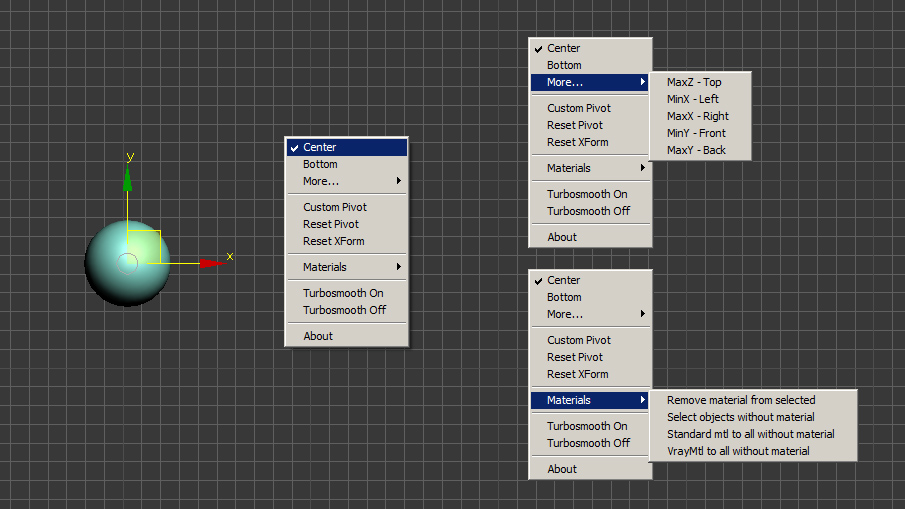
This is only my small version of quick pivot.

New: Dual Shortcut - short / long click:
  1. quick press shortcut for less then 0.5 s - Quick default Pivot witout menu
  2. hold shortcut - popup menu (or hold Shift + press toolbar button)

To choose default option (hold Ctrl while choosing from popup menu)

This method  I developed to save shortcuts - to use one for 2 options / scripts (with short click or long)
I can publish it as a open code if anybody is iterested in. Let me know.

Quick Render

6 votes

The idea was to create a script which makes renders in every Nth minutes from a selected view of a camera. The result is a breakdown of the project, phases of the creating. You can use it in: tutorials, "making of" projects, presentations, showreels etc...

Quick Renderer

3 votes

Small renderer enables you quick preview the scenes - hope everyone will like it. It also has a built in movie maker...

Quick Resize Image

1 vote

Simple and fun script that allows quickly of resize any image.

quick image resize

Quick Selection

1 vote

Quick Selection is a handy utility that provides several methods for selecting and managing objects within the scene, including the following:

  • Selection by Category
  • Selection by Stored Objects
  • Selection by Selection Sets (independent of any Max file)
  • Selection by Pathname literals (stored in a text file)


See online guide in links section. 


Quick Skybox

0 votes

A QUICK WAY TO GET 6 IMAGES FOR A SKYBOX OR CUBEMAP FROM YOUR 3DSMAX SCENE.


  • Create your SKYBOX or CUBEMAP in seconds!
  • 6 images ready to use in UNITY or your favorite 3D Game Engine.
  • Options: Auto-create or pick custom camera || With or without Alpha channel || Set image Size


USAGE:

Just set the few required options (camera / image size / alpha / output file) and hit 'RENDER SKYBOX'.


INSTALLATION 

Quick tangents

10 votes

This will set the tangents of your selected keys
in the trackbar.  It's pretty easy
to use,
select your
keys in the trackbar or trackview
(however the whole point of it is to change your keys without opening
your trackview) and click on the tangent you want. That's it.
It also has options to choose whether you want to change only
the
incoming or outgoing tangents.

Quick UV Mapper - Interactive Unwrap

1 vote


Quick Vray Camera for 3dsMax2016 and Vray 3.xx

4 votes

Very simply script which allows the creation of  "hidden" Vray Physical Camera in 3dsMax2016 with Vray 3.xx

qvc

In the last release of Vray 3.2 for 3dsMax, the Vray Camera does not appear; VRay uses the physical camera of 3dsmax. If you write in maxscript: " vrayCreateVRayPhysicalCamera() " we can create the "hidden" Vray physical camera.

Quick Vray Camera, facilitates the work for us.

Syndicate content