3ds Max | Scripts

Printer!

13 votes

This script allows you to make object print on another object, it doesn't use any displacement maps, it works directly on geometry (objects must be Editable_Poly).

move to origin

1 vote

the script allows you to move selected object/s to 0,0,0 coordinates.

useful when moving imported cad files or 3d files to immediately move your objects to 0,0,0

note: it uses selected objects center for reference

v.1.1 - now works on group/s
v.1.0 - initial script

Change Render Engines

4 votes

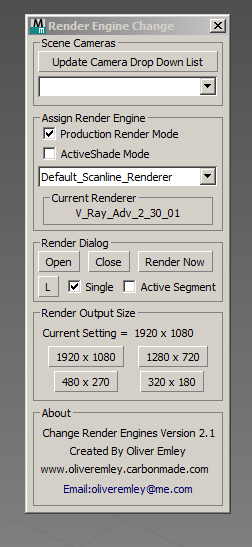
Change Render Enging ScreenshotV2.1 

Change Render Engines V2.1

The script allows you to do the following:

 - Select any cameras that are in the scene and automatically switch to that view

 - Update the camera list at the touch of a button

 - Assign Production or ActiveShade rendering mode

 - Assign a Render Engine to the Render mode that you are in

V-Ray Material Creator and Randomizer

4 votes


A script that creates randomized  V-ray materials and assigns them to a selection of objects in the scene.

Usefull when many similar objects in the scene and you want to assign similar but randomized material to them.

Hope you find it usefull!

Vray Light Select Elements

2 votes

—-Description:
—- With One Simple Button Create One VrayLightSelect Element for each Instances Light
—- Rename RenderElement with name of light
-- Ignore Targets

Inspired by the script of "ecXimer" "Auto Render Element VRayLightSelect" I created a new function more simple, with one unique button create one render element VrayLightSelect for each Instances Lights.

Modifier Manager

4 votes

With this maxscript tool, you can manage your modifiers
1: you can align gizmo and change gizmo properties on multiple objects
2: you can attach gizmo to an object, so one object can control multiple gizmo on multiple objects with move, scale and rotate
3: you can control all the modifiers options on your object selection.

Detach faces V2

10 votes

with this script, you can detach all the faces of selected objects as separate objects.
with pivot aligned to their center.
You also can detach only selected faces, with pivot and parent options.
You can detach faces from edges selection, if you check align pivot, it will align pivot to the center of each edge.
You can align pivots or parent after, on objects selection.

Pivot placer

10 votes

With this script you can replace pivot where you want.
on the selected vertex, at the center of the selected edge or face, or at the center of the object.
You also can create a point as pivot.

Morph UI Creator

7 votes

A maxscript to Auto create morph UI.
Multiple UI types : 4, 3 and 2 morphs linker.

realtime Spring and distance constraint

15 votes

based on minksox researches : http://www.scriptspot.com/3ds-max/scripts/sox-dynamics

This one is easier to build, you only have to create points and select them in the right order.

UPDATE : 06.11.2012

REALTIME SPRING
corrections : edit text bug and lookat flip
Bake in keyframe and unbake new options.

Syndicate content