3ds Max | Scripts

Duplicate Geometry Select

7 votes

v1.31
If selected 0 Work to all objects
If Shift pressed then will select objects by geometry vertex count.
If Shift NOT pressed then will select by center objects position

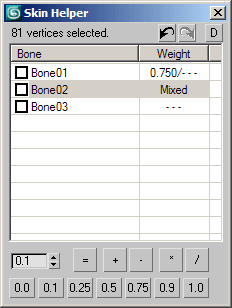
Skin Helper

15 votes

A tool to help setting vertex weights when skinning.

Changes in version 0.90:

  • Added: option to sort list by bone name (turned on by default).
  • Added: Restoring the bones list position after list update (if possible).
  • Fixed: updating values didn\'t work sometimes due to precision issues.

Changes in version 0.85:

Make Planar Advanced

2 votes

Make Planar Advanced works like this:
Select one or more objects/components and generate a projection plane from them. After that you can move/project any selected objects/components to that plane, either directly or in specific coordinate modes / axis. Basically the point is to give a lot more freedom in how you flatten a surface compared to what's possible with the standard 'Make Planar' or scale to zero features already in Max.

Macroscript Creator

19 votes

Most MAXScripts are available in .ms format and if there is a .mcr file included, it often requires rigid path structure to work. This little script creates macroscripts to run .ms or .mse files, the files themselves can be placed basically anywhere and you can define how they show in the interface.
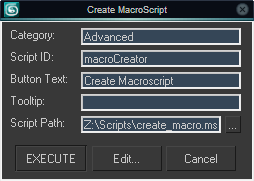

Macroscript Creator UI

RealWorld Resizer

2 votes

Real-World size in texture aspect ratio

VRay material to Standard material

26 votes

Hi..
this script converts all scene VRay materials to max's standard material.
it keeps diffuse color and diffuse map. right now it works with multi sub-object materials if you guys found it useful ,I can add support for other maps like transparency and reflection, refraction and etc.

Morpher Utilities

10 votes

A set of tools to work with the morph modifier.

Features:

  • Put an edit poly over the morph modifier to make any changes, then use the script to collapse the edit poly keeping the morpher operational. 
  • Extract the shapes to work on them separately and then load them again with one click. 
  • Skinwrap an object on another with a morph modifier, then convert the skinwrap to a new morpher.
  • Copy the animation track from one morpher to another, matching channels by name or number.

Known issues:
morpher channels with spaces on the name cause an error.
I hope you'll like this. Please comment!

Image Resizing 3ds Max

2 votes

MCloth Animator [MassFX]

0 votes

MCloth Animator

MCloth Animator allows you to simulate mCloth on any animated mesh directly, including the 'Skin' modifier of your character! Your mesh will stay original and not being simplified (as 'convex'). No more headache with proxy objects or exporting to other software. MCloth Animator will simulate selected objects automatically with only 1 button! Don't waste your time for routine.
Third party plugins are natively supported.

QuickMeasure

4 votes

Allows you to quickly measure the distance between two mouse clicks.

Syndicate content