3ds Max | All

Select Similar Edges

0 votes

Select similar edges of an editable poly object.

You can define similar edges to select by up to percentage larger and smaller.

Installation:

  • Place in scripts folder
  • Go to "Customize User Interface"
  • Go to tab "Toolbars"
  • Go to category "Westmark"
  • Drag "SelectSimilarEdges" to a toolbar of your choosing

Select Similar Objects

50 votes

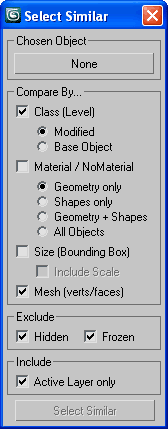
Select similar (to chosen) nodes by assembly of similarities.

SSObj

Select Similar Pro

0 votes

poster1

The alternative to "Select similar" command that selects not just objects of the same type, but objects that you consider to be visually similar! It uses different characteristics to compare objects such as polygon count and size. For instance, if you created several copies of a certain tree, you can select all the copies of this tree among a lot of other editable mesh.

Select Similar Spline

1 vote

this script works like select similar faces in polyboost or gmt, but with splines. so feel free to test it an post some suggestions :)

it have two modes:
by segments - selects by spline segments and their lengths (most precise)
by length - selects by overal length of the spline (useful in some cases)

new in v2.1
by type - selects by knot type (bezier,corner,etc)

Select Similar Spline

8 votes

This script alows you select similar splines in subobject. It doesnt work very well yet but it works :)

Select spline segments by matID

0 votes

With this script you can select splines' segments by matID.
There are two methods of selection:
- "Use IDs of selected segments" - select some segments and press the [Select] button. The script will find the matIDs of the selected segments and will select all other segments with the same matIDs.
- "Use IDs typed below" - type as many matIDs as you want in the field(separate matIDs with comma) and press the [Select] button. The script will select all segments with the matIDs entered by you.

Select Vertex Cross-section

40 votes

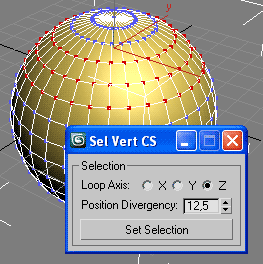
Extend 3ds Max selection features on Editable Mesh and Editable Poly.

Select Vertex Loop

* [Read Notes]

Select Vertices by Bone

0 votes

Selects vertices affected by current bone.
Difference with max native method is that this one will ignore hidden parts of your mesh.

Select | Invert Faces By Element

2 votes

This macro script contains two usefull operations (as in Lightwave):
#1 select all faces by element
#2 invert selected faces by element
Requested by titane357

selectAddTarget

8 votes

This script takes all current selected objects - and if they have 'targets' - selects the targets as well - keeping the inital objects still selected.
For example - you can select a target camera and target spot - but not their targets - run this script - and the targets are ADDED to the selection.

Syndicate content