3ds Max | Scripts

AutoEdges

27 votes

Script looping through selected objects of your scene to hide unwanted edges in editable meshes (typically the middle triangles of surfaces).

This script was created to improve the visibility of models imported from Revit into 3ds Max via the FBX file format.

Light meter

18 votes

This is a script I use to calculate the key to fill ratio of a scene. Pretty simple script right now. I eventually want to be able to just select all the lights in a scene and run the script to get a ratio back, that is when I can find the time. For now you just have to manually pick each light individually. Any feedback would be great.

Quadrangulate

37 votes

Converts a triangle based mesh into quads. This script has also been known as polybomb.

Recreate Subdivision Levels

48 votes

I renamed this script to TurboReduce, get it here http://www.scriptspot.com/3ds-max/scripts/turboreduce

A script to recreate the subdivision levels of an object in case if you somehow lost them. Watch a demo here:

http://www.youtube.com/watch?v=asfko3kQQqQ&feature=channel_video_title


Rate It !

14 votes

Rate It banner

What's new in 1.1 :

- Added annotation Mode : click on your object, add annotation !
- Snapshot mode : create multiple snapshots of an object (including annotations)

Rate It! allows to review objects of a scene in order to evaluate (validate or reject) and rate them. It features a light interface, a comment box to add comments to your objects, a snapshot function and the publication of a review HTML file.

HexColor

5 votes

This tool is for converting from hexadeciaml strings to max color values and from max color values to hexadecimal stirngs

to install:
exxecute\run the script from maxscript menu
go to customize -> customize user interface and then go to the toolbar tab
find the mark tsang category and drag hexColor onto a toolbar of your choice

to use:
either use the color picker to pick a color to display the hexadecimal string

or:
use the editText box to enter a hexadecimal string e.g #5c9c00 to change the color swatch to the hexadecimal color

mark tsang 2011

Auto Loader

42 votes


This little tool manages and autoLoads scriptFiles in max.
You define scriptFiles to be loaded, it saves those to the registry and also creates an autostart file containing links to those scriptFiles. It does not manage/disturb any existing autoLoads.
have phun

HDR dome light for max 2009

37 votes

I have modified the amazing script HDR dome light from Chris Subagio and now it works in Max 2009;
also, I have added some new features, and now it works OK if you link it to a moving object.

It uses Spot lights with Shadow Map, so it´s very fast, about 7 seconds the renders I have attached
in a Quad Q6600 2´4Ghz.

But it has a little problem: if there are many dome lights in the same scene linked to many moving
objects, the global illumination has changes along the time, with brighter and darker frames.

This is not always, only sometimes.

Change Renderer

34 votes

This is the updated version of my First Script which u can use to change Render Engines. Am planning to add more render engines if i get their RenderClass.names. I would like to add other renderers too but i need their rendererclass names. You can see how to get that at the end of the video. Hope you enjoy this simple script.

UPDATE:

Version 4 Available HERE

OLD VERSIONS:

v3.00b screenshot:

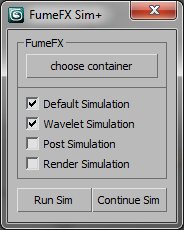
FumeFX Sim + 4/7/2011

23 votes

Updates
- Can automate the simulation for all selected states (default,wavelet,post,render)
- Can continue simulation from any state (default,wavelet,post)
- Prints simulation time in the listener for most accurate simulation times

Syndicate content