Tagged '3ds'

3DS Max Multi/Sub-Object Material Browser Script

2 votes

When dealing with various bitmaps to be applied on multiple objects (i.e large video walls), this script comes really handy. The purpose is to scroll through the Multi/Sub-Object Material diffuse bitmaps and apply on one or several objects.

Change Log:
v0.9b :

  • Bug Fix.
  • Added icons and macroscript.
  • v0.9a :

  • SubObject Support.
  • Preview before applying.
  • Improved Code and functionality.
  • New features added.
  • Quick Z-Depth (mental ray)

    1 vote

    With this useful and simple script, you can create a non-destructive quick map Z-Depth in mental ray.

    rollout Quick Z-depth

    Enjoy!!


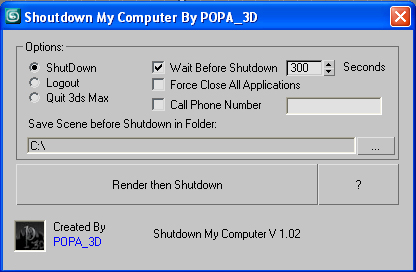
    Shutdown Computer after render with automatic phone call

    4 votes

    If you have a render that take a long time and you want to go to sleep or to go out your office this script will shutdown your PC after the render is completed.

    - Shutdown will shutdown the computer

    - Logout will Log off the user

    - Quit 3ds Max will exit 3ds Max

    - Force Close All Applications will forces running applications to close without warning

    - Wait Before Shutdown will let you Set a given time for shutdown, in seconds


    Addtional Notes:

     

    NukeOps

    39 votes

    A set of functions wrapped into a minimalist single-click button to help 3ds Max and Nuke artists to bring the 3ds Max 3d scene assets into Nuke's powerful 3d compositing scene.

    This tool allows:

    1) Copy cameras and any other objects (as points) and their animation into clipboard for an easy Copy+Paste action inside Nuke.

    2) Generate .chan files from selected cameras and any other objects (as points) and save them either many at once or one at a time to selected destination.

    Batch Preview Renderer

    4 votes

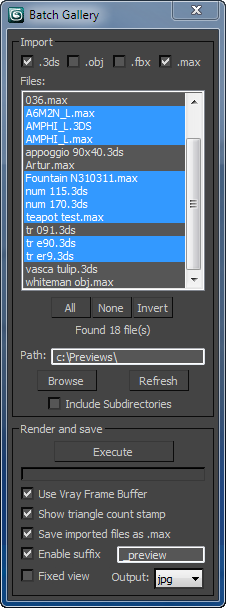
    The script searches for files in a given directory and renders a preview from the files found.
    Ideal if you have a lot of model library and you dont know the content of the files.

    Lattice

    7 votes

    Uses selected object to creates lattice/blob like objects.

    Updated!

    --V2.0--

    Scene Light Multiplier By POPA_3D

    2 votes

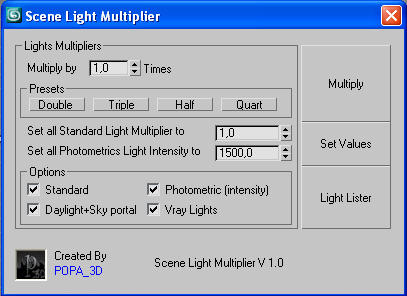
    Scene Light multiplier let you manage all your scene lights by multiplying their multiplier by a defined value or set all light multiplier to a defined value...

    you can chose which lights will be taken in consideration

    #Standard will affect:

     target Spot 

    free Spot 

    Target Directional ight 

    free Directional light

    Omni light 

    Skylight 

    mr area omni

    JJTools

    30 votes

    I have used 3DS Max on a daily basis for almost 10 years now and I took an interest in MAXScript almost immediately. The learning process was slow but I was able to pick the brains of my very talented colleagues. I began by studying 3ds Max’s ‘Listener’ and with time and confidence I tentatively created short scripts of my own. Many years later, and with a lot of help from my friends, I am in the fortunate position of being able to create my very own 3ds Max tools.


    http://www.jimjagger.com/Pages/Tools/index.htm

    Most of my scripts are workflow improvements in an effort to avoid repetitive tasks. With any luck, they may save you some time too.

    SOX Dynamics

    3 votes

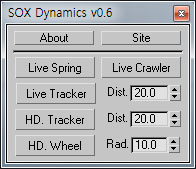
    Sorry, The management of the tool will stop temporarily.


    Syndicate content