3ds Max | All

Fractal Maker

14 votes

DCP Particle Speed

1 vote

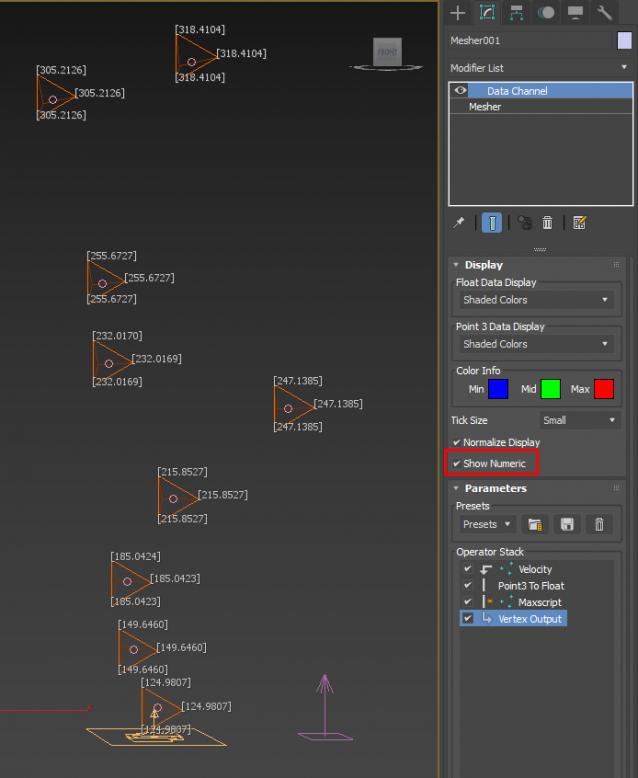
bit of a hack to display Particle Speed...where the particles ARE that is...

Extract preset to:

C:\Users\xxx\AppData\Local\Autodesk\3dsMax\2017 - 64bit\ENU\en-US\plugcfg\DataChannelPresets

Then in your DCM (on a Mesher that is, coz DCM needs a mesh to work on, it can't work directly with PF), load it as a Preset.

ver 1.01: Maxscript op now will use correct (auto) frame rate

To Perspective

2 votes


Align lights/cams...anything (Force, PFlow, FFD...etc...etc...) to current Perspective view.

99.99% you'd use it for a 3rd party light eg. Vray, Redshift, Arnold. I got annoyed at doing it manually so got into Frankenstein mode and cobbled together bits of codes here and there...so don't flame me for the lack of mxs expertise...

Just drag the ms file into viewport...

Krakatoa light control

2 votes

A small tool I developed while working on StarTrek Beyond's krakatoa nebula cloud to help me control the lights that are acting like a giant stars on the go. It allowed me to control lights globally or just the selected ones and I only exposed the following parameters:

Random Startup Splash Image

4 votes


A quick script for randomly changing the startup image for 3ds max.

I have seen other ones out there, but they require additional software, and have more complicated installations, so I made this one for me.

To install:

1. Unzip all files to a folder

2. run install.bat

if the folder structure of your max installation is different, simply copy the contents of $Scripts to your 3dsmax/scripts/ folder.

Poly Stitch tools

1 vote


       The Stitch tools  work on editable polyon object ,and create new faces between selected open edges(borders),which are mainly used to connect roads and terrain.

      In this update,stitch algorithm has been improved and enhanced,error probability is reduced greatly,no longer need to clear jags of borders but final triangluation is much better.

IES from Caustics Generator

4 votes

The script for easy render of the caustic from the lamps. Calculation of caustic takes a long time.

I have decided that you can bake a caustic in IES-files and thus make the caustic effect it deceptive for a large number of fixtures in the scene.

ToTex Render To Texture

205 votes

TOTEX v3

Moved to github

The project Totex has been moved to gihub so community development is easier

https://github.com/svenfraeys/totex

New Version 3.0

"ToTex" is a render to texture script that gives you the ability to quickly bake multiple textures to a folder. ToTex will start baking all the selected objects with the chose selections and will save it to the specified folder

New features (3.0):


- Stability : Bigest issue with ToTex 2.0 was the stability. The ToTex engine is recreated for stronger stability, focussed on high speed expanding.
- Improved User Interface : More compact and focussed on usability
- Auto-Update functionality : Get directly the new features
- New maps in development : xNormal, instant preview and photoshop connection.


New features (2.4):

- new improved UI: much more clear design with thumbs
- Element map now works!

New features (2.3):

- Improved UI: a lot more compact design, better overview and more dynamic system
- Expert Mode: press on the *-button at the top, this will show all the maps of totex, you can easily toggle this on and off

New features (2.2):

- Max Merge: Merge a max file when baking, for embedding complex lightscenes, after the bake ToTex go back to your start state
- Render Preset: Override the renderpresets when baking with ToTex, you can choose between three RPS files that you can override to your own render settings.

New features (2.1):

- Preview : with realtime directX shader (Xoliul shader - http://www.laurenscorijn.com/)
- Light Trace Ambient Occlusion
- Gradient Map
- Mask Map
- For Each Material ID
- Selection Bake : Bake only the selected faces


Vray HDRI Light

1 vote

A new tool useful for those who often use VrayDome Light with a VrayHDRI texmap pluged-in. You simply locate the HDR map on your computer, and the script generate a VrayDome light with your HDR file. The HDR is also display in the viewport and you can rotate it by rotating the VrayDome light. There is an additional parameter on the VrayDome light that allows you to enabled or disabled the HDR in the viewport.


Maxscript 2013 Help CHM creator

10 votes

****
Update: Our friends at Autodesk have released an official CHM for both MXS and SDK!
Get it here: http://usa.autodesk.com/adsk/servlet/item?siteID=123112&id=16707768

****

With this tool you can transcode the offline HTML help into a CHM for personal use.

Remember, while these tools are freeware the resulting CHM is still a copyrighted work and you cannot distribut that without permission, so keep the CHM to yourself.

Needed:
-The offline maxscript help files: http://images.autodesk.com/adsk/files/maxscript-2013-help.zip

Syndicate content