
RappaTools
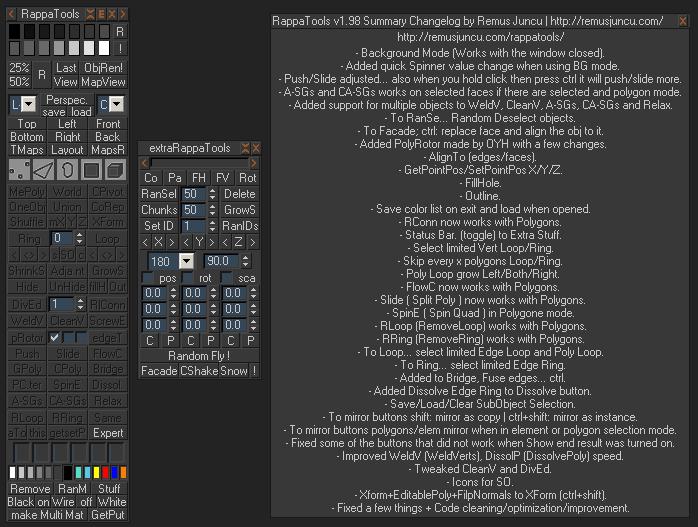
RappaTools is an modeling toolset for 3ds Max (9 Sp1 +), that offers a wide range of tools for creating various types of subobject selections as well as a set of modeling tools which will make any tasks in everyday modeling a lot easier and faster. It also has a lot of other options like 50%/25% Render, Quick Light/Cam select, Toggle maps display in viewport, Random Material/Wirecolor, Make multi material from textures in a folder, and many more...
Download and Experience the power of this free MaxScript yourself.
If you enjoy this free MaxScript consider donating especially if you use it for commercial work, since I'm developing this script on my free time when i'm not working on my college assignments. Let me know what features i could add, or how could i improve it, also how to change the interface since I'm planing a major change in the final version.
See the videos since they show some of the new features.
RappaTools3 > http://vimeo.com/20935321
v1.99
- to GetPut: shift: Get mat from obj in SME.
- Fixed Push with sofselect.
- Added Create VCam from Viewport.
- Now RappaTools opens in BGmode.
What's new since version 1.92
- Background Mode (Works with the window closed).
- Added quick Spinner value change when using BG mode.
- Push/Slide adjusted... also when you hold click then press ctrl it will push/slide more.
- A-SGs and CA-SGs works on selected faces if there are selected and polygon mode.
- Added support for multiple objects to WeldV, CleanV, A-SGs, CA-SGs and Relax.
- To RanSe... Random Deselect objects.
- To Facade; ctrl: replace face and align the obj to it.
- Added PolyRotor made by OYH with a few changes.
- AlignTo (edges/faces).
- GetPointPos/SetPointPos X/Y/Z.
- FillHole.
- Outline.
- Save color list on exit and load when opened.
- RConn now works with Polygons.
- Status Bar. (toggle) to Extra Stuff.
- Select limited Vert Loop/Ring.
- Skip every x polygons Loop/Ring.
- Poly Loop grow Left/Both/Right.
- FlowC now works with Polygons.
- Slide ( Split Poly ) now works with Polygons.
- SpinE ( Spin Quad ) in Polygone mode.
- RLoop (RemoveLoop) works with Polygons.
- RRing (RemoveRing) works with Polygons.
- To Loop... select limited Edge Loop and Poly Loop.
- To Ring... select limited Edge Ring.
- Added to Bridge, Fuse edges... ctrl.
- Added Dissolve Edge Ring to Dissolve button.
- Save/Load/Clear SubObject Selection.
- To mirror buttons shift: mirror as copy | ctrl+shift: mirror as instance.
- To mirror buttons polygons/elem mirror when in element or polygon selection mode.
- Fixed some of the buttons that did not work when Show end result was turned on.
- Improved WeldV (WeldVerts), DissolP (DissolvePoly) speed.
- Tweaked CleanV and DivEd.
- Icons for SO.
- Xform+EditablePoly+FilpNormals to XForm (ctrl+shift).
- Fixed a few things + Code cleaning/optimization/improvement.
Comments
Hi, That's only available in
Hi,
That's only available in rappatools3 and not rappatools2 and in rappatools3.2 it will be customisable :)
Best,
Remus
http://remusjuncu.com/ | http://remusjuncu.com/rappatools/
unable to access spacebar menu
how can I access this flyout menu when I PRESS SPACEBAR NOTHING HAPPENS can somebody please mail me how to access
thanx in advance
unable to access spacebar menu
how can I access this flyout menu when I PRESS SPACEBAR NOTHING HAPPENS can somebody please mail me how to access
thanx in advance
most of the tools in
most of the tools in rappatools3 support edit poly modifier !
http://remusjuncu.com/rappatools/#features
but rappatools3 is commercial :)
http://remusjuncu.com/ | http://remusjuncu.com/rappatools/
nice :D
I like your tools. there is a lot of useful stuff in it. But I'm using the edit poly modifier a lot and I don't want any inconsistencies in my workflow :( I hope you can fix this. As soon you do that you have at least one more rappa user ^^
- as fajar said "rappatools
- as fajar said "rappatools title --> right click --> stuff --> click autostart"
- Customize > Keyboard > Category:RappaTools > GetPut > assign a shortcut with shift... like shift+m
(also in order to work you have to have rappatools opened... or bg mode enabled... next to autostart)
http://remusjuncu.com/ | http://remusjuncu.com/rappatools/
- Disable Autostart =
- Disable Autostart = rappatools title --> right click -->stuff --> click autostart
thank you very much! but i
thank you very much! but i have two issues:
- is it possible to disable autostart
- how to set "to GetPut: shift: Get mat from obj in SME." as hotkey?
ooooo
^O^ thanks a lot~~~~~
I am ( ̄(工) ̄)
They are on youtube...
They are on youtube... http://www.youtube.com/user/RappyBMX#p/u/6/3hOClBQhc0k
http://remusjuncu.com/ | http://remusjuncu.com/rappatools/