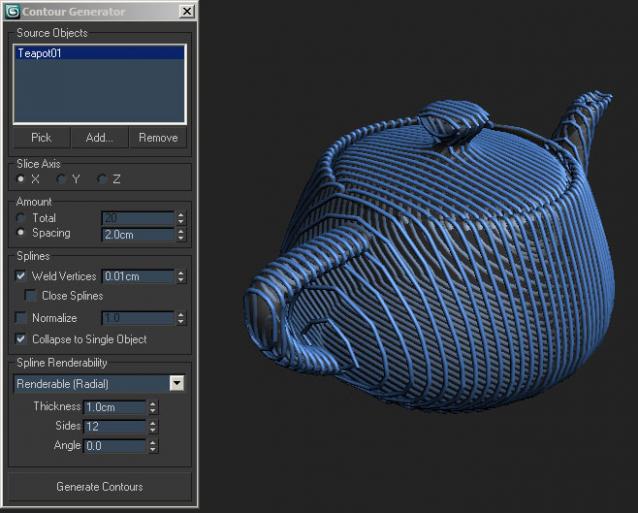
 A small tool which creates cross-section splines of one or several objects in the scene.
Script
Contour Generator
By rotem · 2011-05-24
- Date updated
- 2011-05-24
- Votes
- 54
Description
Attachments
- contours.ms — contours.ms6.8 KB
Comments (33)
Excellent!
JCR2011 · 2022-08-17
This is a really useful script. Thank you so much!
Working perfectly and quickly 3dsmax2019.
Countour script curve nodes problems
graph-ix · 2022-01-22
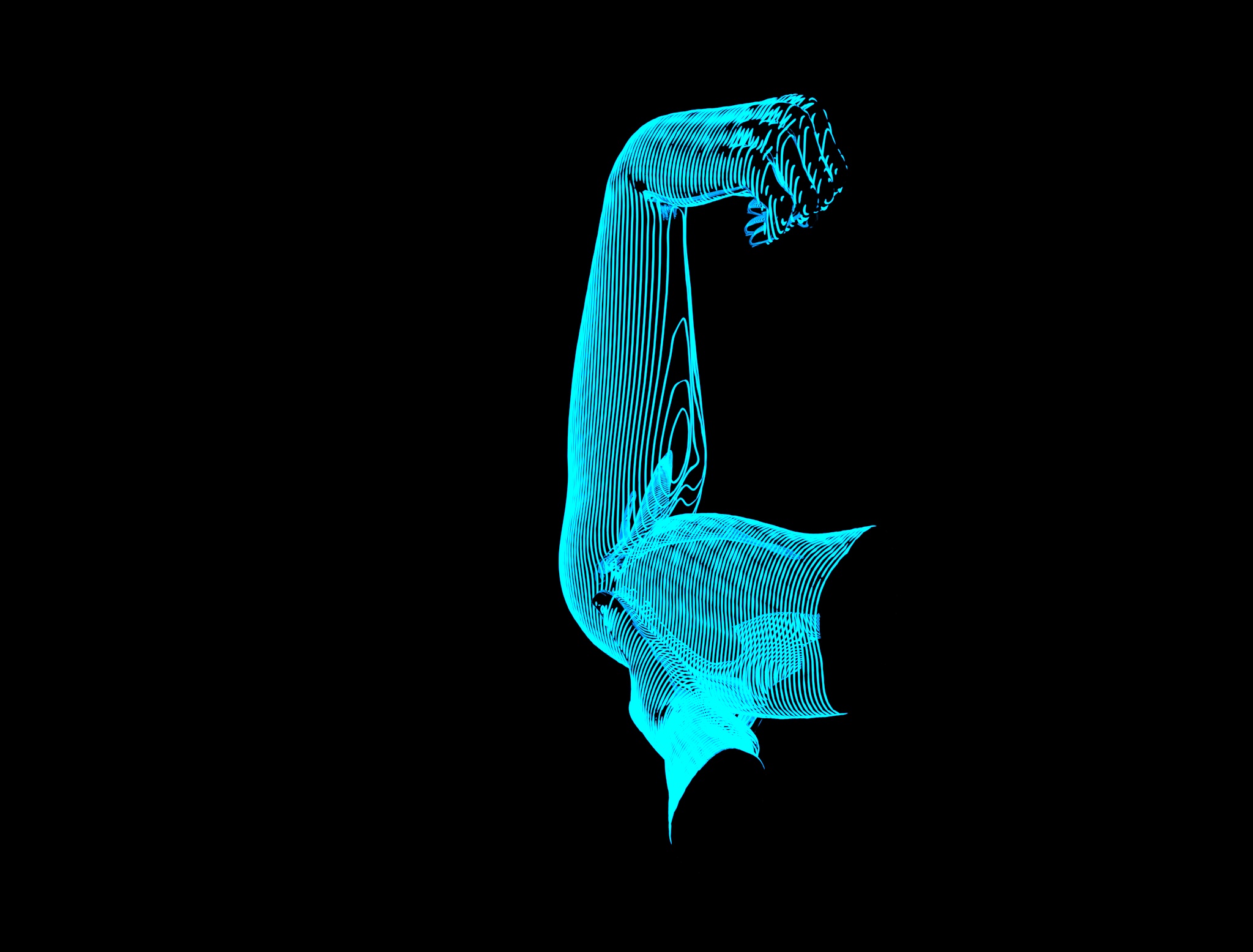
This script is for sure great, but when you apply it to curved suface models (like hands, fingers, or the like), you have to adjust the normalize of the contour curves generated (before generate contour). I had some strange curls on specific points, where the contours curves coudn't be closed, or when two contour curves were too near (it pinched the line between them, making a flip of the curve, and creating some strange rendered sweep).
And also, if you have a slow CPU, and/or few RAM available in you PC, it's better not to collapse to single object the contour line. I uncheck this option, because when I let it on, it cause a failure to the software core, and 3dsMax goes off (losing your scene with it).
So I uncheck this option, and after, I attach each line to the first (it can take some time to do).
And also, if one of you have a similar script, but creating a spiraled curve over the surface of the object used to create the contour line, it would be great. I have succeeded in making one of this kind. I'm just making scripts for building walls of bricks and stones, and paved floors.
Thanks.
Attachments
- partial_contoured_arm.jpg — partial_contoured_arm.jpg260 KB
revised version of this script
graph-ix · 2022-01-21
Hi, I tried this script on an imported character from DazStudio, via the Bridge available and the import script.
For the character, I had to convert it to a simple Polymesh, so the rig won't affect the model.
The first version of the script had many problems, and oversatured the Max core software, so it halted each time.
Using the corrected version of the script, with close the spline on, and colapse into single object off.
After, I used Sweep, with a personnal line as profile (sized to go with the spline from contour_0.ms), and it goes.
But I'm just beginning.
Attachments
- contours_0.ms — contours_0.ms6.8 KB
- g8f-test-01.jpg — g8f-test-01.jpg1018 KB

Very nice!!
 medlenen · 2020-11-25
Thank's! You are best!!!
 todor · 2020-11-09
Thank you :) I really like it !
Thanks
din · 2020-11-07
Thank you for this wonderful plugin. God bless!
themaxxer · 2020-06-09
thank you very much! have a nice day.
version for max 2020
themaxxer · 2020-03-10
it's only the NrmlSpline modifier that makes problems, I think this has changed in the newer max versions... can a scripter make some changes to make it work again? thanks a lot...
themaxxer
there you go
drakulaboy · 2020-04-20
i just fixed it
Attachments
- contours.ms — contours.ms6.8 KB
update for 3dsmax 2018.4 , 2019
 ateya3d · 2018-10-19
Update from https://www.cgway.net just to be compatible with 3dsmax 2018.4 , 2019
all Copyrights to the Programmer we just do some little changes
Link
https://online.cgway.net/cgway/Contours-3dsmax-2018,2019.zip
ratatouille · 2019-07-18
Your link doesn't work. Please consider re-up again.
please send my update for 3dsmax 2018.4 , 2019
estmaza · 2019-10-21
Hey. can you please send me an email script updated for version 3 d max 2020? Your link is not working
holaa
legrand · 2015-09-03
muy bueno la aplicaci
on de para 3d max
how can i downloud?
Ayat Watany · 2015-07-25
I am sorry but how can I download this script
?
thank you
Ayat Watany · 2015-07-25
good script
Direction/angle
thewool · 2015-05-27
Awesome script!
One thing that would be very useful, it would good to set an angle relative to the slice axis. Or even select world/local/grid etc.
noa · 2014-10-10
good
animated
renascent · 2014-10-09
hey there, really love this script...
i created this image using a tedious method with Section where i had to close many splines...
http://renascent.nl/_x/sectioning/sectioning.jpg

is there any way you could get this script to work on animated objects.
maybe a create by frame method, baking it?
i can get this to animated using Sections but cant put any modifiers ontop.
http://renascent.nl/_x/sectioning/animatedsection_preview.avi
how?
titol · 2015-02-09
Hello, I was just wondering how have you actually managed to have that effect on an animated object :)
Cheers,
Oli..
sarkawt · 2014-09-29
hi .. can u send me(Contour Generator ) ? this is my gmail (rasulsarkawt32@gmail.com)
rotem · 2014-10-04
The file's right there, you can just download it.
archzain · 2014-09-26
Thank you
Nancy22 · 2014-05-03
thnx (Y)
cacavisio · 2014-02-23
Thank you
Good Script
KK Kamaal · 2014-02-18
Very Very Thanks
hamiam · 2014-02-18
can i download ot
 Waseem3D · 2014-01-27
WOW! I think it helps a lot!
THK
claudio_86 · 2014-01-27
Thanks! Very nice...
claudio_86 · 2014-01-27
Thanks! Very nice...
Fantastic script - please help
Humma · 2013-06-05
Great tool, I require help though, I need to cut on a 45 degrees for example, slice plane options are only XYZ direction = OK. So I set up Grid helper and rotate/activate, when I run script it still slices to the World Axis XYZ.. Can this be amended or suggest? Also what would be amazingly amazing, would be ability to select a start point where contours are generated from!
rotem · 2013-06-06
You could always rotate your object and position it at the world origin to control the slicing offset and angle, and then rotate/position it back to the original state.
Humma · 2013-06-07
Thanks rotem - no complaints your script is fantastic. Yes I've been rotating objects to achieve desired result, though some more complex scenes asset management becomes more involved this way - I don't have any idea though how hard it is to implement these ideas into code. Suggestion to be able to specify start point/vertex/poly etc would be very very good
 tassel · 2011-05-24
Nice One :)