
MatSnap AI
MatSnap AI - AI Material Generator
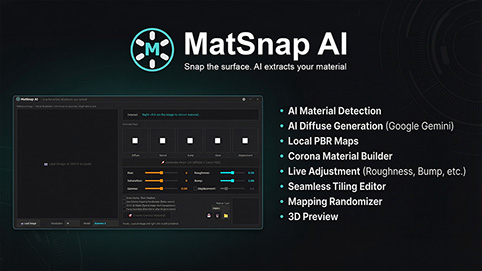
MatSnap AI is an AI-powered script for 3ds Max that turns screenshots, photos, and text prompts into fully seamless, high-resolution PBR materials in seconds. It bridges the gap between AI texture generation and 3ds Max, allowing you to create production-ready materials without ever leaving your workflow or searching through texture libraries.
Key Features:
Image to PBR: Simply paste any image from your clipboard, point and click on the specific material you want to extract, and generate a clean, high-resolution Diffuse texture.
AI Prompt Generation: Define materials using text (e.g., "worn concrete wall" or "clean oak wood floor"). The AI respects strict 2D perspectives and generates accurate, flat textures based on your descriptions.
Automatic PBR Channels: Instantly extracts and generates all necessary derived maps from your diffuse, including Normal, Bump, Roughness, Displacement, and Ambient Occlusion.
Interactive Seamless Editor: A built-in seamless tweaker tool. Adjust X/Y center-offsets and gradient blend softness to make any texture perfectly tileable. Includes live real-time grid previews.
One-Click Material Setup: With a single click, MatSnap automatically creates and correctly wires a complete Corona Physical Material (with proper gamma settings) into your Slate Material Editor.
Real-Time Material Controls: Use the script's UI to adjust bump intensity, displacement height, and roughness values. Changes sync instantly to your active 3ds Max material.
Workflow Summary:
- Load or paste a reference image into the MatSnap UI.
- Point and click on the material you want to extract.
- Adjust your resolution and AI settings, then hit generate.
- Use the Seamless Editor to ensure perfect tiling.
- Generate the PBR maps and click "Send to Max" to apply the ready-to-render material to your scene.
Requirements:
Bring Your Own Key: This script requires a personal Google Gemini API Key for generation.
Compatibility:
3ds Max 2023 to 2026
Currently supports Corona Renderer (Material generation auto-setup).