
infoOverlay
Version:
0.91
Date Updated:
02/05/2008
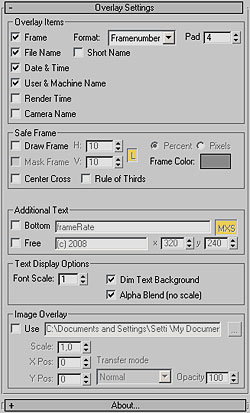 Updated to v0.9 - This Render Effect displays additional information such as frame number - file name - render time etc. as overlay onto your rendered image. Useful for previews - previzualisation and other non-final renderings - should work with any 3dsmax-compliant renderer. All parameters animatable.
Additional Info:
Complete list of features:
- Scene file name - optionally just the file name without path
- Render date & time per frame
- User & render machine name
- Name of current camera
- Frame number - optionally in SMPTE or seconds (new in 0.9)
- Freely defineable user text with X/Y position (new in 0.9) - accepts generic MAXScript commands for custom frame information
- Adjustable font size
- Image Overlay (e.g. for watermarks) with different types of compositing modes and scaling
- Display of safe frame
- Center cross and 3x3 'Rule Of Thirds' grid
To install - unzip into your 3dsmaxroot\scripts\startup directory (if you haven't changed the startup directory setting) and restart 3dsmax. For more details - see header of the script file.
Version Requirement:
6 - 2010
Comments
motion blur
very good script, i'm using it very often! there is one problem though. it doesn't include time for motion blur, and often it takes more time to calculate than actual rendering of a frame. is there a way to add also mb in to this? thanx.
Hello, Thanks for the great
Hello,
Thanks for the great script.
I am using it for sun studies and would like to extend dmmd123's max expression.
how do i access the date and lat/long info from my daylight light?
thanks.
Unfortunately no. Viewport
Unfortunately no. Viewport overlay and render effects at two independent subsystems. I would need to add a completely separate code branch for the viewport - certainly doable but I have no time for this right now.
Why do you need it in the viewport?
Thank you for this script! it
Thank you for this script! it is very usefull!! but is it possible to view it in viewport in 3d max 2010?
Dustin, would you mind
Dustin, would you mind downloading and testing the script again? I made a small modification (v0.91), and here it did not crash with mr anymore, but I haven't tested it properly.
Let me know
That sounds weird. I have no
That sounds weird. I have no idea why a scripted render effect would mess with the viewports! Can you post a screenshot and/or repro steps? Have you tested it with standard 3ds Max (not Design)?
Thanks for the Daylight
Thanks for the Daylight expression. This could be useful for others, so I included it in the comments of the script for future use. Hope this is ok with you?
Man you've really got to get
Man you've really got to get this working with mental ray. Great script, but I hardly ever use the scanline anymore unless it's absolutely necessary.
Messes up 3ds Max Design SP1
Messes up 3ds Max Design SP1 64-bit viewports in DirectX. :( Otherwise works fine.
For anyone confused like me,
For anyone confused like me, about where this script comes up, its in Rendering>Effects>Add
If you are doing a sun study and want to put the time of day on the frame paste this code into the Additional text, bottom field:
(int($Daylight01[3].object.value/3600.0)) as string + ":" + formattedPrint (int(($Daylight01[3].object.value - int($Daylight01[3].object.value/3600.0)*3600.0)/60.0)) format:"02.2d"
Change all the Daylight01's to whatever you have named your sun.