
ArborSway
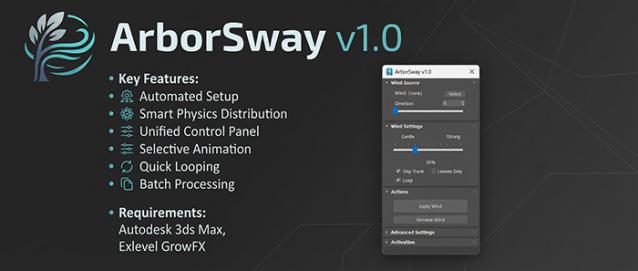 ArborSway: One-Click Wind Setup for GrowFX
Overview
Adding wind to GrowFX trees in 3ds Max usually involves repetitive manual work: selecting individual paths, adding modifiers one by one, linking Wind Helpers, and trying to guess the correct stiffness values for different branches.
ArborSway is a utility MaxScript that handles this repetitive setup for you, allowing you to add natural-looking wind to your vegetation assets in seconds.
Key Features
- Automated Setup: Select a GrowFX tree and click "Apply Wind." The script automatically creates a Wind Helper, adds the required Wind Modifiers to your paths, and links everything instantly.
- Smart Physics Distribution: ArborSway automatically assigns varying stiffness and amplitude based on the tree structure. Main trunks stay rigid, while thinner branches and leaves sway more freely.
- Unified Control Panel: Adjust overall wind intensity, stiffness, and speed directly from a single floating dialog instead of digging into the modifier stack.
- Selective Animation: Use checkboxes to skip main trunks or restrict animation to leaf and flower models to save on viewport performance.
- Quick Looping: A single toggle recalculates stiffness and amplitude to provide smoother looping animations for video renders.
- Batch Processing: Select multiple GrowFX trees at once to apply or remove the wind setup simultaneously.
-v2.1
- Generate Point Cache: Bake wind animations into Point Cache sequences to optimize heavy scenes, reduce viewport lag, and lock in perfect loops.
- Other Fixes: Fixed a "server connection failed" error affecting activation on older 3ds Max versions (e.g., 2021).
-v2.0
- Full support for GrowFX 2.1.2 or later: Now natively compatible with the latest node-based architecture.
- Special Thanks: Huge thanks to Eduard (Exlevel) for his incredibly fast response in updating the GrowFX API to make this version possible!
-v1.1
- Tree Growth Animation (Beta): Instantly generate organic sequence animations for your GrowFX trees. Adjustable start frames, durations, and tier overlaps to make your plants grow naturally from trunk to leaves.
- Custom Settings Presets: Save your own studio-standard physics numbers (e.g., custom stiffness or amplitude) into a preset. ArborSway will permanently use your saved baseline, and the main intensity slider will smoothly scale based on your custom input.
- Precise Looping Control: Define the exact frame length required for your project (e.g., 100, 150, or 300 frames) and save it as your default looping duration.
Technical Compatibility
- Object Requirement: This script works ONLY with GrowFX objects. It has been developed and tested primarily using Maxtree GrowFX models.
- No Mesh Support: It will NOT work on trees that have been converted to Editable Mesh or Editable Poly.
- GrowFX Version: GrowFX 1.9.x and GrowFX 2.1.2 or later.
- Platform: Autodesk 3ds Max 2018 or newer.
Quick Workflow
- Select your GrowFX tree(s) in the viewport.
- Open ArborSway and click Apply Wind.
- Adjust the master Intensity Slider to test the resulting sway.
Comments
ArborSway v1.1
Hi j_forrester,
Thanks for the suggestions! We listened and just released ArborSway v1.1.
Both of your requests are now live:
You can now set exact frames (e.g., 150) for the wind loop.
You can save your own custom physics numbers as default Advanced Presets.
Please download the new version from your Gumroad account. Hope this improves your company's workflow!
Loop length
My company have just purchased your script. We would normally loop animations at 150 frames, but I've noticed that it defaults to 100 frames loop and I can't see a way of altering it. Can it be changed or added as an option to change?
Also, it would be good to be able to save advanced settings into pre-set files so these can be the defaults and stored. It's a really handy script though.
Thanks