ScriptSpot

Script

Batch Render Assistant

By ausn · 2009-09-03

Version requirement
max 2009 and higher
Date updated
2009-09-09
Votes
18
Description

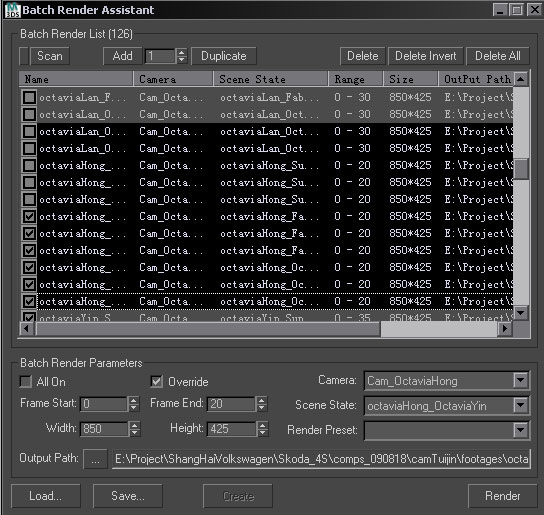
-- Batch Render Assistant

-------------------------------------------------------------------------------------------------------------------------------

-- Motif

-- The max built-in tool Batch Render can only be operated in a single-selected way which in not very convenient.

-- So I create this tool to help you manipulate Batch Render in a multi-selected way.

-- Their interfaces are nearly the same.

-------------------------------------------------------------------------------------------------------------------------------

-- Usage

-- 1.Add new views of which count is based on the spinner value to the right of the Add button.

-- 2.Hold down Shift or drag from the empty bottom space to multi-select items on the list.

-- 3.Change the parameters of each selected Batch Render View at one time.

-- 4.Change name by clicking and staying on the item you want then enter a new name.

-- 5.Delete all Views at one time.

-- Delete selected Views; delete invert selection of selected Views.

--

-- 6.Save data to .brd file; open .brd file then create batch render view based on the data.

--

-- 7.Double clicking left mouse button on the left part of the dialog can quickly widen the dialog and columns.

-- Double clicking left mouse button on the right part of the dialog can quickly shorten the dialog and columns.

-- 8.Holding down right mouse button and then moving mouse within the dialog area can quickly change the width of columns.

-- 9.Holding down left mouse button and then moving mouse within the dialog area can drag the dialog as you drag it in the title area.

--
-- 10.Change language between Chinese and English.(The file BatchRenderAssistant_EN_CN.ms)

-------------------------------------------------------------------------------------------------------------------------------

-- Max Version Requirment

-- max 2009 and higher

-------------------------------------------------------------------------------------------------------------------------------

-- Author Information

-- author: Jausn (Chinese Name:Jin Xi)

-- E-mail: ausn_shi@yahoo.com.cn

Attachments

Tags: render, batch

Comments (23)

NicolasC · 2014-10-30

Very nice !! thanks for sharing :) it's becoming interesting, compared to the crappy batch render utility that ships with 3dsmax ...
A bit more options to name the outputs and we'd be done !
Thanks again.

EDIT: wanted to test it with a production scene ... doesn't seem to work anymore on 3dsmax 2014 :( :(

Rearrange Jobs would be cool

vklein · 2012-09-18

The possibility to rearrange the jobs by Drag and Drop or even Up/Down buttons would be very cool.

Great script, thanks a lot

mirza · 2011-09-08

So far I am very pleased that it fixes the bug of the native batch render.

I Just changed in line 139 :
local presetFiles = getFiles (GetDir #renderPresets + "\\*.rps")
to get the list of render presets, as the path where they are changed since max 2010.

MarkD · 2010-04-25

I found a way to make the load/save feature work. If you have the same number of batch render views as what the file was saved as it will create the views. I'm pretty happy with being able to edit multiple batch views at the same time, thanks a bunch. I hope my comments help you with your trouble shooting! Thanks again for the script.

Also if you have net render checked on in the original batch render, when you click render in Batch Render Assistant it will kick on the network render.

ausn · 2010-03-04

And I've not used the Net Render, since I just got one PC, so I didn't put my mind on it.
Maybe you can try the Distributed Bucket Rendering if you use Mental Ray.

I think adding Net Render will need a lot of additional work to do. Maybe you can try to do it.

Thank you, fjordside, for your Net Render part. But according to my current situation I can't test it.

Anyway, I'm happy you guys like it!

ausn · 2010-03-04

MarkD' Message:
I've run into a bit of a bug, when I save the .brd file, delete all the views and load the .brd file, it crashes max.
If I have the views already created then it refreshes the views just fine.
-----------------------------------------------------------------------------------
My reply:
Thank you for your feedback.

Actually I got this problem when I run it. But unfortuately I don't know why.

Just after I finished it, it worked very well, as you can see the Demo:
http://v.youku.com/v_show/id_XMTM4NjU1MjU2.html

But I have no idea why it always doesn't work now. I look through all the script and it seems to be no problem.

And so don't use the Load and Save function which in my opinion are not very useful.
The cool feature of this tool is to multi-select items. So just enjoy it!

And I also wrote a tutorial of how to make it. If you're interested in it, you can take a look:
http://forums.cgsociety.org/showthread.php?f=96&t=834881

Thank you, all of you! I love the guys who show his opinion!

noel_d3 · 2010-01-18

Great script, very usefull.

Some functions would be really useful:

It will be fine to add special keyword in the path, which are replaced with the corresponding value (like %cameraname%, %scenename%, %AWordThatIwanttoAddForEveryRender% ...)

You can see this function in "Batch Camera Render" script but it will be fine in your script using with batchrender.

Best regerds,

Léon

ausn · 2009-09-09

That's a bad news!
You can disgard this function just by setting this part to a description so that you can use it but you can't operate the on or off of the batch render view.

leverkusen · 2010-01-17

Great script!
(Especially since the nativ batch rendering has a bug in 3ds Max 2010.)
But unfortunatly Batch Render assistant has no Net Rendering option.
Is there a way to fix this?

fjordside · 2010-02-10

First of all - thankyou very much for this great script - as leverkusen says it fixes a bug in the 3dsmax 2010 batchrendering (i have reported this to autodesk, but have had no feed back).

I've added the batchrenderoption to the script - please accept this change as it is and use it at your own risk.

Thanks.

Attachments

igamaximus · 2010-02-10

@leverkusen, fjordside: Can you tell me precisely what is the problem with batch rendering in max 2010?
Thank you

igamaximus · 2010-02-10

I'm asking because I've used it on several projects, and didn't notice any problem so far.

leverkusen · 2010-02-13

Hi, when "override preset" is on in the batchrender dialog, sequences are not incrementally numbered, but one file is overwritten over and over again. I also reported this to Autodesk with no reply.

MarkD · 2010-02-26

I've run into this bug, you need to go into the Render Setup and change "Time Output" to "Active" or "Range" then it will render all the frames instead of overwriting just one frame when you net render. It's crazy but the override doesn't actually override unless you do that.

It's almost as annoying as the output path not displaying the correct path after its been updated...

Thanks for the script, its great!

leverkusen · 2010-02-13

Thank you so much. I haven't tested it yet, but just what I was looking for..

su37 · 2009-09-08

I've tested ,The script still can not run under max 2008,
Warning dialog box "No "map" function for undefined"

ausn · 2009-09-08

I don't know whether max 2008 can run it or not.

For all I know, you can't set a batch render view to on or off through MAXScript and so you can't run this plug-in in max 9. But if max 2008 fixed this problem then you can use it in max 2008.Well, you could try it in max 2008.

I'll wait your reply. Thank you!

su37 · 2009-09-07

A very good script!
Does not seem to support the max2008!~

ausn · 2009-09-08

I used the new method called renderPresetMRUList which is new in max 2009. But now I replace this new function using another simply method so maybe it works in max 2008.

Great script   Suggestion:

tassel · 2009-09-03

Great script 🙂


Suggestion:

It would be usefull to save camera and view settings in a seperate file in the max path also.

ausn · 2009-09-04

Good advice!

I need some time to add this function!

It's coming later!

Thanks!

ausn · 2009-09-08

I've added the save and load function.