++ Works with All Assets ++
New: column and filter "In Scene" - to show if bitmap is used in scene or only in material editor
New: columns Channels and Memory - to show bitmap channels and estimated memory load for each bitmap
.
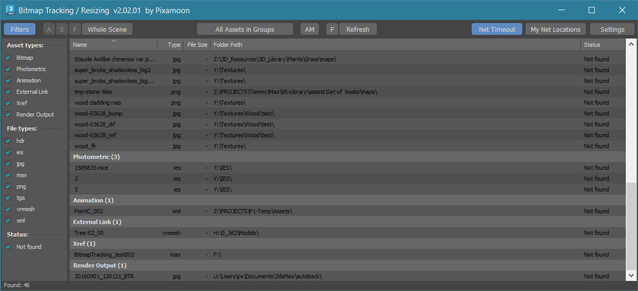
Bitmap Tracking / Resizing... is tool similar to Asset Tracking. But it gives more possibility to work with bitmaps:
- Support for All Assets
- Sort files by name, image width, height, file size, path, gamma, texture name, status (Found - network, Found - local, Not found)
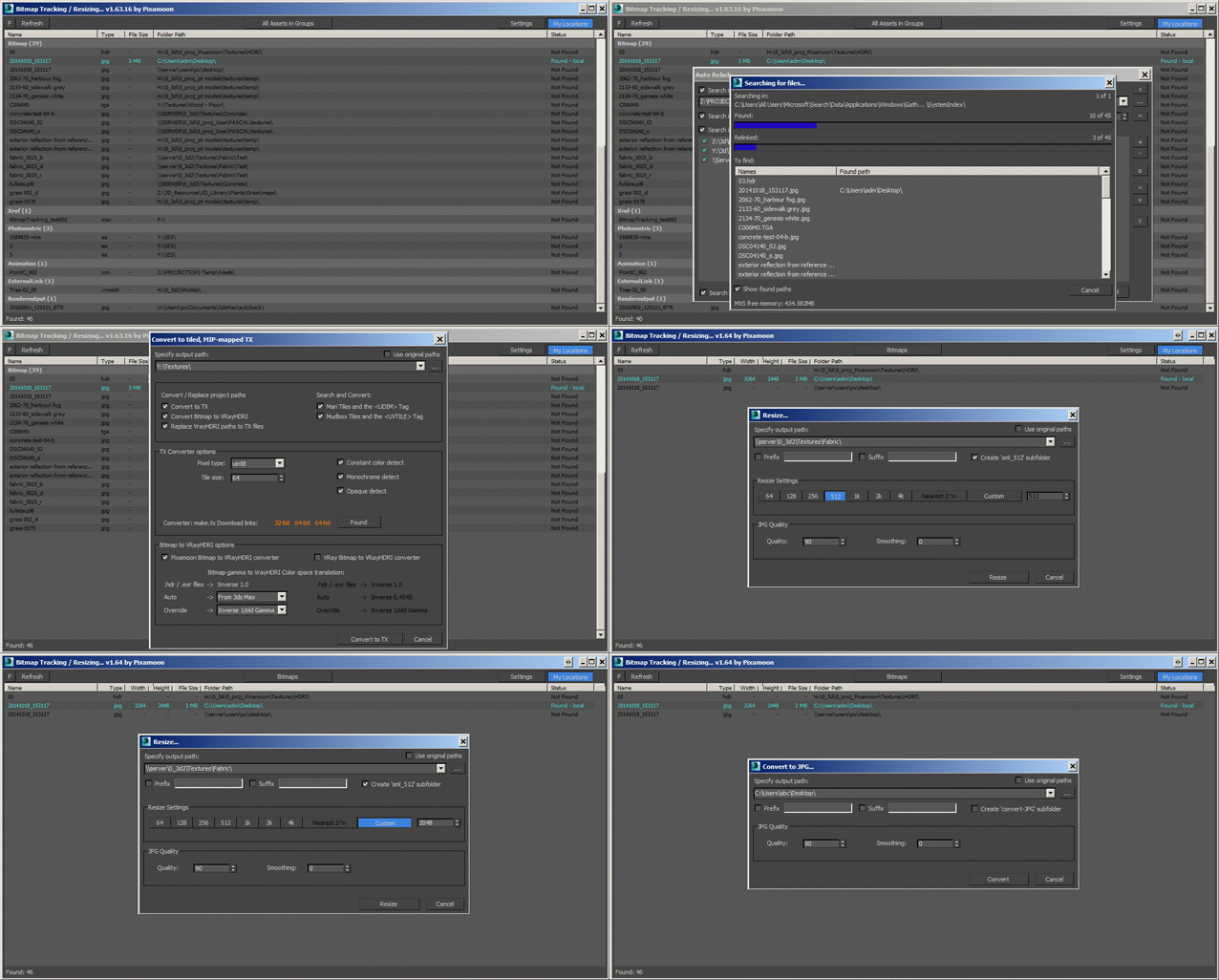
- Resize to JPG selected bitmaps to specified size or to Nearest Power of 2
- can be used to resize and repath selected bitmaps (by size) before sending to external renderfarm,
- resize bitmaps in large animation sceens to reduce memory ussage,
- Convert... see below
- Change / Rename paths (with paths history and rename path prefix eg. change only server/drive letter)
* Choose path from history or scene paths
* Pick new path
* Rename paths beginng ( drive letter or paths C:\sample\abc\ and rename them to Z:\3d\sample\abc\ )
* Find and Replace part of paths - supports Regular Extension
- Multi-threaded Auto-Relink with progress dialog
- And More...
- Select objects by selected bitmaps
- Select / show materials by selected bitmaps
- Select duplicated filenames (coming in next version)
- Copy local files to network with auto path replacing (for distributed / network render)
- Copy Selected / All to one path with path replacing or just copy files - collect selected to project forlder or quickly copy+change selected paths to not show your paths structure
- Shows local and network files -> Status -> OK - network, Found - local, Not found ( eg.: easy sort and select all local -> copy selected to network)
- "In Scene" column and filter - shows if bitmap is used in scene or only in material editor
- Bitamp Info mode shows image size, bits per channel, channels and estimated memory usage
- Supports .ifl - sequence image files - resize / convert / copy / path replace
- Supports Mari Tiles and the <UDIM> Tag
- Supports Mudbox Tiles and the <UVTILE> Tag
- Script works with Bitmap Texture, VrayBmpFilter and VrayHDRI, CoronaBitmap, FStormBitmap and all other assets
- Change ColorSpace / Gamma in selected - works only with jpeg, bmp, gif, tga, tiff in Max 2014 and up. (not in demo)
- Check / Change ColoerSpace in VRayHDRI / VrayBitmap
- Converts to Tiled EXR - it sends comments to img2vrayexr and translate BitmapTexture to VRayHDRI. (not in demo)
- Converts to Tiled TX - it sends comments to maketx and translate BitmapTexture to VRayHDRI. (not in demo)
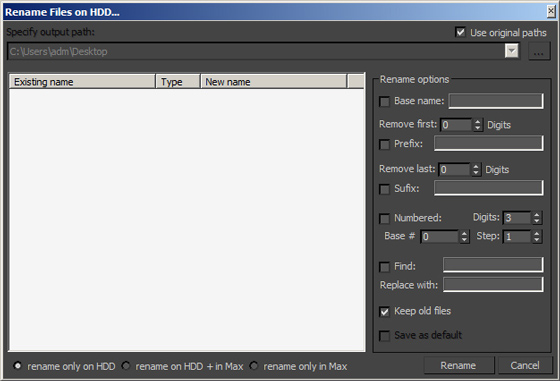
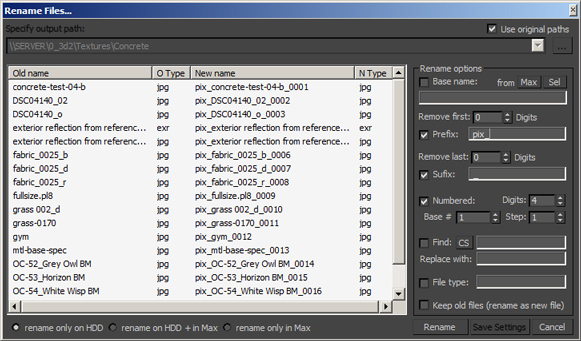
- Rename Files on HDD - 5 methods:
- Copy with new name on HDD only
- Copy with new name on HDD and rename in project paths
- Rename on HDD only
- Rename on HDD and in project paths
- Rename in project paths only
- Convert to JPG - with settigns dialog (Quailty, Smooth, Linear EXR/HDRI to sRGB JPG)
- Save Cropped as JPG - with settigns dialog (Quailty, Smooth, Linear EXR/HDRI to sRGB JPG)
- External Bitmaps options:
- possible options: Resize / Convert to Tx / Exr / Jpg (Tx files can be only converted in ths version)
- how to do:
1. click top middle button and choose External Bitmaps
2. drag and drop folder or image files supported by Max (including Tx files)
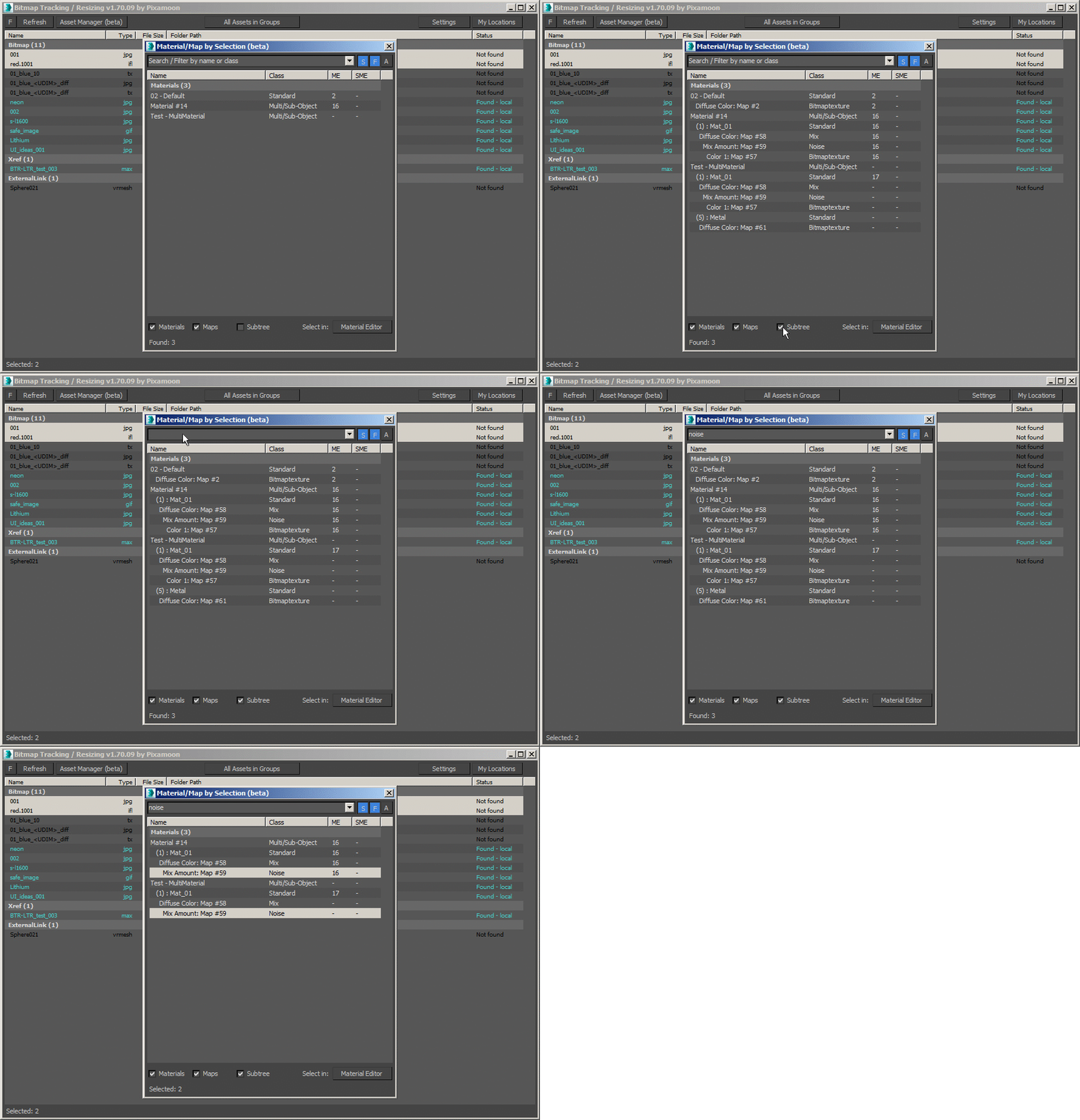
SubTree bowser to Show Materials by selected bitmap assets - and drag and drop to Material Editor: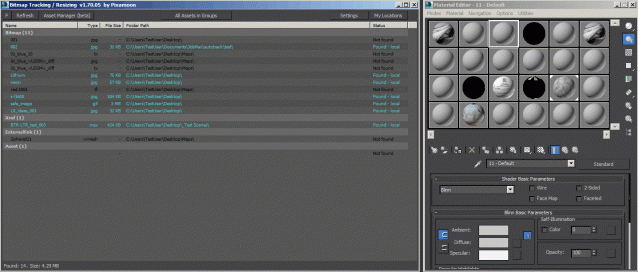
_______________________________________________________________________________________________
_______________________________________________________________________________________________
Changelogs:
To download the newest update please visit www.pixamoon.com/chanelogs
v2.06.00 (2026-05-19)
- new Search box to filter items by filename
- fixed drag-and-drop selected material into SME
- fixed Full Refresh on/off in right-click menu
- fixed list in External Bitmaps mode
- fixed error while switching from Whole scene to Selected objects
- fixed issues in Auto-Relink function
v2.05.00 (2026-04-28)
- added support for 3ds max 2027
- added "Make unique" button in overwrite options
- generates a unique file name
- hidden for multi-file sequences (.ifl, tyCache: .tyc, PointCache: .xml, tagged)
- fixed Resize (with same file format) for multi-files
- fixed error with 'substring' function in some cases
v2.04.00 (2026-04-21)
- added new column "In Scene" to show if asset is used in scene (Used / Not used)
(to show this column: right-click on columns header and pick "In Scene")
- added new filter "In Scene" to filter Used/Not used assets
- added estimated bitmap memory usage to the status bar (all/selected) in 'Bitmap Info" mode
- fixed drag-and-drop selected material into SME
- fixed drag-and-drop selected material into SME
- fixed error in Select duplicate names
- fixed error in Remove selected assets
- fixed error while right-clicking on missing assets
- fixed startup errors
v2.03.02-test (2026-04-16)
- fixed drag-and-drop selected material into SME
- fixed error in Select diplicated names
- fixed error in Remove selected assets
v2.03.01-test (2026-04-15)
- fixed error while right-clicking on missing assets
- fixed startup errors
v2.03.00 (2026-04-14)
- new method to Resize images while preserving original file formats and channels
- renamed the legacy 'Resize' feature to 'Resize to Jpg'
- fixed incorrect color output when resizing to JPG (3ds Max 2026)
- fixed issues with 'Convert to TX' and 'Convert to EXR' methods
- fixed an issue on launching Select by ('S' button)
- fixed an issue where the tool failed to collect assets
- renamed 'Bitmaps with Gamma' to 'Bitmap Color Space' mode
- fixed an issue where the tool failed to launch in 'Bitmaps with Gamma' mode
- fixed startup error
v2.02.01-test (2026-04-09)
- renamed 'Bitmaps with Gamma' to 'Bitmap Color Space' mode
- fixed an issue where the tool failed to launch in 'Bitmaps with Gamma' mode
- fixed startup error
v2.02.00 (2026-04-08)
- added new columns in modes: 'Bitmap Infos' and 'External Bitmaps'
- Channels - show number of channels in image (1: Monochrome, Grayscale, 3: RGB, 4: RGBA, RGBE)
- Memory - show memory usage to estimate RAM usage when texture is loaded memory
- renamed mode 'Bitmaps with Sizes' to 'Bitmap Infos'
- new method to speed up reading image info - especially for large EXR, JPG, TGA (reads in milliseconds)
- major performance increment to work smoothly with 10.000+ items
- all list are virtual lists now
- load into the list 10k+ takes less than 1s (before was 20s)
- immediate sort by column
- fast rename/set path previews
- increased speed in Set Path
- immediate creating dialog window - collecting paths starts after opening window now
- new listView with cached VirtualItems ready for large asset lists (10k+ loads in seconds)
- updating paths textbox 10x faster
- creating listview preview 20x faster (less than 1s | 13k items)
- updating preview 10x faster (less then 1s | 13k items)
- sorted preview by old directory name
- increased speed in Auto-Relink preview window
- immediate creating dialog window - collecting paths starts after opening window now
- updating paths textbox 10x faster
- creating paths preview window
- increased speed in Copy/Collect assets
- immediate creating dialog window - collecting paths starts after opening window nowe
- updating paths textbox 10x faster
- increased speed in Rename/Copy files
- new listView with cached VirtualItems ready for large asset lists (10k+ loads in seconds)
- immediate window start
- fast new name preview even for large asset collections (preview of 10k+ items milliseconds)
v2.01.00 (2025-05-22)
- added support for 3ds max 2026
- Auto-Relink:
- fixed refreshing issue after relinking
- added "Close after all relinked" in Autorelink progress window
- faster repath processes in Auto-Relink / Set path / Rename / Resize by:
- turn off Material Editor
- switch Common Panel to Create mode
- fixed "Remove selected assets" - to clean also Render Output path
- fixed error in collecting RenderElement and Displace.Bitmap assets
- fixed activation problem with Act# BStandard... exception
- fixed External files method
v2.00.00 (2024-12-12)
- added new option to Filter or Select assets based on selected Objects or Materials (Filter / Select by)
- 'F' checkbutton - means Filter assets by selected objects or materials
- 'S' checkbutton - means Select assets by selected objects or materials
- 'A' checkbutton - means Automatic - to automatically catch refresh selection changes in scene or material editor)
- to change method press button (Whole Scene, Objects, Materials) and select from menu
- fixed collecting assets info from OSL shaders
- fixed function to Select materials/objects by assets from OSL shaders
- changed style of the group headers in asset list view (added line and space under last group item)
v1.81.00 (2024-03-26)
- added support for tyCache .tyc files - to Copy/Collect all sequenced files
- added new columns:
- Multi files - shows count of multi-files (sequenced .ifl, PointCache, tyCache or tagged files)
- Multi size - shows total file size of multi-files
- fixed status bar info for selected items
- increased speed of listview multiselection
- fixed installation message in 3ds max 2024+ (selects Toolbar tab and Pixamoon category for easy button creation)
v1.80.00 (2024-02-13)
- fixed problem in Convert to TX - error message: files not supported
- fixed problem in Resize - error message: files not supported
- fixed support for sequenced ifl files
- fixed UI issue - disabling controls below when custom message box popup
- fixed Rename / Copy files dialog to be a child window of main BTR window
- fixed error on start in 'Bitmaps with Gamma' mode
v1.79.00 (2024-01-23)
- Copy / Collect assets:
- collects only filtered / displayed assets
- fixed creating subfolders from UNC paths
- Rename/Copy files:
- added possibility to store 'Rename/Copy mode' in current 3ds max session:
- to set it: Hold Ctrl while choosing option or pressing 'S' button
- added checkbox "Don't ask again" in query box: "Warning - Rename / Move files"
(it will stop asking in current 3ds max session only)
- added check on script start if main window position is saved outside of desktop
- possible if resolution/scaling changed or 2nd screen disconnected
- if outside - it will start in default (center) position
- UI fixes:
- set focus on last focused control when activating window again
- disable main BTR window when any popup window is open (to prevent changing selection on the list behind)
- hide child/popup windows when minimizing 3ds max
- updated deactivation process - added Automatic (online) deactivation
- fixed error on loading BTR - (error occurred in some scenes with OSL maps)
- fixes crashing issue when BTR starts (in 3ds max 2024 + Corona 11)
- fixed installation message window in newer max versions
- fixed error on loading ini settings: Unable to convert undefined to type: String
- fixed error in Resize images option
- fixed values in 'Bit depth' column
v1.78.00
- added support for 3ds max 2023
- fixed bug with editing path in Auto-Relink window
v1.77.00
- added support for VRayBitmap's Color space transfer function in VRay 5.2.0 (additional type 'Auto')
- shows gamma values for VRayHDRI and VRayBitmap (None:1.0, Inverse:Inverse gamma value, sRGB:2.2, From 3ds max:current Auto in Gamma)
- added network files search timeout - checkbutton "Net Timeout"
- to speed up checking network files status
- modified My Network locations option
- works only with network paths now (no need to add local drives to My locations)
- possible to add server names (eg \\DATA) or network location (eg \\DATA\Textures)
- with this option enabled all other network paths will be skipped during search and shown as "Not found"
- modified Setting window
- added network timeout option
- changed "My locations" to "My Network locations"
- changed to resizable window - to show longer network paths
- added support for RGB Primaries in VRay Bitmap
- new column RGB Primaries
- possible to change RGB Primaries
- removed 'Asset type' filter in Bitmaps modes (Bitmaps, Bitmaps with Sizes, Bitmaps with gamma, External bitmaps)
- fixed refreshing list after changing gamma / color space (to refresh other instances too)
- fixed problem with reading date/Time for 'Not found' files
- fixed problem with reading date/time for UDIM files
- fixed duplicated VRayBitmap assets in Bitmaps with Gamma mode
- fixed ProgressBars for 3ds max newer than 2019
- fixes in Auto Relink window:
- fixed issue with keeping additional search paths from previous search
- fixed wrong window size on start
- fixed right buttons location (when on/off right panel)
- fixed window resize issue in Win7 with standard theme - (resizing with button '>')
- fixed saving window size and position - to not save when minimized or maximized
v1.76.00
- new Overwrite window with map previews and info
- 'Open destination folder' message box has new checkbox "Do not show this again"
(to change Open destination folder settings - go to Settings > Notification tab)
- keep / restore Color space in VRayBitmap after Rename / Copy filename- new options in asset list:
- added column header right-click menu - to choose columns
- added saving columns widths and order
- added new columns Bit Depth (in Bitmap with Sizes), Date Modified, Date Created
(if you don't see them - right-click on header and pick them from menu)
- Auto-Relink window is sizable now (to display long paths)
- fixed bug reading some OSL maps
v1.75.00
- added new method to speed up reading image size and color depth - especially for large EXR, HDR, TIFF, TX etc
- fixed bug showing wrong image sizes in some jpgs
- fixed drag and drop material from "Material by" (it was not working in max 2021)
v1.74.00
- fixed Specify Path fields - events: copy paste text or drag and drop text / folder
- fix to Autorelink (to prevent crashes in large scenes)
- fixed license activation issues
- fixed issue with slow copy / resize / repath assets
v1.73.00
- added Filters by:
- Asset type
- File type
- Bit depth
- Status
- added support for:
- RedShift RS_Bitmap
- Octane RGB_Image
- Arnold Image
- OSL Texture
- VRayOSLTex
- GlareTextureMap
- DirectX_9_Shader
- added Select by duplicated file names
- added Convert to Tiff (Tx or other images)
- added Convert to 1-bit Tiff (black and white bitmap for opacity maps
- to speed up render with lots of vegetations)
- added Convert to TX in Redshift loaders
- faster search for Image Size
- UI changes:
- new custom controls (EditText, Spinner, ComboBox)
- added arrow to show sorted column and sort order
- changed columns style for darker theme
- settings: added row height option (in addition to font height)
- Rename / Copy Files changes:
- added exception to not Rename to empty filename or empty extension
- added check and highlights in red if new files names are the same
- Show gamma mode
- changed how gamma is shown and changing for VRayHDRI/VRayBitmap and CoronaBitmap
- new columns to show bitmap loader location: Slot, Name and Class of parent node
- added possibility to convert to TX / EXR
- Select Objects works with most know objects now: VRayProxy, CoronaProxy etc...
- fixed bug in multithreaded AutoRelink - it was still crashing during long searches
- fixed checkbox "SubDirs" in Autorelink
- fixed reading image size and color depth for 32bit TX bitmaps (half and float)
- fixed auto-search for img2tiledexr.exe - when 'Convert to EXR' starts
- added auto-search for maketx.exe in inside Arnold tools (max 2018 and up)
- fixed drag and drop in Select Material by (for max 2021 and up)
- fixed support for <UDIM> tags in max 2018
Full changelog list can be found at www.pixamoon.com/changelogs
____________________________________________________________________________________________
Known bugs:
Drag and drop material from "Select material by.." dialog does not work in max 2021
____________________________________________________________________________________________
How to use:
To change Image size - click on middle top mode button and choose "Bimaps with size"
To change gamma - click on middle top mode button and choose "Bitmaps with gamma"
____________________________________________________________________________________________
Requirements:
- change gamma works in max 2014 and up
- maketx.exe 32bit: https://code.google.com/p/osspack32/downloads/detail?name=maketx.exe
or 64bit for images bigger than 8k
- maketx 64bit: http://forums.chaosgroup.com/showthread.php?86656-maketx
- maketx 64bit: http://www.nico-rehberg.de/tools.html
- img2vrayexr is part of VRay - It is not part of this script
____________________________________________________________________________________________
Demo version available here:
www.turbosquid.com/FullPreview/Index.cfm/ID/873911?referral=pixamoon
Full version available on my web:
www.pixamoon.com/product-page/bitmap-tracking-resizing
Full version available also on gumroad:
www.gumroad.com/l/bitmap-tracking-resizing
All purchases will be send automatically in few minutes.
All updates till v2.00 will be send automaticaly to your email.
New option:
The newest download links can be requested at www.pixamoon.com/changelogs
Download links will be sent via email in a few seconds after request (only to users who bought license already)
Let me know what you think.
Pixamoon
 3dwannab · 2021-09-23
 D0br0 · 2020-06-08
 aranmor · 2018-07-27
 Strob · 2017-06-27