
Dimension
Scale tool coded as modifier plugin
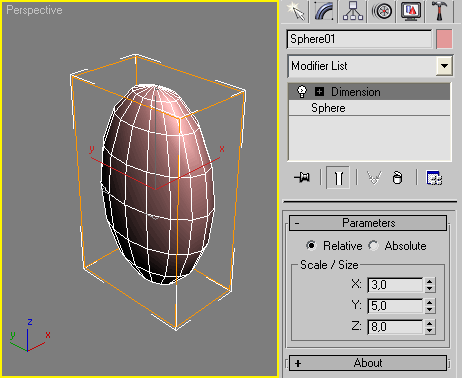
Installation:
Put this script into your Max stdplugs\stdscripts and restart the Max.
Disadvantage:
The Garbage Collection don't like this modifier.
Recommended to collapse the modifier stack and restart the Max.
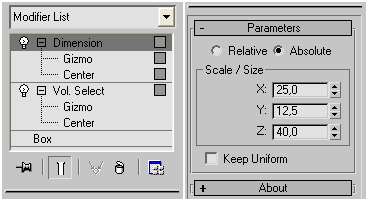
Update Log:
v.1.1 - added checkbox to keep proportion
v.1.2 - now switch between relative/absolute mode fixed
Usage Notes:
Such scripted modifiers are memory consumer and I prefer to omit any callbacks additions which might polish some behaviours but will make the whole solution more dirty.
Instead of future complications, just read next usage notes about 2 known cases:
1. The size of modified object is acquired once when the Dimension is added to it. And that mean any size's changes of the base object after that are not handled. Shortly, if you need to modify the base object, just temporality remove/cut the Dimension modifier and then you are done, turn/past it back on the stack.
2. When you apply the modifier as instance to many objects of varied size, and wish to work in Absolute mode, keep in mind that the XYZ values you see are the size of the first object (to which the modifier is applied to). I hope this not look too logical confusing.
| Attachment | Size |
|---|---|
| simpleMod_Dimension.ms | 1.05 KB |
| simplemod_dimension_11.ms | 1.35 KB |
| simplemod_dimension_12.ms | 2.25 KB |
Comments
useful script
useful script