

Grab the active viewport with embedded alpha channel

Listing updated
No reports yet for the available releases.
Compatibility comes from the author’s supported range or requirements in the original listing. A tested version records what the author tried.
“2020 unconfirmed” in the catalog means support for 3ds Max 2020 is still unknown.
Community reports record successful tests on specific releases.

Grab the active viewport with embedded alpha channel
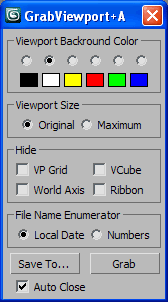
At the beginning I not intended to contribute this script because there is 2 scripts added here recently for such purpose: Grab Viewport (with alpha channel) by Kostadin Kotev (miauu) and GrabViewport 2 by Leslie Van den Broeck (ravenslayer), ...but Kostadin convinced me to share my version with the community :)
What I done is a bit of optimization of his alpha applying method and now it is about twice more faster. But the major reason to create my version was the need of custom background color option, since that method is based on color comparison and the color affect the final alpha separation result. Also a custom background color has other benefit more tactile when we has transparent objects.
After that, I added some options that I feel useful and
spend some time as well to make the script runing in old Max's.
There only 3 options accessible according to the Max version,
but they do not limit the functionality of the script.
Only hidding the World Axis goes via DialogMonitorOPS (Max2008+) but it slow down the process anyway and I include it just because am sure someone will ask it. You'll save a time if you turn off the World Axis once by hand and keep it hidden until done your shots.

Default save path (in case you not set any) is Max/previews folder.
All UI settings are stored in ini file for use in the next runs.
Images are saved in Targa (TGA) format (no file type option)
but for the aim of this script, it is fully enough.
Maximum Viewport Size means Maximize + Expert mode.
Auto Close is for the dialog.
File naming options:
For instance if you save at 2011 June 17 12:32:47
your image file name would be "2011-6-17-12-32-47.tga"
I presume you may like it (if not - use Numbers).
It's my favourite way to build unique (and sensible) ID's
and use it mostly when I send my jobs to Backburner.
Included VBScript (GetCurrentDate.vbs) just log Date-Time to file.
It is called only in Max versions below 9 and without AVG extensions.
In the old Max's we have only LocalTime global variable
that return unsorted date in varied formats, but...
this is a subject interesting to coders only.
Future Requests:
Maybe a few minor changes are possible but the main method not hide improvement points.
There is another method that looks more promising and I'll research it when I can.
Comments (5)
Comment policy
6, 7, 8 ... 2010, 2011, 2012 = OK
Hey Script_Butler,
Why you think it's not supported in 2010?
Erm.....
Good question. I thought i read on here that it wasn't supported in 2010 but it's not there anymore!
I think the other reason was i couldn't find it after running the .mzp. I found it under the tools menu tucked away!
2010
Hi Anubis,
Whats the reason it's not supported in 2010?
thanks
no problem, enjoy it :)
nice script :)
I see you optimized some stuff so i hope you don't mind me looking into your code. great work and thanks for sharing this!