
Rock Maker v2.5 & Rock My World v1.6!
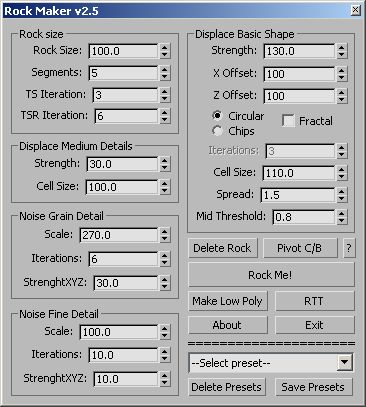
This is a script I wrote while learning Maxscript.
--------------------------------------------------------------------------------------------
Create a high poly Rock and adjust to suit your needs
Click Make Low Poly and you'll get a low poly rock based on the high
poly rock that is unwrapped ready for Render to Texture.
You can save your shapes to presets and adjust the pivot with one click.
The original and the best: :)
--------------------------------------------------------------------------------------------
It is based on a tutorial by Sascha Henrichs
http://area.autodesk.com/tutorials/3dsmax_environment_modeling_1_procedural_stone
------------------------- NEW! ------------------------------------------------------------
Just updated Rockme and renamed it to Rock My World v1.6
Spinners update the settings in real time, so you can make
adjustments while you watch in the viewport.
Rock My World is a script that does the same thing as the
RockMaker but it will work on just about any mesh you want and
is not limited to just making Rocks
--------------------------------------------------------------------------------------------
RockMaker v2.5 uploaded Spinners update the settings in real time.
Has the ability to save presets via ini file thanks to Miauu
-------------------------------------------------------------------------------------------
Luke
| Attachment | Size |
|---|---|
| rockmaker2_5.ms | 19.85 KB |
| rockmaker2.5.zip | 4.73 KB |
| rockmyworld.ms | 13.29 KB |
Comments
Thanks Chris I thought it was
Thanks Chris I thought it was me doing something stupid and I got frustrated (I've no patience)
Upped your user rights so you
Upped your user rights so you bypass the spam filters from now on.
Christopher Grant
Admin, ScriptSpot.com
Thank you, My answer has
Thank you,
My answer has triggered a scriptspot spam filter so my reply is on my blog
Luke
Very good script, it will be
Very good script, it will be very useful.
Let me give a tip, you could use WinRAR to create an installer for the script, so he puts all files in the correct place, facilitating things for users, it is quite simple to do this.
I made an installer for one of my scripts, you can look at it as an example.
http://www.scriptspot.com/files/Instalador_-_Frankenstoy_ImagePlaneRef_0...
Should I include a messagebox
Should I include a messagebox saying if you are making a new rock, but still have have something else selected in the scene that says "are you sure you wish to overwrite the object(s) selected"
Also the Delete rock button as it stands, will delete ANYTHING in the scene you have selected.
Should I add a filter to make sure it can only delete things named Rock_*
Luke
Yes in fact this was my
Yes in fact this was my biggest problem and I had connected float controllers but I couldn't set the defaults on the controllers. I asked on cgtalk how to set defaults but it looked like it can't be done. I dabbled in custom attributes while studying and never gave anything like that a second thought. I get fixated on a problem ie. how to set defaults, and loose site of everything else.
Any and all help appreciated.
ps I included the reference to "Little Briton" because it all seems too serious at times, and needed to have a good laugh. I didn't expect everyone to get it, or even notice it.
Luke
messagebox "You must have at
messagebox "You must have at least one Rock selected!" title:"Computer says no..."
:-D
Funny, I started on writing a script based on that tutorial yesterday for some friends, and now I see this script, and you have saved me some hours of work. Thanks!
If you are going to develop this further, I would suggest using custom attributes on each stone and wire them to the modifier-parameters using controllers for instant feedback on changes made to it. Just a thought though, the script is already great!
http://folk.ntnu.no/havardsc/site/wordpress/
Thank you it's great just to
Thank you it's great just to get some acknowledgement.
I'm not sure I should have uploaded the .ms file as well as the zip file, the script uses a .mat material included in the zip file.
It's not vital, things just look better when you use it.
Luke
Nice and useful scrpit
Nice and useful scrpit lucpet59!