Tagged 'search'

Project Manager

597 votes

After a long stretch of development, Project Manager 4 is officially out — the biggest release in the product's history, and now with full 3ds Max 2027 support.
The headline is AI Asset Classification.
Your library gets sorted automatically — by object type, material, and style — no manual tagging.

Project Manager 4 — What's New Since v3

Changelog · 3ds Max 2016–2027

AI-Powered Asset Classification

  • Automatic categorisation of 3D models and textures by object type, material, form, and style — no manual tagging required
  • Runs entirely on your machine — no cloud, no subscription, your assets never leave your computer
  • GPU-accelerated background processing at low priority — won't interfere with rendering or active work
  • Reclassify specific folders or categories on demand — no need to reprocess the entire library
  • Scale across a team: multiple workstations share the same database and classify in parallel

Colour Tools

  • Find assets by colour — pick from a palette and instantly see matching models or textures
  • Perceptual colour similarity search — finds visually related assets, not just exact hex matches
  • Find Similar by Colour in the right-click menu for models and textures

Find Similar

  • Find similar by content — AI matches 3D models by style, shape, and visual look
  • Find similar by colour palette — matches assets to a reference image or mood board by dominant colour proportions

Smarter Search & Filtering

  • Multi-keyword search: "Chair, Glass" finds a file named Chair.max described as "glass"
  • Category filter correctly includes all subcategories — filtering Furniture also returns Furniture → Chairs → Dining
  • Combine category and material filters: find glass-and-metal tables, or wooden ones, in one click
  • Categorised / Uncategorised quick filters — see which assets still need attention

Gallery & 3D File Browsing

  • Three gallery tabs for .max files: Models, Materials, and External Links
  • Drag materials directly from the gallery into your open 3ds Max scene
  • 3D viewport preview for FBX, 3DS, OBJ, and other formats — inspect geometry before importing
  • Edit external links inline — fix or replace missing textures without opening the .max file
  • Zoom & Pan for images — inspect textures at full resolution inside Project Manager

Migration & Compatibility

  • v3 and v4 share the same database format — point v4 at your existing library and go; no rebuild required
  • Run v3 and v4 side by side on the same team; supported from 3ds Max 2016 through 2027

Performance & Other Fixes

  • Significantly improved overall performance — faster navigation, filtering, search, and file/folder operations
  • Live sync in shared database mode — changes by colleagues appear automatically without reloading
More about new features   Project Manager version 4
 

PBR Material Generator

3 votes

The PBR Materials Generator is a powerful add-on for Project Manager and Materials Manager designed to expedite the creation of high-quality PBR materials.
It empowers users to batch generate materials using custom settings and presets, all within the familiar Project/Materials Manager interface.

Find Script By String

17 votes

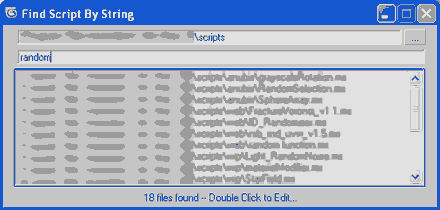
Recursive search in selected directory for string inside .ms scripts and finally double click on item in list of matches result to load the script for editing.

Search Materials And Maps

12 votes


The script is also dockable and it has now a right click menu:
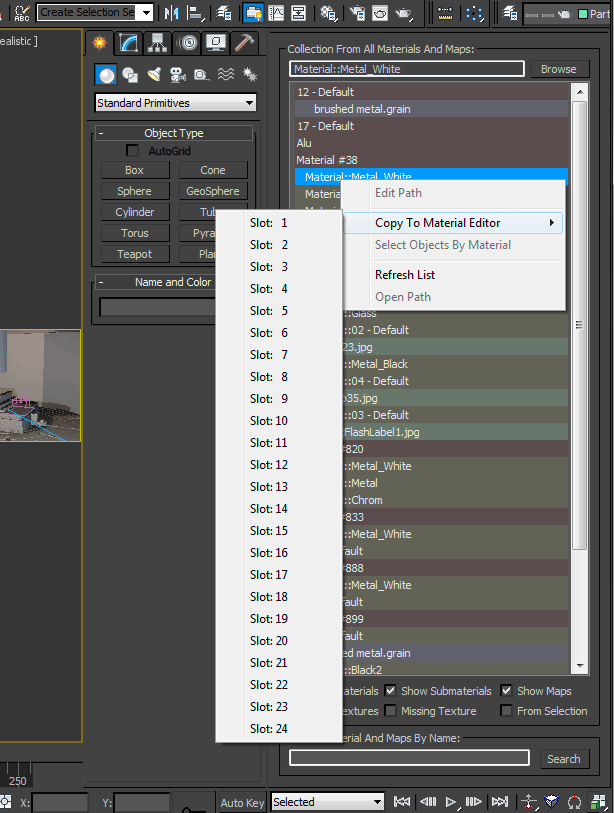
 

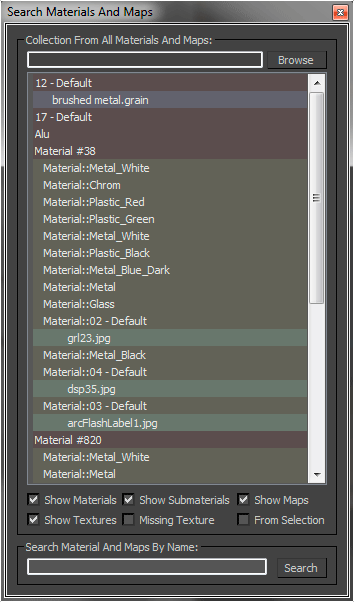
This MaxScript collecting all materials, maps and texture, it also allow to search materials, maps or textures by name. You can modify the texture path, also for multiple selections, and you can copy the selection to the material editor.

ObjectFinder

6 votes

Finds objects by name string in a directory of max files

ScriptSpot Search

14 votes

 Like 3ds Max InfoCenter but then you need to search for help in scriptspot.com

AK-bitmap search by name

13 votes

how many times you wish for a search like windows for your bitmaps inside max? so that's it! now you gut one, it goes throw all your materials and founds maps with specified characters; you can type bitmaps exact name or use * sign like windows.

Find Large Bitmaps

14 votes

FindLargeBitmaps is a quick script to search for bitmaps in your scene that are bigger than a specified dimension or file size.

Use it to optimize your scene's bitmap assets quickly.

Syndicate content