
Modifier Instancer
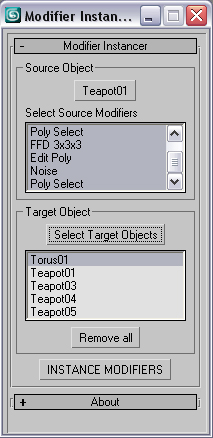
This simple scripts allows you to instance some or all modifiers of an object into large number of objects.
- just pick the source object
- select the modifiers that are going to be instanced. Press CTRL for multiple selection.
- select target objects
- Hit to the INSTANCE MODIFIERS
version history:
version 0.5
-Selected objects automatically will be added to the target list.
-------------------------
version 0.4
-when selecting target objects, the source object dont show up in the selection window anymore.
-When trying to instance invalid modifiers (ie, edit poly modifier on
point helpers) , it simply skips that modifier for that object instead
of throwing an error.
--------------------
--------------------
version 0.3
-first release
--------------------
Its a Macroscript. Drag and Drop or run the script.
Then assign into a menu, hotkey or quad menu through customize =>
customize user interface => Under the Category: Tik Works
Comments
This one works better and its less to look at
http://www.scriptspot.com/3ds-max/scripts/instancer-0
Thanks man!! Jsrocha
Thanks man!!
Jsrocha
Thanks for the suggestion.
Thanks for the suggestion. Its a good idea.
Done that and updated file. Enjoy.
www.ardakutlu.com
I second this !!! :-)
I second this !!! :-)
I have a suggestion: if
I have a suggestion: if possible, let the selected objects be in the "select target objetcs" box already. Doing this, you don´t need to select the objects by name. I think it would be a great improvment to the script...
best regards,
Jsrocha
very, very usefull! great
very, very usefull!
great Job!!
Jsrocha