•••••••••••••••••••••••••••••••••••••••••••••••••••••••••••••••••••••••••••••••••••••••••••••••••••••••••••••••••••• VERSION 1.2
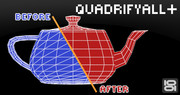
With this script you can easely clean old .3ds models, imported Onyx trees and other types of geometry(mesh) with triangular faces.
Script
QuadrifyAll+
 By barigazy · Credited author: Branko Živković · 2012-10-20
- Version
- 1.2
- Version requirement
- 2010+
- Date updated
- 2012-10-20
- Votes
- 24
Downloads
- bga_quadrifyall_v1.2.ms — bga_quadrifyall_v1.2.ms3.4 KB
Tags: poly mesh quads clean
Description
Additional Info
Supports Editable Poly and Editable Mesh objects.
Face reduction method preserve UVs, face IDs, object material and
object IDs.

I was inspired by this video tutorial:
http://www.viz-people.com/tutorials/108-week-tips-episode-3-triangulatio….
Script is tested in max2012x64 and max2013x64 and I guess it works in previous versions.
••••• Update: [version 1.1]
Some bugs are fixed, and optimized code.
NOTE:Script only works when two triangles of the mesh represent a quad.
I mean that not works if objects are created with "Garmen Maker" shapes modifier (like Cloth for example)
••••• Update: [version 1.2]
Fixed object position.Now object stay in place after cleaning
See the result below

Rendered model

Comments (31)
3dm 2016
GRAPPA · 2017-05-22
Excellent!wonderfall!!Thanx
 Nik · 2016-07-08
Very cool!!
Thanx!
Better than max's tool
max2015
 Vadim Sadykov · 2014-04-30
Script will be updated? TY
barigazy · 2014-04-30
Yup. Soon when I jump in max2015.
You can still use earlier version of max for geometry optimization
Bump :)
 3dwannab · 2015-10-03
Hi, Just wondering the script could ever handle multiple objects added to it in an array? Also see attached.
Could it be updated to fix this issue?
Thanks.

PS Works fine in 2015 for me.
barigazy · 2016-02-10
Hi 3dwannab,
method which is used for this tool can's handle that types of edges.
Are you try to use quadrify mesh modifier?
Test showed
Vadim Sadykov · 2014-04-29
The script does not do anything, everything remains unchanged.
If you shoot all the checkboxes, the script simply crash.
Quadrify All script
 nnq2603 · 2025-05-13
This one still works even in Max 2022, so something was wrong in your system back in the day or you didn't use it correctly(?). This script loads up the UI, then you have to pick the object you want to quadrify, and press Quadrify button.
3ds Max 2015
Vadim Sadykov · 2014-04-29
does not work with the version with max 2015
barigazy · 2014-04-29
I not have max2015 to test it.
serpt · 2014-03-27
barigazy · 2014-03-27
Are you saw version requirement? I did'nt test this tool on max9.
muzammali · 2013-02-27
This is simple, crisp and clear. I think that Everything has been described in systematic manner so that reader could get maximum information and learn many things.
This is simple, crisp and clear. I think that Everything has been described in systematic manner so that reader could get maximum information and learn many things. apple repair
muzammali · 2013-02-27
There are many a casino out there that offer the game, but not all can be trusted and not all offer a great welcome bonus!
http://ohmelec.cowblog.fr
maybe i not get it...
 Anubis · 2012-11-26
but is
meshop.autoEdgenot enough for this process?
barigazy · 2012-11-26
Yes, you are right.
I just create script based on video tutorial, but with more options.
Nothing more, nothing less :)
fajar · 2012-10-23
work on max 9 ...no too intense...but theres a problem
version requirement
barigazy · 2013-01-14
I am already pointed out version requirement.
I did not expect to be able to work on v.9
Works on max design2013 x64 + Win7 x64
 miauu · 2012-10-22
I just tested on Max Design 2013 x64, Win7 x64 and the script works with no problems.
barigazy · 2012-10-22
Thanks Kostadin for testing and support.
Best regards!
titane357 · 2012-10-22
don't work win7 3dsmaxdesign2013...
barigazy · 2012-10-22
titane357 i don't know what is the problem.I use this on max2013x64
win7x64 and works perfectly. Not have Design version for testing.
 br0t · 2012-10-22
nice, thats useful for turbosquid stuff
barigazy · 2012-10-22
Thanks br0t.
Nice Script
 wtv3d · 2012-10-21
Thank you,
i give a try soon with some old models.
Error
chakib · 2012-10-21
it gives me erro when i hit quadrify, look at the screeshot i'm using max 2012 x64 win 7
Attachments
- error.jpg — error.jpg462 KB

barigazy · 2012-10-21
Yep, i saw that.
Send you a mail.
version 1.1
barigazy · 2012-10-21
Fixed problem, and optimized code for fester result.
If you using highPoly models which consist several elements, you can speed up the process by detach theses elements and quadrify them separately.
WOW
chakib · 2012-10-21
Thank you so much will test it !
Works much better than Max's QuadrifyAll
Andriano · 2012-10-21
Super! Works much better than Max's QuadrifyAll
Thanks man.First comment and
barigazy · 2012-10-21
Thanks man.
First comment and script test always get from you.
And yes,that's why i put "+" in the end. :)
Cheers!