
SuperExtruder
Version:
1.96.20
Date Updated:
03/24/2020 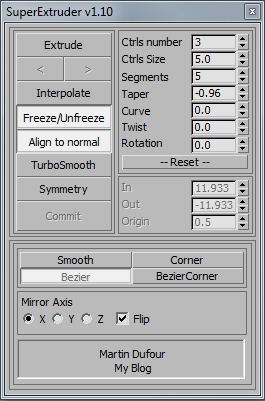
This tool will extrude the selected face on a editpoly object with a spline that you can easily controls.
Version Requirement:
2019 | Attachment | Size |
|---|---|
| superextruder_195_50_max2011x64.rar | 110.81 KB |
| superextruder_195_50_patch2015x64.rar | 3.5 KB |
| superextruder_195_50_patch2016x64.rar | 3.5 KB |
| superextruder_195_118_max2011x64.rar | 112.21 KB |
| superextruder_max2019x64.rar | 115.51 KB |
Comments
Here the fixed GUI for
Here the fixed GUI for max2019, I've done this quite a long time ago since I needed it for some modelling I was doing but keep in mind that it doesńt include all of the feature of the old version and may contains new bug since I didnt fully test it :-)
-- you only need the new package if using max2019 !
-- nothing new in this version only a fix for the GUI !
It's a shame
Too bad this tool no longer has support for current 3dsmax releases. This was one of the most useful tools for 3dsmax modeling, and still has amazing potential. I wonder if something like this is possible with MCG?
https://www.artstation.com/luxxeon
https://www.cgtrader.com/designers/luxxeon
https://www.youtube.com/user/luxxeon3d
Status?
Still not working in 2017/2018?
2017 and 2018 recompile would
2017 and 2018 recompile would be awesome!
Not working in 3ds max 2015 x64 SP4
download and install "superextruder_195_50_patch2015x64.rar".
get many Start-Errors an dll isn't loading.
~~~~~~~~~~~~~~~~~~~~~~~~~~~~~~~~~~~~~~~~~~~~~~~~~~~~~~~~~~~~~~
---------------------------
Plug-in Assembly Load Error
---------------------------
The assembly "SuperExtruder_2015patch_x64.dll" encountered an error while loading.
It is possible that this error put the application in a bad state. The application will continue to run, but we recommend quitting the application, removing the plug-in, and restarting.
File: E:\Tools und Apps\Autodesk 3ds Max 2015\3ds Max 2015\bin\assemblies\SuperExtruder_2015patch_x64.dll
Full Error: System.IO.FileLoadException: Could not load file or assembly 'file:///E:\Tools und Apps\Autodesk 3ds Max 2015\3ds Max 2015\bin\assemblies\SuperExtruder_2015patch_x64.dll' or one of its dependencies. Operation is not supported. (Exception from HRESULT: 0x80131515)
File name: 'file:///E:\Tools und Apps\Autodesk 3ds Max 2015\3ds Max 2015\bin\assemblies\SuperExtruder_2015patch_x64.dll' ---> System.NotSupportedException: An attempt was made to load an assembly from a network location which would have caused the assembly to be sandboxed in previous versions of the .NET Framework. This release of the .NET Framework does not enable CAS policy by default, so this load may be dangerous. If this load is not intended to sandbox the assembly, please enable the loadFromRemoteSources switch. See http://go.microsoft.com/fwlink/?LinkId=155569 for more information.
at System.Reflection.RuntimeAssembly._nLoad(AssemblyName fileName, String codeBase, Evidence assemblySecurity, RuntimeAssembly locationHint, StackCrawlMark& stackMark, IntPtr pPrivHostBinder, Boolean throwOnFileNotFound, Boolean forIntrospection, Boolean suppressSecurityChecks)
at System.Reflection.RuntimeAssembly.InternalLoadAssemblyName(AssemblyName assemblyRef, Evidence assemblySecurity, RuntimeAssembly reqAssembly, StackCrawlMark& stackMark, IntPtr pPrivHostBinder, Boolean throwOnFileNotFound, Boolean forIntrospection, Boolean suppressSecurityChecks)
at System.Reflection.RuntimeAssembly.InternalLoadFrom(String assemblyFile, Evidence securityEvidence, Byte[] hashValue, AssemblyHashAlgorithm hashAlgorithm, Boolean forIntrospection, Boolean suppressSecurityChecks, StackCrawlMark& stackMark)
at System.Reflection.Assembly.LoadFrom(String assemblyFile)
at AssemblyLoader.Loader.LoadAssembly(String file)
---------------------------
OK
---------------------------
~~~~~~~~~~~~~~~~~~~~~~~~~~~~~~~~~~~~~~~~~~~~~~~~~~~~~~~~~~~~~~~~~~~~~~~
Max.Net Unhandeld Exeption:
System.NotSupportedException: An attempt was made to load an assembly from a network location which would have caused the assembly to be sandboxed in previous versions of the .NET Framework. This release of the .NET Framework does not enable CAS policy by default, so this load may be dangerous. If this load is not intended to sandbox the assembly, please enable the loadFromRemoteSources switch. See http://go.microsoft.com/fwlink/?LinkId=155569 for more information.
at System.Reflection.RuntimeAssembly.nLoadFile(String path, Evidence evidence)
at System.Reflection.Assembly.LoadFile(String path)
at Autodesk.Max.Manager.LoadAssembly(String name, Boolean startingUp)
at Autodesk.Max.Manager.LoadAssemblies()
edit : remember , you only
edit : remember , you only need one of the main script file and one of the patch if you have the invisible spinner bug !
Hi everyone, I've made some
Hi everyone, I've made some more fixes ... I haven't got the time to fully test everything so I will leave the old version as well cause there may be some broken stuff in this one :-)
enjoy !
Thank you!
Thanks for updating this for 2016. One of the most handy tools available for Max, and I'm glad I can have it with the latest release.
https://www.artstation.com/luxxeon
https://www.cgtrader.com/designers/luxxeon
https://www.youtube.com/user/luxxeon3d
well, the script itself
well, the script itself should work in 2014 x64 but as for the path I don't think it will, I don't have 2014 at hand so I can't recompile the patch , sorry :-)
Does the version:1.95 work in max2014?
Does the version:1.95 work in max2014?i've tried to put the SuperExtruder.dll for max2011&2015&2016 in max2014,but it Load Error