
Viewport Bookmarks
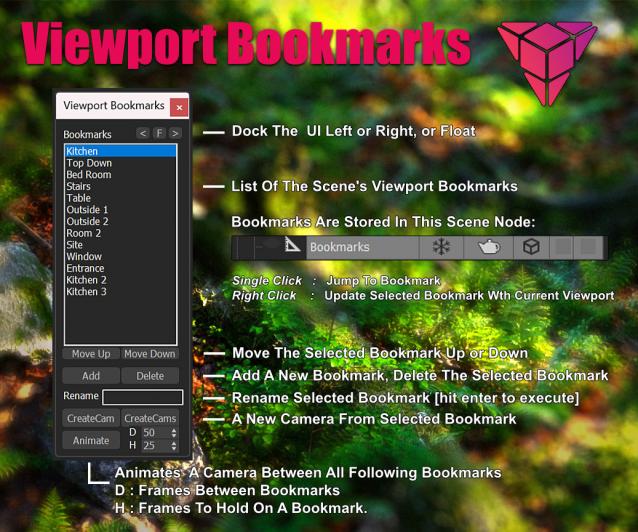
This is a tool for bookmarking viewport positions. It's especially useful in large scenes.
Features
- Add and remove viewport position bookmarks, and name them.
- Switch between bookmarks by clicking on the bookmark name.
- The window is dockable
- Cameras can be created from the bookmark, based on the active renderer (Arnold, Vray, Corona, etc.)
- The data is stored persistent in a scene node, which can easily be transferred between scenes:

-- V 0.1 Release
-- V 0.2 The list box is now 28 rows, two little bugs are fixed
-- V 0.3 UI is scalable now, more data is stored: viewport type, fov (courtesy of Simon Bourgeois)
-- V 0.4 right click on a bookmark name updates the bookmark with the current viewport, no need for deleting, and creating a new bookmark everytime you need to change it.
-- V 0.5 the bookmark list can now be reordered with the up and down buttons
-- V 0.6 Export Bookmarks to camera (by Simon Bourgeois)
-- V 0.7 Added a button to just create a camera for the current bookmark
-- V 0.8 Added a Function to create an animation from all perspective bookmarks, starting at the selected bookmark, and undo for camera creation
Update: you might have to delete the old bookmark node for it to work
Install: Drag and Drop the .mcr to the Viewport, or drop .ms-file to scripts folder,
Tested in Max 2024, 2025
.mzp-file might not work in 2025, use the ms file instead
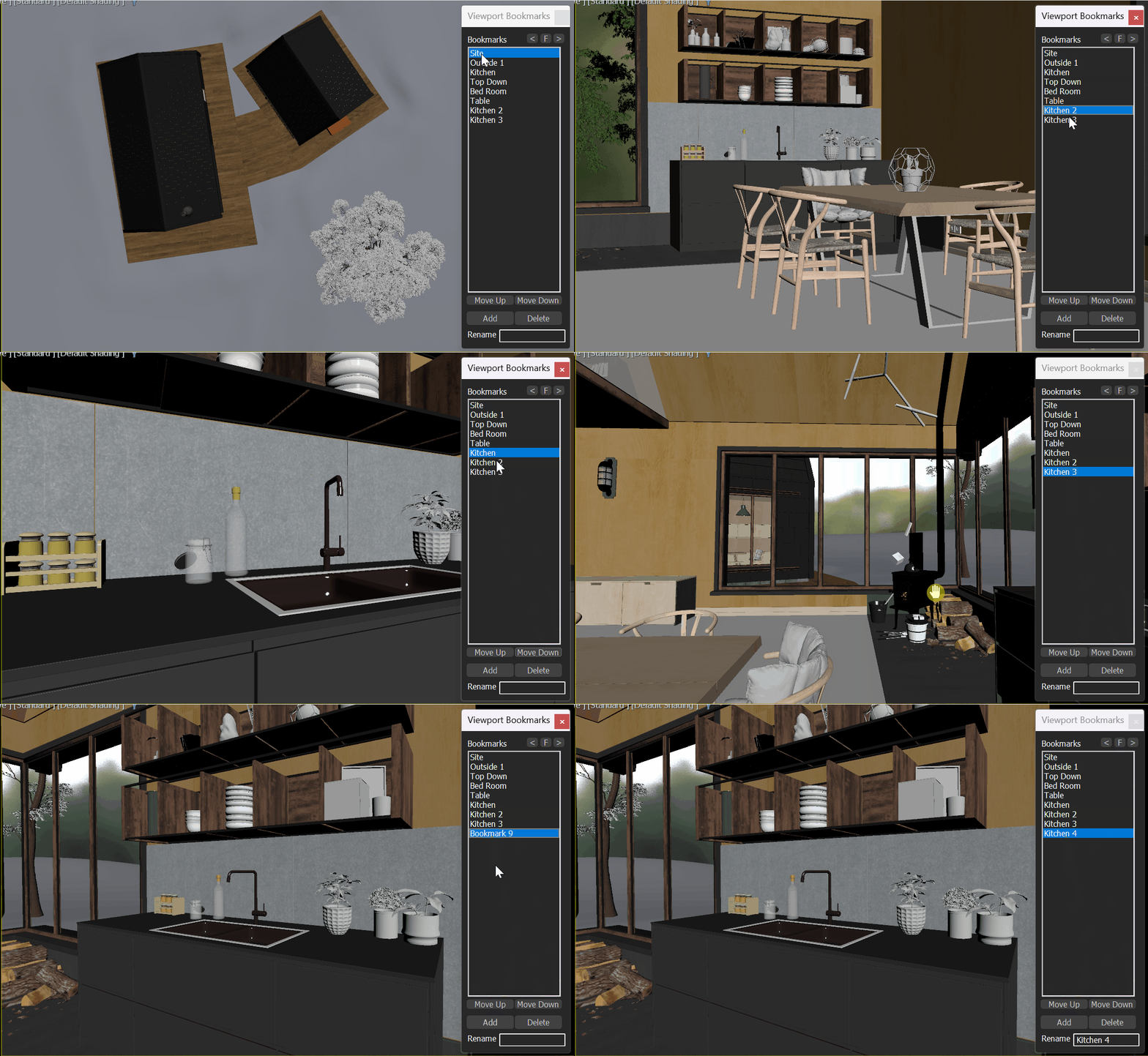
Create an animation from all perspective bookmarks:
| Attachment | Size |
|---|---|
| trooper_viewport_bookmarks_0.8.mcr | 13.85 KB |
Comments
suggestion
Hi, great script, thanks! :-)
just a suggestion, to put the point helper that is created when a view is saved in a hidden layer, or with the "ignore extents" option checked.
Best regards,
Juliano
Hi,
Instead of removing Vray and Corona camera support, you should just change this part:
"name:(uniquename (bookmarkRollout.items[i]+"_Cam")" for both Renderer by the one used for physical camera :"name:(uniquename (bookmarkRollout.lbxBookmarks.items[i]+"_Cam")",
This function used to be placed inside the rollout, it was able to find the items but now that it has been placed above the rollout, it doesn't. The author updated the physical camera part but other renderer cameras weren't updated :)
Replace "local newcam = VRayPhysicalCamera"
Found the culprit for the rollout handler exception:
Find: "local newcam = VRayPhysicalCamera" and "local newcam = CoronaCam"
and replace each of them with: local newcam = Physical
a rollout handler exception
When trying to "createcam" or "createcams" a rollout handler exception pops up:
https://drive.google.com/file/d/1NhhBnvcwcT0PH2vDfSITS8OpLIduauxK/view?u...
3ds Max 2024 here on Windows 11.
a rollout handler exception
When trying to "createcam" or "createcams" a rollout handler exception pops up:
https://drive.google.com/file/d/1NhhBnvcwcT0PH2vDfSITS8OpLIduauxK/view?u...
3ds Max 2024 here on Windows 11.
a rollout handler exception
When trying to "createcam" or "createcams" a rollout handler exception pops up:
https://drive.google.com/file/d/1NhhBnvcwcT0PH2vDfSITS8OpLIduauxK/view?u...
3ds Max 2024 here on Windows 11.
Awesome!
Awesome!
It is dockable hit the < or >
It is dockable hit the < or > button :)
- The window is dockable
Hi! Nice Script! Thank you.
Something that I noticed is that it doesn't seem to be dockable. Is it? Max2025.3
update bookmark
Just right click on the bookmark to update the bookmark!