Object Library v1.10

Tagged with terms:
10
points
Date Updated: 
10/28/2008
Author Name: 
Martin Dufour
Version: 
1.10
1.08 Fixed startup error. I think this time, it should work :-P
1.08 Added compatibility with 3dsmax 2008.
1.08 Added limited compatibility with 3dsmax 9. This mean, that it may, or may not work :-)
1.08 Added back the preview label.
1.08 label show triangles count instead of face count. no more edit_poly modifier added to the object...
1.08 Custom text show the current maxversion until I figure out where I'll put the other textbox :-P.
1.08 Fixed a bug when overwriting a file and changing the extension ... the old file was not deleted.
1.08 Renderable property is back to normal. Sorry about that, it have been disabled on code export and just forgot to enable the damn thing :-(
1.08 Fixed an error when moving the form. I don't really know what was causing this, so I could not test it, but I think it's gone now !
1.08 Added a ini setting to controls the label border size. 
1.09 Fixed rename with max9 and max2008.

1.10 Fixed some memory issue & some code cleanup. 


Version Requirement: 
Max9/2008/2009
AttachmentSize
Object_Library_Creator_080.jpg233.8 KB
Object_Library_Creator_085a.rar228.78 KB
Object_Library_1_10.rar410.69 KB

SpookyCat's picture

Any chance of an English

Any chance of an English Translation. Looks very useful.

MarTroYx's picture

sure I will post a new

sure I will post a new version soon :-P

MarTroYx's picture

Please, somebody tell me why

Please, somebody tell me why I can't skip a line in my description ???

Admin's picture

Sounds like you're having

Sounds like you're having trouble with formatting text.

There is two ways of inputting data into ScriptSpot - via the standard textbox or via the rich-text editor (the enable rich-text link below all text boxes). However, there is the additional setting of "Input format" which is usually right below the "enable rich-text" link.

The input format defaults to "filtered html" which means it will try to maintain line breaks as you typed them in the simple text box. If you want to control your input via html / use the rich-text editor its best to set the Input-format to "Rich text with images" as it will them maintain the formatting you used in the editor. In addition, if you use the rich-text editor, you can insert/upload images and change how the teaser snippet is generated by clicking the last button to insert the html "break" statement.

MarTroYx's picture

Thank mate ! I just did'nt

Thank mate ! I just did'nt seen the "enable rich-text" link :-P

themaxxer's picture

It sounds interesting, but

It sounds interesting, but for me it only make sense if you could define pathes to drives or folders by myself. Is this possible to add I mean user pathes? like a history list where you can save pathes?

best regards
themaxxer 

MarTroYx's picture

That's a good idea, I look

That's a good idea, I look into it :-P

Excubitor02's picture

It is a good plugin, It

It is a good plugin, It would be cool if you could add these features:

1. The possiblity to make folders in the object list.

2. The possiblity to load and save object lists (like libraries).

3. The possiblity to be able to click in the scene where the objects should be inserted.

MarTroYx's picture

Well , #2 is Definitely on

Well , #2 is Definitely on my to do list and 3 seam a good idea but I don't get it with the folder thing....what do u mean ?

cecofuli's picture

Quote this:   1. The

Quote this:


1. The possiblity to make folders in the object list.

Excubitor02's picture

I mean so you can get a tree

I mean so you can get a tree like structure:

Cars (folder)
- Object 1
- Object 2

With folders that you can open and close.

MarTroYx's picture

I thing a get it now

I thing a get it now ...maybe this will be available in the next version :-P

kuang123456's picture

please add batch save

please add batch save function(support group)

MarTroYx's picture

Well, why don't you do it

Well, why don't you do it yourself you seam able to do so ?

MarTroYx's picture

--please add batch save

--please add batch save function(support group)


I'll add this but I'm not going to offset the main button.

Are you using blue UI .....better shot myself in the head (just kidding :-).


Take care.

Martin 

kuang123456's picture

thank you very much !!! i

thank you very much !!!
i like the script,it save my time

yes my max UI is blue

PS:sorry my english is very poor.....

vsai's picture

Nice script.. Looking

Nice script.. Looking forward to seeing how batching works out :)


2 small bugs, It appears that there isn't any text created when using max2008, and it seems to fail when trying to import in a file with a Biped in it, because of the lack of .pos

MarTroYx's picture

--kuang123456: I have to

--kuang123456:

I have to think about this one, I can do it, but No. That is not a good idea, because when I save my object, I like to position my camera to show the object at is best.

also another thing I like to point, is the fact that you put your name on my script without asking me. This script is free and will ever be, but at least if you want to put your name on
it, just ask!

--vsai:

Thank, I'll look into it!

Bye!

Martin

kuang123456's picture

i am very sorry . that's my

i am very sorry . that's my false.. sorry

MarTroYx's picture

That's fine! everything fine

That's fine! everything fine now :-P
maybe I'll add an optional batch save for you when I get sometime.

Take care!

Martin

MarTroYx's picture

  2 small bugs, It appears


2 small bugs, It appears that there isn't any text created when using
max2008....


Hi vsai,


 I was'nt able to reproduce this bug, can you say a little more under witch circumstance this happend ?

Martin 


raistlin's picture

very interesting script for

very interesting script for a lot of artists ! A lot of great updates !

vraiment très bon taff ! L'idée est géniale et pratique, tu fais des mises a jour rapidement et c'est très appréciable !

Continues !

MarTroYx's picture

Thank ! I'm working on

Thank ! I'm working on something else right now but I'll return to this one as soon as possible :-P

Bye

Martin

ZoMbiE's picture

I have been looking for

I have been looking for something like this for a long time. Very useful script. Thank you.

MarTroYx's picture

Glad you like it :-P Let me

Glad you like it :-P

Let me know if you find bug also if someone could confirm if this is working under max 64bit because mine is broken right now.

Thank!

Martin

ZoMbiE's picture

I was wondering.... Can the

I was wondering....
Can the thumbnail viewer be modified to accpet different formats(.jpg) and sizes? Maybe a larger size render could be rendered out and in the viewer it could be a sort of shrink to fit type thing instead of cropping it?

MarTroYx's picture

Hi ZoMbiE, I'm doing some

Hi ZoMbiE,
I'm doing some tool I need then I'll add this.
Thank!

Is this version stable enought...anyone??

Martin Dufour

ZoMbiE's picture

Hey MarTroYx, The only

Hey MarTroYx,

The only problem I am running into is when I am using a different renderer (VRay) it doesn't seem to remember my settings. For example: when I am saving an object using VRay materials it will render the preview using scanline so the object renders black. But if I turn on Force Scanline then turn it off again then the preview will work with the VRay render. Other then that it seems pretty stable to me. Thanks again for making this scipt. It has saved me a lot of time.

MarTroYx's picture

Hi ZoMbiE, I don't use VRay,

Hi ZoMbiE,

I don't use VRay, so I can't test this but I'll try to figure this out.also I will add what you requested in your previous post soon :-P

Take care!

Martin

ZoMbiE's picture

Thank you for making that

Thank you for making that update. I can't wait to test it out. I am having some trouble installing this version though. I followed the install txt but I keep getting a runtime error when I try to use the script. Thanks for your help.

ZoMbiE

MarTroYx's picture

delete the Setting.ini file

delete the Setting.ini file in your script\ObjectLibrary directory, this should work ... let me know if it work !

thank!

Martin

ZoMbiE's picture

I deleted the Settins.ini

I deleted the Settins.ini file in the script ObjectLibrary directory but I am still getting the same error. Not sure if this helps any but when the script opens the settings buttons and the preview window are all blank. If I click on the the path (in the spot where you add new directories to the library) I get an error that says:
-- Runtime error: dotNet runtime exception: Specified argument was out of the range of valid values. Parameter name: index
Thank you for your help.

ZoMbiE

MarTroYx's picture

could you tell me if it

could you tell me if it print something in the listener when you run the script ?

it seam that the Gui isn't initialized correctly...could you send me a screenshot ?

thank!

Martin

ZoMbiE's picture

Here is the error I am

Here is the error I am getting.

AttachmentSize
LibraryProblem.jpg105.47 KB
MarTroYx's picture

Try to overwrite the main

Try to overwrite the main script file with the one in Object_Library_Creator_082a.rar and see if it make any difference !

ZoMbiE's picture

More buttons came up this

More buttons came up this time but I got the same error.

AttachmentSize
LibraryProblem_02.jpg109.31 KB
MarTroYx's picture

Yes, this must be a problem

Yes, this must be a problem with max2008. I'll try to find a workaround.

Thank!

Martin

ZoMbiE's picture

Excellent! Everything works

Excellent! Everything works great now. Thank you for making this update.

MarTroYx's picture

I just posted a preview of

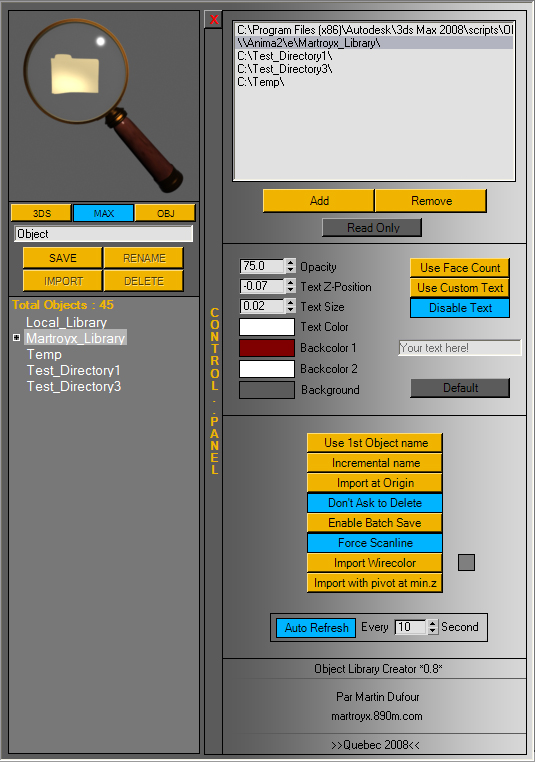
I just posted a preview of the new object library...let me know what you think about it ?

phudgey's picture

Hey looks good, any new

Hey looks good, any new features? cant really see from the screenshot.

here one for my wishlist, not too sure how hard it would be to implement, but i would like to see rather than having a list of file names with one thumbnail showing at a time, but have lots a more 'windows explorer' feel to it so you can just scroll down the list an see if a thumbnail catches your eye!

but its a great script keep up the good work!

phudgey's picture

oh and another one for the

oh and another one for the wishlist

would it be possible to have one version of the creator (to create the max files and thumbnails) and then a stripped down version that is soley for importing? im not sure what you think of this but using it in production its easier not worrying about accidently overwriting thumbnails, deleting files ect ect

MarTroYx's picture

yes, that why I added the

yes, that why I added the lock folder function... maybe I could add some kind of password protection ???

as for explorer thing...well maybe but not for now I guess :-P

ZoMbiE's picture

Everything is working good

Everything is working good so far. Some of the text is abit hard to read against the gold background, but I think I like using the black gradient better. Great job on this plugin.

phudgey's picture

Hey man heres a

Hey man heres a request/question
is it possible to be able to have the settings.ini file located on the network so everybody using the library has all the latest updated directories

MarTroYx's picture

Hi phudgey, yes I'll try to

Hi phudgey,

yes I'll try to add this to the next version but, I'll have to put this in a different ini files since it will most certainly cause bug if all the user write to the same ini file at the same time.

Martin Dufour

phudgey's picture

hey, been almost 2 months

hey, been almost 2 months since last heard from you, any news on an update?

MarTroYx's picture

My god, already two month,

My god, already two month, I've been really busy with other script and haven't touched this since then. The export to .net only is done at 80%, I would say. I try to find some time to finish it soon.

Version 0.85a is really hard to beat in term of speed and stability and I wont realease a new one until it beat it !

just keep waiting, I haven't forgotten this one :-P

Martin Dufour

MarTroYx's picture

After some testing with the

After some testing with the 1.06, some gc error appear, the second time you open the script(at least on my system), I investigate into this and post an update ASAP.

Martin Dufour

fajar's picture

i've tried it (1.05) in 3ds

i've tried it (1.05) in 3ds max 9, it's error comes first. so i change to the older one!!

hey bro can you make it compatible for 3ds max 9 ((1.05)) or may be the next generation.
I still use 3ds max 9, i`ve already had 3ds max 2008 and 2009 but I still not move to it 'cause they are suck!! all feature from 3ds max 9 is already wiped out!not to mention VRay is still demo in max 2009!!heeeeehhhh........

they are too slow when I work in large scene!even if I already tweak the model,texture and 3ds max setting!!

hey ,sorry for what I say

MarTroYx's picture

Yeah, I know I've got 90fps

Yeah, I know I've got 90fps in 2009 compared to 300 in max9 but I don't really need fps after all :-P

1.09 should work in max9 ... but you have to tell me if you find bug cause I don't really have time to test it for now :-(

Best regard ,
Martin Dufour

phudgey's picture

Hey martin thanks for the

Hey martin thanks for the great update! there is one bug that im getting though, if im using a jpg that is longer than it is high, instead of cropping the image as it did in previous versions it will now squish the image in a square and makes all the images look thin and squashed.

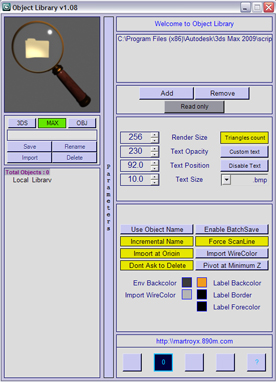
also there are now 4 buttons down the bottom and when you press the second from left it changes to a '0' what does this mean/do?

Cheers

Using 1.10

MarTroYx's picture

Hi phudgey, Thank for

Hi phudgey,

Thank for pointing this out, I'll have this fixed in the next release, as for the button this is the timer that refresh the list of object if it detect new file. I just put some text in there so that you know it work... until I find some time to do a cool button :-P

Best regard,
Martin Dufour

kilad's picture

Hey! Thanks for a great

Hey!

Thanks for a great script ;)

Is it possible in some way to convert the max files thumbnails to a bmp? Then we wouldnt need to batch save all our objects.


Kilad

MarTroYx's picture

Thank! yes this must be

Thank!

yes this must be possible since the explorer is able so see them...I look at this when I get some time :-P

Martin Dufour

Comment viewing options

Select your preferred way to display the comments and click "Save settings" to activate your changes.