ScriptSpot

Script

111_cameraMatch

By 111 · Credited author: Andrei Kletskov (111) · 2011-10-15

Version
0.4
Date updated
2012-05-19
Votes
12
External download
External download

Tags: camera match utility perspective

Description

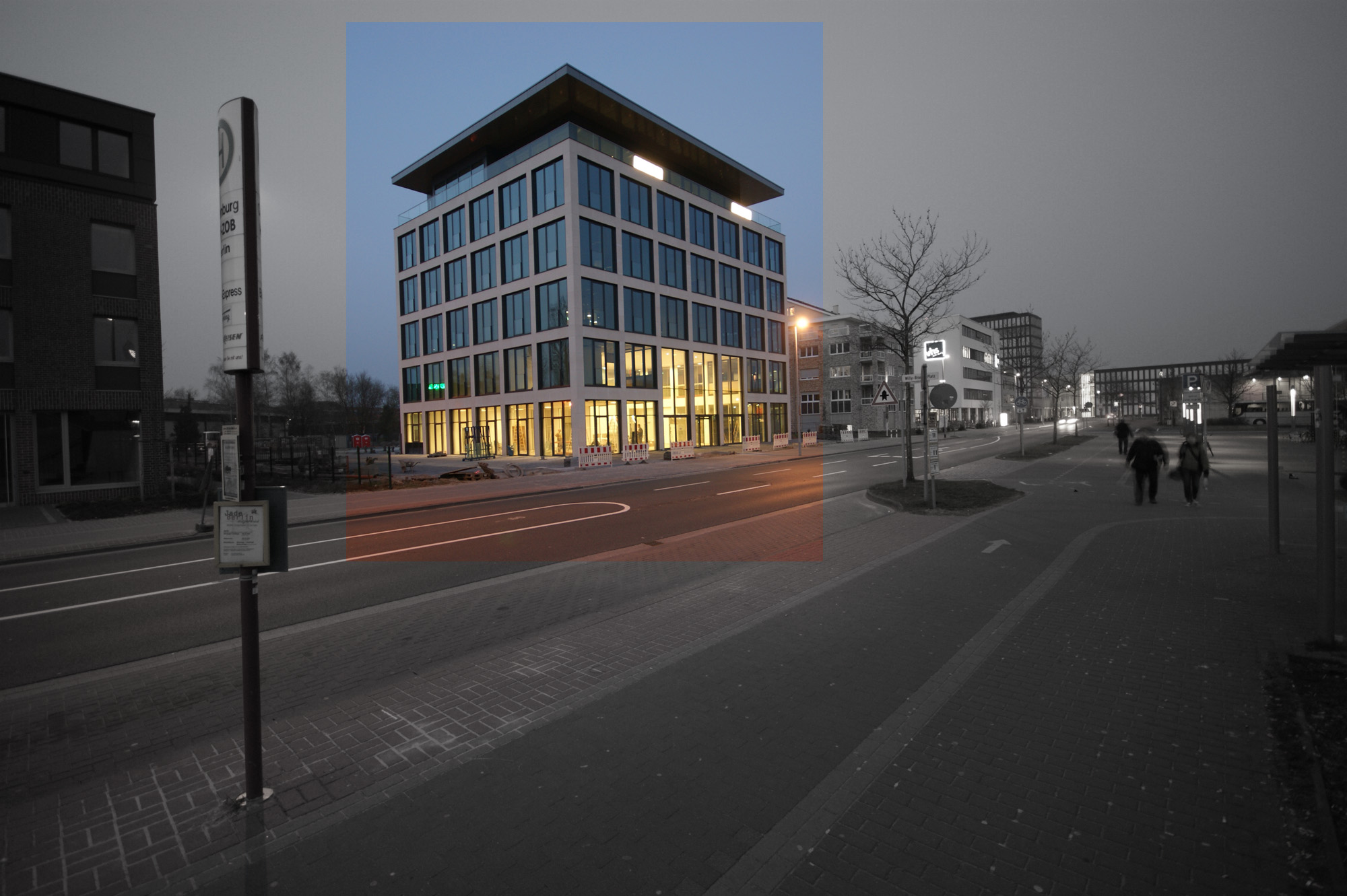
This is a script that creates camera according to perspective lines on your image. It is sort of a beta version and has no error handling yet, so be warned:).

1 - get an image for which you want a camera being created.
2 - run the script (it is ordinary maxscript).
3 - press first button in UI and select the image
4 - an image plane and helper curve will be created
5 - modify helper curve (subcurves) so that they follow perspective lines, the vanishing points with three pairs of subcurves
6 - press the second button in UI, the camera with correct FOV will be created and another one, aligned to the image. That's all.
Testing needed, my tests show good results.

Acknowledgments go to sanctus (http://somesanctus.blogspot.com/), who made a similar script for maya, thank him a lot for the main idea.

how to use mini tutorial - http://andklv.narod.ru/tut_mini/minitut_10/111_cameraMatch_tutorial.html

Comments (31)

Hi! Привет!

kilid · 2015-05-11

Dear Andrei? can you send me copy of a camera match plug pls.

kilid@mail.ru thx

cameraMatch

Marcelo Baglione · 2015-02-21

THANKS, Andrei Kletskov!!!
Gracias,

Marcelo

the link to the script fixed

111 · 2015-02-21

some troubles with the hoster

503 Service Temporarily Unavailable

mohsen1212 · 2015-02-16

hi
what i do not download camera match?

Tutorial in portuguese

stenionet · 2013-04-01

This is a tutorial that show how to use this script:
http://www.youtube.com/watch?v=Yu_6NIHWC9Q

The first part is about the script that come with max 2014 and the second part is about cameraMatch script.

Even if you don't know portuguese, I think it will be possible to understand.

One vanishing point?

Vipera · 2013-03-28

How do I have to put guide lines if photograph has only one vanishing point?

Always the flipped camera problem

chakib · 2012-12-14

I did align the lines corretly but i have always the mirrored camera ( looking down ) i don't know why

Also when i download ur version i use v0.4, why it says that i use v 0.3 ?

Thanks.

Yusuf_ES · 2012-07-09

Good script. Thank you. Very helpfull

Camera Match plugin

Marcelo Baglione · 2015-02-21

Dear Thanks, hi,

Can you send me a copy of Camera Match plugin, please?
Thanks a lot!
Gracias,

Marcelo, from Brazil, Rio de Janeiro

e-mail: mlfbaglione@gmail.com

Camera Match plugin

Marcelo Baglione · 2015-02-21

Dear Thanks, hi,

Can you send me a copy of Camera Match plugin, please?
Thanks a lot!
Gracias,

Marcelo, from Brazil, Rio de Janeiro

e-mail: mlfbaglione@gmail.com

nice script

AlexYu · 2012-07-06

Really good script and thank you for sharing.
Is is possible to create Vray Cam instead of a Max Cam?

tip for AlexYu

VitaminD · 2012-07-09

after creating standard camera
press P to go from camera view to perspective
select vray camera (or just create one now)
and press ctrl+C
it will align vraycam to current view (it can be a bit different though)

tip for AlexYu

AlexYu · 2012-07-12

Thanks!

interiors

dub73 · 2012-06-29

Hi, Script looks promising. Is it possible to match interiors as well? I couldn't get it to work. I get extreme distorted results?

cheers

dub

q: Is it possible to match interiors as well?

111 · 2012-09-17

a: it is no matter what kind of a scene is depicted on an image. The obligatory thing is a cube - a thing with three faces perpendicular to each other. They are used to build guides for defining vanishing points. If your picture has a table or a cabinet or whatever square with all sides visible and not parallel to the camera, you can build guides and solve the camera.

mirrored camera solved

111 · 2012-05-19

I hope I have solved the issue with mirrored camera (in version 0.4). In case camera islooking down, the aligned camera has appeared to be mirrored. Now this case should work ok.

mirrored camera

Pvt.hudson · 2012-05-09

Hi first off. this script is unbelievable good.
i use to pan, orbit, rotate,... till i got a good match.

with this , life's great :)

i also struggled with the mirrored camera. but it happened when the help lines didnt had a blunt angle.
can this be the cause?
when you get that lines good (blunt angle). the camera resolves ok.

grtz
and thanks again for this.

Tommy

mirrored camera

bronius · 2012-04-16

Yes, I've got same mirrored camera..

dub73 · 2012-06-29

when I flipped the lines, the one form the top goes to the bottom, the camera is not flipped (max 2012)

Klonsemann · 2012-04-20

At first, Very nice Script. You did a great job on that !

I used the script to match some pictures and it worked for two. But for the last pic, the solved cam was mirrored. The cone looked correctly towards the imageplane, but the Camera "body" seemed mirrored in the opposite direction.

The cameraview does not show the plane. Mirroring the Cam back by hand does not help. A dummy building shows that there were no parallel lines with the image.

Does someone have the same problem. Would it help when i upload the image so you can confirm that ?

Attachments

thx for the script

StaazVaind · 2012-07-04

topic says all

2chakib

111 · 2011-12-20

You could be doing something wrong (most likely drawing lines in rear view instead of front view). Can you show the image you are trying to match?
If you read more carefully the documentation (yeah:)), you would understand that one camera just has FOV calculated, and aligned camera tries to align to the picture's world.

Camera result is inverted

chakib · 2011-12-01

Hi,

i did follow you tutorial i did perfectly align the lines to match the photo,

BUT

i must rotate my object to 180° ( things down must be up ) to have a the good result so, why ? also why there's two kind of cameras ( camera and camera aligned ) , the camera aligned is ok just inverted, but the other camera is giving a massacre view, what's the utility of this camera?

Many thanks for your effort but please i want understand why the camera aligned is inverted because i must rotate the objects completly to match it :(

i'm using Win7 3dsmax 2012 x64

le1setreter · 2011-10-20

great job. without the tutorial i did not get it to work but now it is fine. many many thanks for that script.

Great Script

luisllamas · 2011-10-15

Nice Script!! This feature should be included in 3ds Max a long time ago.
Excellent work! One must have script

Big_Hobbit · 2011-10-15

thanks! ))

llld · 2011-10-16

thanks! it works!

need tutorial

llld · 2011-10-15

can you make a video tutorial or gif pic to show how you use it?
i try but do not get correct result.
best regards
derik

Big_Hobbit · 2011-10-15

Андрей может сделаешь не большой видео урок для тех кто в танке! а то лично мне не понятно как нужно расставить линии по фотке!
за ранние спасибо :)

tassel · 2011-10-15

Nice Script :)