ScriptSpot

Script

Auto mesh Skinning

By super_oko · Credited author: Blazej Kowalski · 2013-07-25

Version
0.7
Version requirement
3ds max 9+
Date updated
2013-08-12
Votes
13
Description


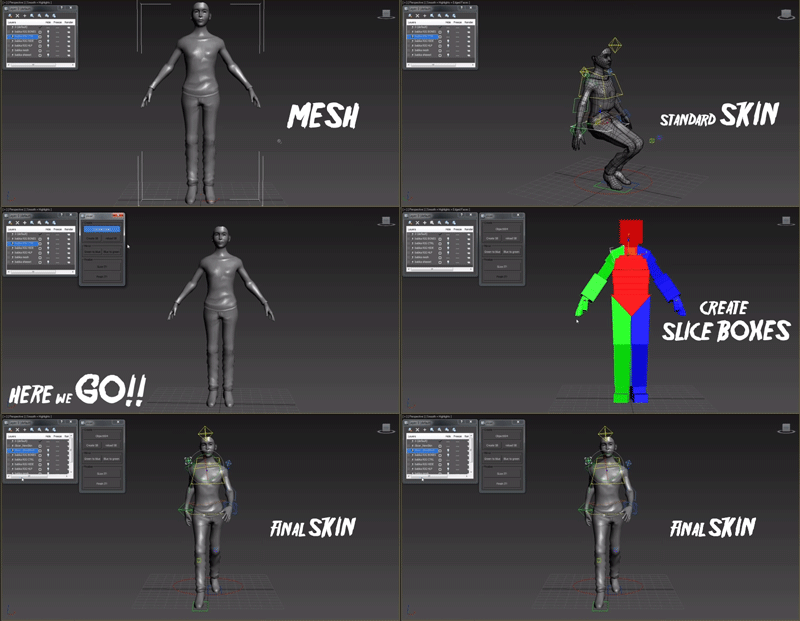
This script is for fast and accurate mesh skinning, but it won't generate skin for production ready. There will by always something to correct weights.

It's very simple all You have to do to set slice boxes. Just watch video and everything should be clear.

In version 0.6 there is simple automatic mirroring made. The rigg should be set in x=0 position.

All comments and suggestions are welcome.

------------ version 0.7 -----------

- Script didn't work with bones which had space in names - Not any more :]

------------------------------------

------------ version 0.9dev -----------

- Open source version. There is some problems with this automatic symmetry, so I added buttons for manual symetery.

If there is some super script master and have some ideas how to make this recognition of symmetry better pleas do that!

Let's heal the autodesk World together!

------------------------------------

Additional Info

To run it just drag and drop this to your viewport or use "run script" in MaxScript menu
Videos
Attachments

Tags: rigging, skin, skinning, Rig, automatic, auto, weight, autoweight

Comments (21)

Green To Blue Button

dandezign · 2017-03-08

Whenever I press the mirror button it does nothing. v7 does it but when the script decides and v9 does nothing at all.

3ds max 2013 getting stuck at slicing

avengerxp · 2015-04-23

I tried this more than 8 times and confirm the script makes 3ds max go "not responding" at slicing.

I dont know what i did wrong, it just makes max go not responding and only resolution is to kill it via task manager.

windows 7 64 bit - 3ds max 2013 64 bit.

Look's great!!

Luchiano · 2014-09-29

I try right now!

I have a problem

Luchiano · 2014-09-29

Hey hi all!
I try the script with CAT, but when i start to script slice, the result has less bones, have you an idea what is the problem?
Thanks!

Getting a symmetry bug

pacermike · 2014-05-30

I'm trying to skin a symmetrical model (used symmetry modifier and collapsed to edit poly) but the script insists the model isn't symmetrical, so I have to manually fit the slice boxes on each side. Bummer.

It's too bad the script is encrypted. If I could look at the code I might be able to see what's causing the problem myself. Just curious, why encrypt a free script?

super_oko · 2014-09-12

You right about encrypting free scripts, so I uploaded new open version. If you got time you can take a look inside the code. Maybe U will find other way to do that symmetry stuff.

Hand control?

dpolcino · 2014-04-02

Great script! hey, what's that hand control modifier?

Bug

rimbros · 2014-03-22

I really love this Tool but have a true big bug, if u save the scene with the boxes ready to use in other models on same position u can use the Reload SB butom, but gotcha!!! atm u try Slice Hit, this message come up, --NO convertToPoly function for undefined, and u cant use more the boxes u need made new and readjust, hope the greath friend Kowalski can fix this.

Reload SB Bug found and fixed

pixhellmann · 2014-09-22

Hey,

I think I found the bug of reloading SB and "No convertToPoly function" error message.

It's in the on BBreload pressed do ( ... ) part of the script.

3ds Max is counting the bones in a weird way. They are not numbered straight in an order starting from 0. The script tries to reload the bones and searches the scene for existing slice objects. Then it fills the slicerArray and the boneArray to match up and start slicing.
Since the slicer Array is filled with this line within a for loop that counts from 1 to numberOfBones:

b = execute ("$slicer_" + (x as string))

It assumes that the slicer objects have numbers from 1 to x. But they don't!!

So the fix would be to select the slicerObjects from the scene and match them again with the bones.

I tried:
b = slicerCheck[x]
but they don't come in the right order.
Could someone with more maxscript skills help me with this?

I attached the fixed script. It's in line 298.

Thanks

Attachments

Update

pixhellmann · 2014-09-22

Ok after some more testing, I think the assignment is still mixed up.

At least it takes now all slice boxes.
Now we need a way to sync them back up with the bone IDs.
Can somebody help me with this?

error loading the slice it script

monaeldaly · 2014-03-16

i was working on the slice it script yesterday and i saved. then i couldnt relaod the script.
thanks
mona

Really Nice !

asadar · 2014-01-23

It's just working perfectly with 3Ds Max 2013 64bit(still need to test it with 2014). That's a very useful script, quick and easy. It saves me a lot of time. And it's free! ...what else?

Thanks for sharing. Keep it up!

Superb script dude

kunalrony · 2013-12-26

Really i save my lots of hours. thanks dude.

br0t · 2013-08-13

the "final skin" looks like something different in the gif :> just kidding, I will try this soon, thanks for sharing!

titane357 · 2013-07-30

>Hello
looks very nice but I get :
>> MAXScript Rollout Handler Exception:
-- Type error: Call needs function or class, got: undefined
3dsmaxdesign2014

super_oko · 2013-07-30

Hi. Can You write a little bit more about this error. What you do to get this message? Is it at start up, or You pressing some button ????

titane357 · 2013-07-30

In fact, I tried with simple boxes as bones and it works, with few cat bones it seems ok, but with a entire cat skel, when I clic "Create SB" button, I get the error.
I exlude all superposed bones to not have slicing boxes on top of each other,and I'll continue to search.
Hope it is my fault. :-)

titane357 · 2013-07-30

oookkkkeeeeey
It is my fault :-)
As I'm lucky man, I use catparent "base human" and it don't work...
I have tried before with few bones of "Ape" and it worked.
ARghhh, there is a space in "base human", so I renamed bones without space and it works. :-)

Thanks for your tool !!!

super_oko · 2013-07-30

Ok thanks for your replay, now I know where this error come from. I didn't test this script really much, only on few characters.

So people DONT USE names with spacebar in your Rigs. I will correct this in next ver.

Thanks titane357

titane357 · 2013-07-30

Thanks

the button slice it

jdev · 2013-08-29

Dude how many hours need the script after press the slice it! button to finish the job?
im using the 0.7 version