This script conforms a terrain surface to a road in just a few click. It's very easy to use. 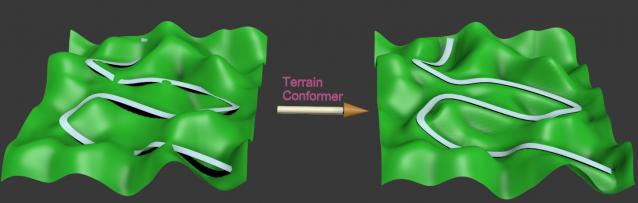
Script
Terrain Conformer
By LittleLordPotala · 2011-11-25
- Version
- 1.1
- Version requirement
- 2010, 2011, 2012, 2013
- Date updated
- 2012-12-04
- Votes
- 12
Downloads
- terrain_conformer1.1.mse — terrain_conformer1.1.mse4.6 KB
- terrain_conformer.mse — terrain_conformer.mse3.7 KB
Description
Additional Info
1- Create a road and a terrain as an editable_poly.
The objects must not have any thikness. (Very important!)
To conform smoothly, the terrain must have enough subdivision.
Also, you will get a better result if you build the road near the terrain
otherwise it can produce some distortion on the topology.
2- Launch the script, pick the road, pick the terrain,
choose the distance of the blending (smoothness of the slope),
click the button "Conform terrain" and wait a few seconds...
3- If you don't the result, click "undo conform",
then move, rotate or scale what you want and click again "Conform terrain"...
---------------------------------------------------------------------------------
The road does not change at all.
Only the terrain is conformed right under the road
but, outside the road, it keeps the original relief.
The terrain is conformed to the road only on the Z-axis,
it's not doing anything along the other axis X or Y.
A important thing :
The original objects are not deleted, just hidden.
Version 1.1:
Correction of an offset that appeared in certain cases.
The script works now in world coordinate system and respects
the initial position of the objects.
The spinner indicates the actual system units.
---------------------------------------------------------------------------------
---------------------------------------------------------------------------------
If you have any suggestions, feel free to post comments !
Look at the video demo on youtube ! (there is no sound)
Videos
Comments (23)
Thank you so much!
souzagiovanne · 2017-01-17
I can not imagine any more without this script! My workflow has improved considerably. I use it in many ways, almost all the time. I import the contours of AutoCAD, I use the plugin Populate Terrain to create the terrain. After that, I import the poly lines in .dwg, from the streets, sidewalks, blocks ... and I transform into faces, subdivide the mesh with Populate, and then conform all those elements in the terrain using that script. It gets accurate, and very quick to be done. For example, I can model a whole residential condominium in a matter of minutes. Thank you so much!
@trixian
LittleLordPotala · 2012-12-04
I've published the new version and I've tested it on 2012 and 2013 version.
The problem with offset seems to be resolved on all my tests. But notice that I didn't make one thousand tests, I'm not 100% sure that it will work for everyone. So let me know if everything works for you. Thanks.
Fantastic
 trixian · 2012-12-07
Works great so far. I can't see any new options as far as pivots go, but it is now conforming correctly, not moving the road and generally making me happy :)
Great Job
Thank you trixian,
LittleLordPotala · 2012-12-07
As I said previously, I've decided to not expose the pivot option because it's now became completely unnecessary. I'm also happy that it works fine for you.
trixian · 2012-12-07
Hmm. Looking closer there are a few issues where the script is "deforming" the road in strange ways, like sudden peaks sticking up, and smaller patches where the terrain is "warped" and not conforming to the road. The latter could be because of the topology of the mesh maybe. (I selected all faces under and adjacent to the road and meshsmoothed them, and relaxed them before running the script). Still better than nothing :)
Edit: Never mind the comment about the road. That was my fault. Still its ignoring and warping the terrain in small patches at random places.
Strange offset problem
trixian · 2012-12-03
None of the objects have thickness no. I'll just zip the model into my DropBox public folder and link it here ok? Don't worry, its a clean file :)
Explanation :
LittleLordPotala · 2012-12-03
This strange offset happens because the script centers the pivot point before the calculation and that is not a good thing in all the cases. Your sample file demonstrates it.
Consequently, I have put the pivot to the minimum Z-axis and disabled the CenterPivot command in the script and it has resolved the problem.
The initial pivot position modifies the final result but with the actual version of the script, you cannot change that. So I will soon publish a new version where the CenterPivot will be optional.
After that, you will have to adjust correctly yourself the pivot point depending on your terrain and what you expect as result.
I don't know if you work on the terrain that you have sent, but (at least) I would recommend you do add more subdivision under the road if you expect a better result...
I would also say that this terrain has not a very good topology for 3dsmax and editable_poly. If you want to modify the geometry, it will be way better with quads than tris. The easiest way to do it, is by conforming a plane primitive on your terrain with the "conform modifier", the "conform space warp" or the one in the "free form tools".
trixian · 2012-12-04
The terrain is generated from map data by our GIS guys. Triangulated meshes like this are a pain, but letting them generate a quad grid based mesh makes for an enormous waste of polys while still not capturing the "detail" of the topography. Sadly these Delauney triangulated meshes are the best we can get for this type of work, and the budget. The file you got is the main area, but when I was trying to conform, I had split off the east part from the west part and added some subdivisions to the areas under the road. That file got messy as I was getting progressively frustrated so I figured you'd be better off with the clean file.
What I sometimes fantasize about is bringing these terrains into Zbrush and using the new Qremesher topo-tools to get an adequate loop flow, then re-projecting the details onto it. The trick would be making this a very fast and painless procedure.
Anyway, looking forwards to try out the new version once its ready.
Will it still also offset the road object like now, or can you make it only offset the conformed terrain?
LittleLordPotala · 2012-12-04
In fact, I'm currently trying to remove the offset for all the situations in a way that you will not have to care about the pivot point position but only the initial positions in the worldspace coordinates. So, the objects have to keep the exact same place as initialy. I think this way is more reliable than a pseudo-parameter for the pivot point...
Considering that you often have to deal with triangulated meshes, I totaly agree with you and encourages you to find a better and faster solution with some plug-ins for 3dsmax or sculpting softwares like ZBrush.
Strange offset problem
trixian · 2012-12-02
Ok. Not a bug but a feature :)
How do you do this manual adjustment?
It seems to offset no matter where the terrain or road is placed (in Z). It seems quite hard to manually adjust, as the road object is offset upwards (2.6168 meters in this case), and the terrain is offset down (7.2393 meters in this case), and then the areas under the road projected up. Why would the road object move up while the terrain moves down?
Surely these large numbers aren't correct. Your own examples don't show any visible offsets.
Do you want a file to see what I'm experiencing?
Yes,
LittleLordPotala · 2012-12-02
You could send one or two screenshots to show exactly this problem.
Just in case : does one of your objects have a thickness ? (because this is not supported by the script...)
Std. English version only
LittleLordPotala · 2012-12-02
@fred3317:
The script doesn't support localised versions. This is due to the fact it uses references to the UI that are translated. I'm also french and I've never used the french version because, in my opinion, the localisations are just a source of problems. (Désolé et merci pour ton commentaire.)
@tprompt3d:
I'm glad you like it. Thanks.
@trixian:
This is not a bug. The script performs average of distances, so it needs somtimes to be adjusted manually. I will have a look one day if I can improve this behavior.
Strange offset problem
trixian · 2012-11-30
When I use the script, the conformed terrain is moved down quite a bit (variable amount from varying the falloff spinner value), while the areas included in the falloff range are conformed up to the road. Sometimes the new road is offset down a bit too. Happens in meters and cm scene unit scale, and when all objects have had their transforms reset.
3dsmaxdesign2012, Win7 64.
tprompt3d · 2012-11-26
Very useful,thank you for sharing.
curmeiste · 2012-01-17
Thank fantastic script
Really cool
 48design · 2011-12-06
Awesome! I wanted to script something like this myself but now I don't have to do that. ;o)
Great Script
luisllamas · 2011-11-26
It works now. (I used a road with thickness :P )
Thanks for the instructions.
Tested in 3ds Max 2010 and 2011, 64 bits. You can add it to version requirement info.
Good work!
+1 for you.
LittleLordPotala · 2011-11-26
Thank you for your feedback and your test.
I updated the "version requirement info"
and added a comment about the necessity to build objects
without thickness, in the "Additional Info" section.
Do you think that I need to create a start-up tutorial ?
Best regards.
Hi!Very excited about this
guiboy · 2011-12-05
Hi!
Very excited about this script but it did'nt work for me..
It says: "--unknown property: "falloff in undefined".
In 3dsmax 2010.
I followed all the prerequisites to make the terrain and road objects.
An example file would be useful to identify if the problem comes from my objects.
Thanx!
About compatibility with Max 2010
LittleLordPotala · 2011-12-05
I didn't test myself the script on Max 2010.
(Read the previous post of "luisllamas")
I can only give an example file from Max 2012,
eventually saved with the compatiblity 2011 and 2010.
I never had any error message.
Just a suggestion : have you installed all the updates available
for your version ?
Attachments
- terrainconform_example.max — terrainconform_example.max3.1 MB
Hi !Iam very interesed by
fred3317 · 2012-11-27
Hi !
Iam very interesed by your script but i've also an error message "--unknown property: "falloff in undefined"
I don't understand what's going wrong. I tried with your example file and the result is the same :"--unknown property: "falloff in undefined"
Edit : I have some more informations...
" -- Erreur dans CTerr.pressed() ; nom de fichier : D:\Programmes\3ds Max 2012\Scripts\terrain_conformer.mse ; position : 2758; ligne: 11
-- Définition dans le script codé
>> MAXScript Réf. pann. déroulant Exception:
-- Propriété inconnue: "falloff" dans undefined << "
Only a flat copy of the road and the plane are created...
I've got 3Dmax 2012
I just don't no what to do :s
In any case, thanks for your work !
Edit : Hum ok, i found :p i was using 3Ds Max 2012 French...
Your script is Awsome !
Interesting script
luisllamas · 2011-11-25
Very interesting...
But tried doing some experiments and it hasnt worked as expected. May be I have been doing something wrong.
Best regards
There are prerequisites...
LittleLordPotala · 2011-11-26
The objects must be "open" objects, so you can easily select the borders
of the road and the terrain. They must not have thikness,
like with the "Shell" modifier.
Do not apply any modifier on your objects:
collapse the stack modifier (or duplicate and collapse the stack).
It works also better if the faces normals are directed upward.
I tested it a lot of times with different combinations
and it has always worked as expected.
For example : I always create my road with a spline.
Then I add a "Sweep" modifier and select "use custom section",
pick a simple line, uncheck the "Banking" option. If the normals are
directed backward, in "Sweep parameters", I check "mirror on XY plane".
Finally I convert it to editable poly.
If you don't want to use this road to render your scene, you can use it
as a proxy-road to conform the terrain and make another road with the same spline,
more complex, even with thikness for the final render.
I hope it helps ! Best regards.