EDIT: I have uploaded a newer version of the script with a simple change. I just tested it with Max 2012 64bit. The only major change is you can now add names to the different systems that are created.
This is my first script that I wrote while learning MaxScript. It creates a particle flow system that creates a fire effect on a selected object in a scene. This is my first pass so I figured I would post it up here and get some feedback and if it helps some people that's cool to.
Additional Info
I am a student that is currently pursuing a career that will allow me to use my artistic skills as well as my technical skills. Any feedback is appreciated, I am always looking to learn and build in the areas that I might be lacking. If you are confused on anything about this script there is a tutorial that I posted on www.youtube.com that walks through everything on the script.
VideosComments (24)
Caveman Fire Script
GGrandScheme · 2018-09-29
Thanks for making this script! It gives us easy access to a pretty decent fire effect in very little time.
one of...
Ggpaget · 2017-11-29
... the most useful script i have found there for my use.
So simple to for getting such a really good result !
Thank you so much
EEdwin guy · 2017-10-31
Thanks a lot for the script. It was very helpful. Just so you know, I tried doing this with a sphere and it didn't work. It worked for a box though.
Fixed and enhanced version released...
spacefrog · 2016-02-23
Here's a fixed and enhanced version ( i call it CavemanEx to keep it distinct from the original ) CavemanEx V1.2 comes with the following fixes and enhancements :
Max 2016+ compatibility, UI code cleanup
Allows to manage multiple fire systems in the scene ( Firesystem pick option)
UI for particle display type, motionblur and other previously missing options
Framerate independence ( the original was hardcoded for 30fps )
Sanity and error case checking to make things more stable ..
I think you should replace the old download links in the ATTACHEMENTS:
caveman.ms 7.89 KB
cavemanv1_1.ms 8.19 KB
by " CavemanEx_1.2.ms 18 KB"
Also, the latest version should not be 1.1 but 1.2 (at the top of the page, next to the votes).
As i'm not the original
spacefrog · 2016-09-08
As i'm not the creator of the main post or the original script, i can't edit anything in the main text. I only can post a link in the comments section, like i did. The whole main post can only be edited by the original author ( which is not me). Putting the CavemanEx script into a complete new post, would have been an option, but i did'nt want to create more confusion. But maybe i will do exactly that over the next days...
PS: just learned that theMadMonster's forename is "Joseph" ( mine is "Josef" ) but that's pure coincidence 🙂 )
Bbugmenot · 2016-09-09
Yeah, maybe it's better not to add confusion with another (almost) similar article.
bug with 3DSMAX 2016
Bbugmenot · 2015-12-13
Hello.
Currently, the script (version 1.1) doesn't work with 3DSMAX 2016. :-(
Here is a screenshot:
Please, please, update your great script.
Thanks
I am not sure what has
TtheMadmonster · 2015-12-23
EDIT: So I just looked up the documentation and 3D_Type is still there, so I would guess how I scripted this is no longer supported, or the particle system has changed, or ... there are a lot of possibilities for things to change. Looking at the documentation there is support for python (not available when I wrote this), so I think a lot has changed over the years that will make this script outdated.
I am not sure what has changed in Max over the past few years, but I have not used 3ds max in 4 years or so. Looking at what the error is I am guessing what ever object is giving the error no longer has that property, or its been named something else. I would suggest looking up the ShapeLibrary class and see if it still exists. If so, what property has replaced 3D_type. I have had another person send me a message about another error, so even getting past this one, I am sure there are a hand full more waiting to be fixed. Sorry for not being much help, but this was the first and last thing I wrote for 3DS Max.
Fix is in the works ...
spacefrog · 2016-02-14
High guys !
I just stumbled over the post by Pyro on the Area's Max Programming forum and thought i'll spend a couple of hours and fix the script for Max 2016 and up... The Max 2016 issue is fixed already ( they changed the property names to be more sane ... ). I came upon some additional refresh issues ( particle spawn not triggered etc.. ), which are not really Max version dependent.
I'll try to fix those issues too and do some additional sanity checking. I guess the result will be ready later today or tomorrow. I'll post again when it's done ...
Error found
FFahad-Ahmed · 2018-01-23
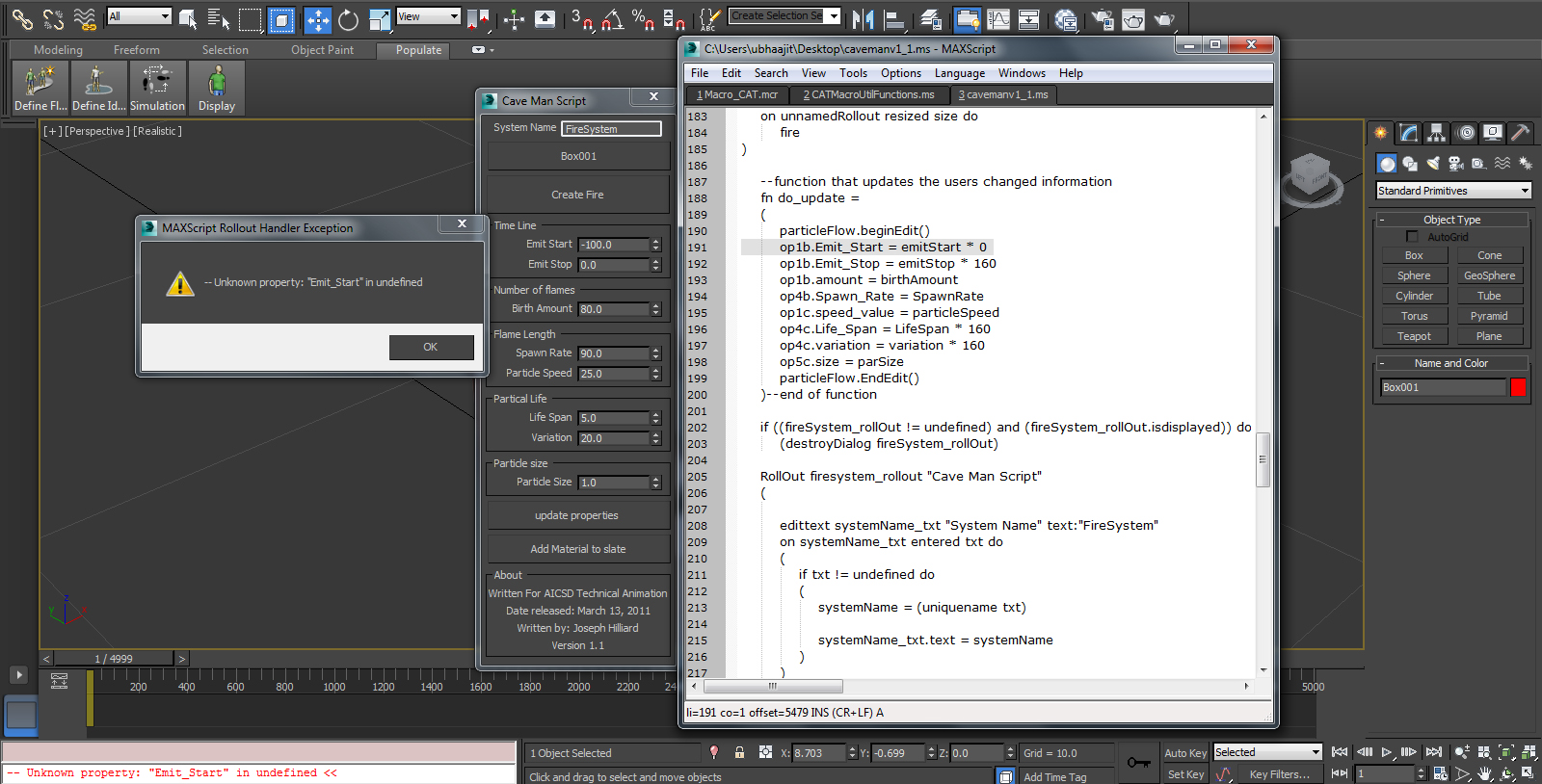
I have same error any solution plz..
BBharadwaj · 2014-05-09
Hi, i am new to script part for me doesn't work in max 2014 64bit i am facing problem is unknown property : "emit_start" in undefined pls help me.
Great work man... continues to evolve the idea can become a good tool, good luck
Nothing happens #2
Hhaph81 · 2012-07-04
It doesn't work in max 2013 64bit, pls help me.
The fire doesn't show when i click the create fire button.
Thank you!
my email: haph81@yahoo.com
Same Problem
Curtis W. Tooley · 2012-07-23
Object selects normally but particle streams do not leave the object and move towards the wind object.
So obviously I have no fire.
Using Max 2013 Win7 i7 x64 8Gb + 1.5Tb.
NOTE: It also exhibits the same problem in my copy of Max 2012 here.
Does the script use or rely on anything external that is not included in the
standard Max install?
Actually this can be a very useful tool once fully fledged out.
Curt
Mmikebkastro · 2013-01-31
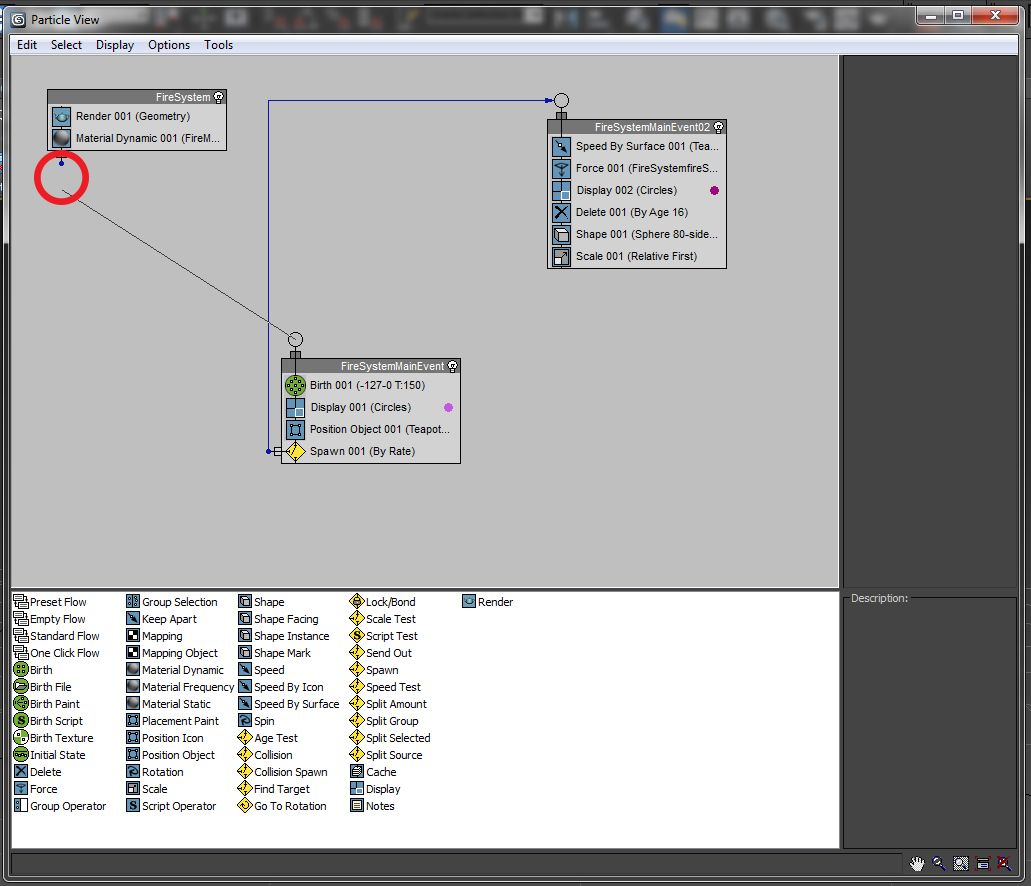
Hi, you have to go to the particle view and disconnect the 'Firesystem' and connect it again to the 'FireSystemMainEvent', worked for me on 3ds max 2013 64bit, Great Plugin!
hi, I'm new to 3dmax and working in max 2010, i followed the tutorial but wen i click in the create fire button, the fire dosnt show, y get the control and that marker in the center of the plane but not fire, any ideas of what im doing wrong or if its the version????
toolbar
JJCR2011 · 2011-09-23
Nice script! Can it be added as a button?
Thank you!
MAXScript FileIn Exception
Nnotapix · 2011-08-30
thanks for the script.
would be useful for me, but I work on max2008.
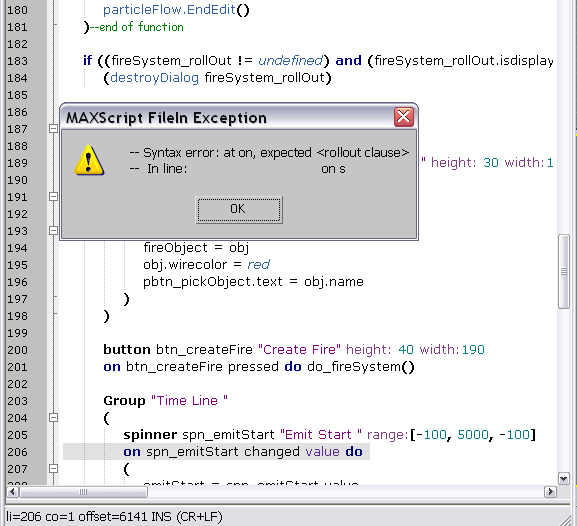
when I run your script "caveman_0.ms", this window-message "MAXScript FileIn Exception" appears:
--Syntax error: at on, expected
--In line: on s
Please, it would be possible to make the script work in max2008?
tnk :)
Nice script, but could still use some improvement.
I had an error at some point (somewhere after creating a second fire-system accidently and ctrl-z) Plus one still has to go into the particle-view to realy tweak it.... well, still a nice script anyway.
I had a hard time combining it with a Vray Cam + Light, but i just played with it for an hour or so.
tassel · 2011-03-23
Nice Script.
We must certainly add the "motion blur by image" by our self, this is perhaps a bit unnecessary.
I see you've tried to do it in the script and commented out. I tried to find Out of this, but are stuck here. I can see more on it tonight if I have time. maybe you can do it with camera.
Anyone that know how to do this with pf ?
motion blur
TtheMadmonster · 2011-03-23
As for the motion blur part I have been trying to figure this out for a while. What I have found is that there is two motion blurs for the particle flow. What I mean by this, in the view port you can right click the particle flow and change the motion blur (this is the motion blur that is commented out of my script, it is not the right one). The motion blur that I cant seem to find is the one that you get to from the particle view menu. If someone knows please do tell, I have asked on forums and no one seems to respond.
 spacefrog · 2016-02-23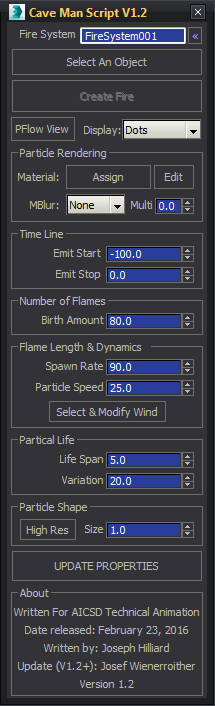

 Curtis W. Tooley · 2012-07-23
 Ralf · 2011-04-18
 tassel · 2011-03-23