
Straighten Edge
Version:
2.0.0 
Straighten Edge (maxscript) allows projecting and placing selected vertices/edges on the given straight line on the Editable Poly object, Edit Poly modifier, and Editable Spline & Line objects.
When the SHIFT key is pressed, vertices/edges will be straightened with axis constraints
in the chosen Reference Coordinate Systems. For how to use axis constraints, please read the 3ds Max help Using the Axis Constraints chapter.
When the ALT key is pressed, vertices/edges will be straightened and normalized in their distance/lengths.
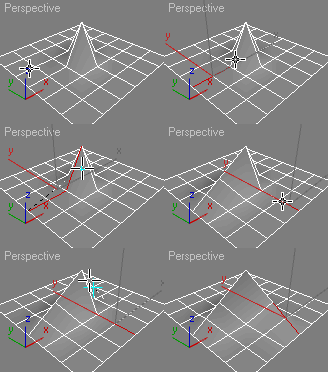
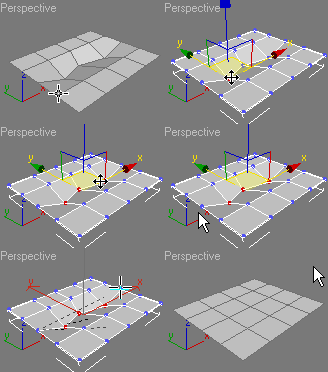
The script works with the following objects / modifiers:
- Editable Poly object
- Edit Poly modifier
- Editable Spline object
- Line object
Supported Reference Coordinate Systems:
- World
- Working Pivot
- Parent
- Screen
Additional Info:
2.0.0 (03.04.2026) for 3ds Max 2025+
- Rewritten and improved projection to line calculations
- Added support for constraints by axes of Working pivot, Parent, Screen, World
- Improved normalize calculations Removed script “Straighten Edge (Spline Undo)”, it not needed in modern versions of 3ds Max
- Cleaned up and refactored code
Version Requirement:
2025+
Comments
Great script for every day!
Thank you very much for your script, I always use it.
Спасибо большое за Ваш скрипт. Постоянно им пользуюсь!
If you want edge loop
If you want edge loop straighten with geometry constraints (edge/face/normal) you can get a script that'll do that here: http://www.scriptspot.com/3ds-max/scripts/edge-loop-straighten-with-cons...
.
.
Royal Ghost | veda3d.com
any news about axis
any news about axis constraints...?
if this would work I would use the script every day! :)
thanks.
themaxxer
Axis constraints not work
Axis constraints not work properly, please do not use it. I have no time and experiences of math to fix it. :(
Royal Ghost | veda3d.com
same for me. the shift key
same for me. the shift key doesn't work.
the constraint thing is not
the constraint thing is not working for me either
thanks
themaxxer
Axis Constraint
I am still having problems using the constraint function. When I hold shift it no longer functions.
It is working on my home PC but not at work. Both Windows 7 both Max 2013. Any clues as to why? thanks
Cobra: I can't understand
Cobra: I can't understand what the problem. Can you send me video or example with this problem?
Royal Ghost | veda3d.com
Hi everyone, I am having a
Hi everyone,
I am having a problem when trying to use this script.
In the animated diagram on the left above it shows it aligns the points perfectly, I am trying this to a peice of track I am editing and it doesn't align it the way it is shown above, actually the points get all messed up.
Please can someone help me.
Thank you