3ds Max | All

miauu's Draw Circle

0 votes

The main purpose of this script is to allow you to draw a circle with an exact amount of knots, something you can't do with the built-in Circle shape.

Also, you can set the radius of the circle. The circle will be created at world's center.

How to install: drag and drop the miauuDrawCircle_01.ms onto any 3ds max viewport. Go to Customize -> Customize User Interface -> miauu category and find the "Draw Circle" item.

Set 3ds Max window Size & Position

0 votes

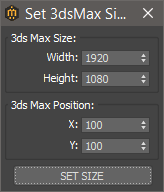
With this script you can set the position and size(in pixels) of 3ds Max window.


How to install:

drag and drop the miauuSet3dsMaxSizeAndPos.ms onto any 3ds max viewport.

Go to Customize -> Customize User Interface -> miauu category and you will find the "Set 3ds Max Size and Pos" script.

3DS Max - Plugin [UPDATE] - drawparamLine v2

0 votes

This major update brings you new features and improvements to already existing ones. Now, in addition to the existing method using a picked point and XYZ orientations, where you can change the length after creation, you have a second method of creation using two picked points, where the line will start on the first point and points in the direction of the second one using the length value in the spinner. Also, in this version, you can load 2D shapes from the scene, that have 2 vertices only, and change their lengths, the script will always respect their current orientations.

Maxscript interacts with WPF

0 votes

I used WPF to write an interface that implements the function of buttons to switch between different pages, and usercontrol for subpages. When calling this wpf-written interface library in MaxScript, the events are written in MaxScript. Events are useful when the widgets on my main page are bound in MaxScript. But the controls I defined in the subpage have no effect. But when I define Form1.MainContent.Content = Form2 -- set the subpage as the main content

FloralStarBall

0 votes

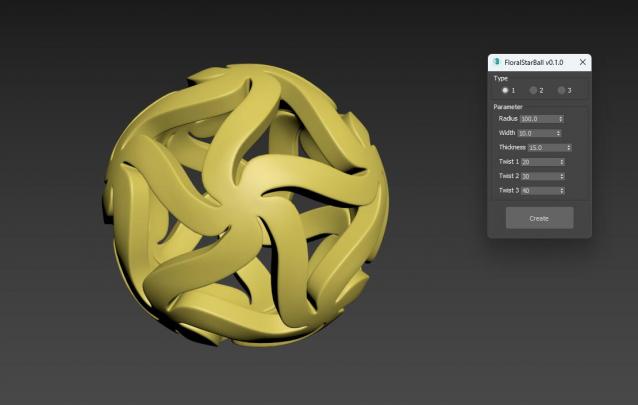
Floral Star Ball for 3ds Max plugin, A beautiful variation of the classic star shaped sphere. The star shaped pattern is arranged in a floral style, giving objects a unique visual aesthetic. It will be an excellent addition to any Math Art collection, desktop exhibit, or even stress reliever for flexible plastic printing. One click generation surprisingly effortless!

FloralStarBall

0 votes

Floral Star Ball for 3ds Max plugin, A beautiful variation of the classic star shaped sphere. The star shaped pattern is arranged in a floral style, giving objects a unique visual aesthetic. It will be an excellent addition to any Math Art collection, desktop exhibit, or even stress reliever for flexible plastic printing. One click generation surprisingly effortless!

GLB2OBJ

2 votes

This is a small application to convert glb to obj
extract the zip file anywhere. launch glb2obj.exe file, choose one or multiple files ,then an output folder and press "Convert Files".
to import objs into 3dsmax you should use my script "ImportObj" http://www.scriptspot.com/3ds-max/scripts/importobj ,It will import PBR materials and handle multiple parts objects.

Update 1.1: Added glTF support,a better texture file naming for PBR textures,and a new UI.

ImportObj

1 vote

This script, will import one or multiple *.obj files, if the meshes have some vertex colors they will be imported aswell . there is options to "normalize" scale of imported objects, if checked, each imported object will fit into a 100 unit box (as i work mostly in cm, it makes a 1m box) i'll try to implement this function better for other units. There is also an option to evently space imported objects.

DataWire

2 votes

DataWire 3dsmax script

DataWire 3ds Max script exposes general object properties – such as number of faces, spline length or object dimensions – as wireable parameters through a custom modifier, allowing you to easily connect them to other objects’ parameters or display them on a TextPlus 3D text on your scene.

3DS Max - Set The Size Of A Mesh

0 votes

This tutorial will show you how to control the width, height, and length of objects that are not parametric, which means you don't have access to the spinners that determine these parameters. You'll also learn some additional tips on how to quickly play with values inside spinners and how to quickly change the pivot location.

Syndicate content