3ds Max | All

Poseidon

13 votes

This program is a script made for 3D Studio Max 3 allowing to create underwater worlds from a parameter selection usually taking time to set.

Collapse Geometry

19 votes

I wrote this tool as I was sick of the default collapse tool crapping out when trying to collapse large amounts of objects. So far this has tool has been pretty rock solid. I mainly use it when I need to work with CAD files that I have imported. It is pretty self explanatory.

Replacer

4 votes

A maxscript to replace a selection of objects by others. You can enter a percentage by object, and a random scale value. It replace the objects and copy the position, rotation, scale and visibility animation. the old objects are placed into a layer named "Replacer_Old"

Facial Controls

13 votes

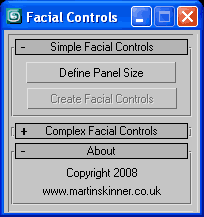
User InterfaceFacial Controls v1.0.ms - Maxscript that creates simple controls for driving a facial rig be it basic or complex.

Lightlister

3 votes

its based on the Lightlister that ships with vray which is based on the original that came with max.

the additions i made are.
- added support for corona lights, corona material and corona light material
- added tooltips to some parameters
- ability to edit ies files on vray, photometric and corona lights
- wider interface

tested on : 3DMax 2015 – 2016

Version:3.02

V-Ray 2.0 for 3ds Max now available

65 votes

V-Ray 2.0 for 3ds Max comes with V-Ray RT and V-Ray RT GPU included

Chaos Group is pleased to introduce V-Ray 2.0 for 3ds Max, which is officially on the market starting 6th December 2010.
V-Ray 2.0 for 3ds Max is a complete rendering solution, which combines the power of the well-known V-Ray award-winning production rendering engine with the flexibility and exceptional speed of the interactive rendering system V-Ray RT and the even more impressive new V-Ray RT running on GPUs.

Material Renamer

19 votes

Slice by VerticalHorizontal View

9 votes

v1.2 Fixed bug if shifted Pivot point

"More Video - Ещё видео"

Vray HDRI Viewer

2 votes

Vray HDRI Viewer is a simple and quick way of getting your HDRI's into your scene. Please note that for every HDRI the viewer requires an equivalent jpg file sized at 1000x500. I will be releasing a photoshop action to make this a little easier.

To intstal, use the maxscript menu > run script. You will then find it in "Catagory > shawvfx"

Lock Cameras or objects

3 votes

A little script to lock/unlock the movements of the cameras or objects too.
Put into your scripts directory, and under "Customize user inteface" open the category "Maico G." and assign "Lock Camera" to a menu, shortcut or toolbar.
To use, select a camera, camera target or an object and click lock or unlock.

Syndicate content