
Batch Loader
Version:
2.0
Date Updated:
10/26/2012 Quick Merge/Import multiple files.
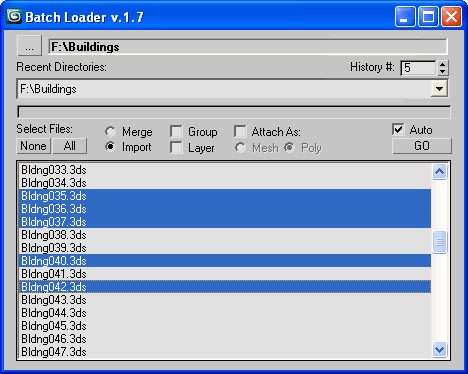
Features:
- Merge multiple .MAX files
- Import multiple .* files (ie all that can be imported)!
- Log all files where failed to load to Listener (if any)
- Multiple history for recent used paths available
- Limit count of recent paths to keep in history added
- Group option available
- Layer option available
- Attach option available
- "Auto" option (if is checked no prompt for Merge/Import) *
- Dialog window is resizeable
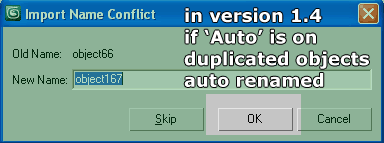
- Auto rename duplicated objects on import
[*] If "Auto" is unchecked then default Max Merge/Import dialog appear for each file.
It is slower alternative, but it is important and useful in some cases.
Additional Info:
I noticed that there is interest in scripts like "Batch Merge".
I also read the comments and requests, so here's what I created.
Version history:
- 1.0 - initial version
- 1.1 - minor code polish up
- 1.2 - INI file previously saved to Scripts folder, now saved within script source file location
- 1.3 - added minimal dialogue size when the dialogue is resized
- 1.4 - suppress the name conflict dialogue when imports and "Auto" option is on (now auto rename)
- 1.5 - create layer per file using it file name as label
- 1.6 - minor fixes
- 1.7 - attach per file as mesh or poly
- 1.8 - suppress additional imports dialogue; browse for folder dialogue start in recent path
- 1.9 - auto renaming rewriten (as the auto suggested name is not always correct, now append count digits)
- 2.0 - now check (by name) for existing layer and create new only if not exist
(TodoList: Remove stored paths that no more exist)
Version Requirement:
3ds Max 9+ | Attachment | Size |
|---|---|
| batchloader_19.ms | 9.84 KB |
| batchloader_20.ms | 10.01 KB |
Comments
Open Batch Loader script in
Open Batch Loader script in MaxScript Editor and change next lines (128,147,158) with this line:
bga
barigazy
barigazy, where to put this code?
@rachka
Find all lines with this code
bga
the script loads and lists files by random order
Seems like the script loads and lists files by random order instead of by name. Is this on purpose? I can't see the reason behind this. It's a real mess. Otherwise the script is great.
time saver
A huge time saver. thanks alot "Anubis". best thing is that it keeps the history of
recent directories. :)
nikart3d.in
Hey Kino
Thanks for reporting this tipo, I fixed it ;)
my recent MAXScripts RSS (archive here)
Small bug
If you have file which name is "0.obj" (zero) it will break the layer creation process. In line 235 FName-variable has filename "0" in it..
Thanks for the great script anyway! :)
Is there any reason you can
Is there any reason you can think of that this would run slower on Max 2010 64 ?
I've recently switched to 64 bit and importing takes ages compared to 32.
Granted, I am importing 2212 objects, but they come in at a crawl. (about 45 mins)
Maybe a heapsize issue ?
EDIT: Found the problem, if I have Outliner open at the same time as importing it slows to a crawl.
Absolutely Perfect!I can't
Absolutely Perfect!
I can't thank you enough, as I've said before I'm totally lost without this little script.
I love the way it now numbers the imported files, the entire scene is more organized , and each object now has a sequential relationship, I can see which file came in, and in what order.
Many thanks for your time and patience on this one :)
Richard
v.1.9 update log
issue detected:
Max auto suggested names for renaming are not always correct.
solution:
Now BL append count digits to the duplicating objects names.
Thanks to Richard Missin,
who send me testing files that reproduce the issue.
my recent MAXScripts RSS (archive here)