ScriptSpot

Script

BIPPY

By Jifman · Credited author: Geoff Samuel · 2010-10-19

Version
v1.9
Version requirement
3ds Max 2008 +
Date updated
2010-09-17
Votes
66
Download
Download
Description

Bippy is a tool for converting FBX bone data onto a 3ds Max Biped and offeres serveral tools to help optimize this conversion pipline.
Its perfect for motion capture data when the client needs the data in a biped format.

The script in action:
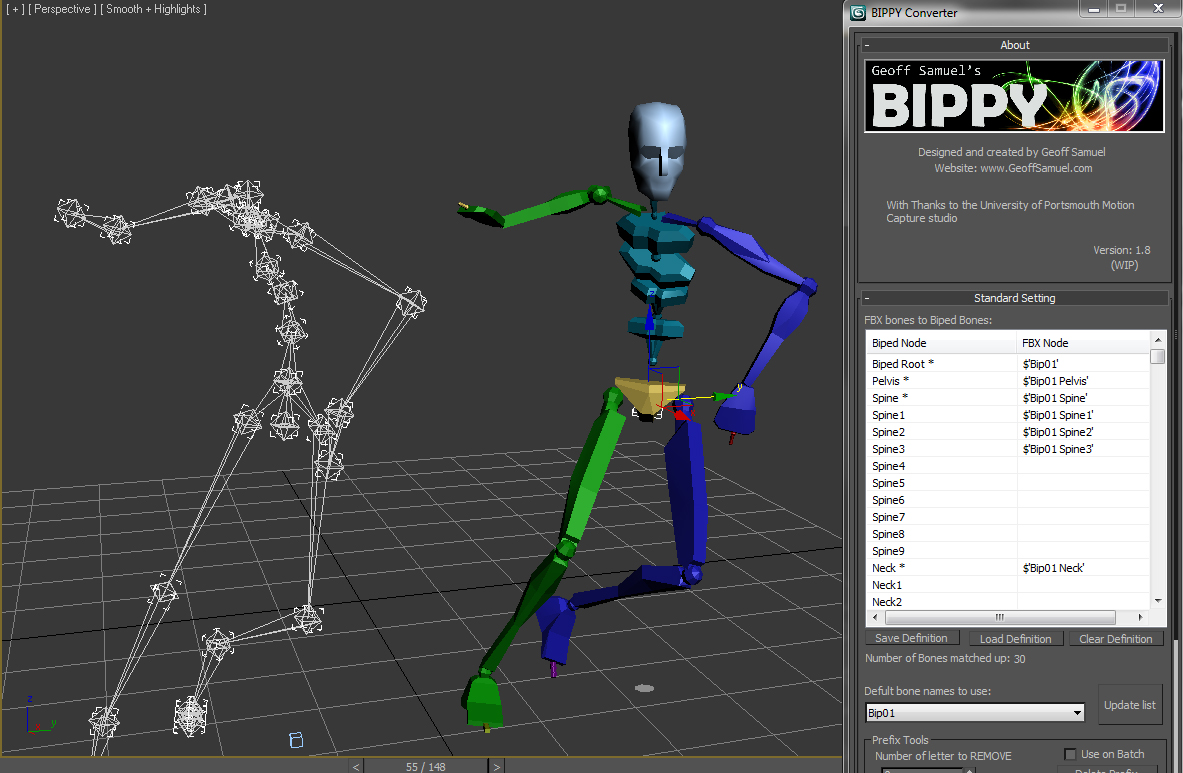
The script in action


The Script's feature list includes:

  • Complete MaxScript core, allowing for switching between any versions of 3ds Max 2008+.
  • Save and loading of custom biped naming conventions.
  • Automatically creation and re-sizing of a biped model.
  • Batch processing of multiple files.

As always, this script is open source so feel free to use it.

The installation is easy, simpley copy the un-ziped files to the 3ds maxs\Scripts folder within the programes files in order to work.

A video tutorial on how to use BIIPY can be found at:http://www.vimeo.com/18775418

Thanks

Geoff Samuel

www.GeoffSamuel.com

Videos

Tags: Animation, Biped, converter, Bones, fbx, Geoff Samuel, Motion Capture

Comments (20)

I can't get the Bippy Script!!!! The Website dosn't work

roubla500 · 2019-01-20

Hi guys, can someone give me a link to download the Bippy Script pleaaase ??

aksmfakt132 · 2018-05-23

Why does not this work in 2018?
(It worked fine in 2017)

dotnet.loadAssembly (GetDir #maxroot + "\\Scripts\\Bippy/GTools 64 - Bippy.dll")

3ds max 2014 and 2018

Artemcg · 2018-05-19

your script is the best, but it gives out hello and bye on line 1706. Something with a dotnet.
dotnet.loadAssembly (GetDir #maxroot + "\\Scripts\\Bippy/GTools 64 - Bippy.dll")

aksmfakt132 · 2018-05-23

I solved it (in 2018)

How?

SpencerH · 2018-06-08

How did you fix it?

I have a problem

aksmfakt132 · 2018-04-19

Since the direction of the bone is set differently, I made a dummy in the right direction
And I linked that dummy to the bone.
This works well
But no fingers are made. (only fingers)
Why?

Biped to FBX?

jg · 2017-09-15

Is there a way to transfer biped animations onto a regular skeleton?

jgk1981 · 2015-12-16

Hi ABTOMAT thanks for the check you made for 2016. I was tried to see if i add what Royal Ghost said on the post too, bad same result to me :( maybe i need some newest .Net package to install in order to work.
Thanks for the try anyway. :)

Can not reproduce the error

ABTOMAT · 2015-12-16

Hello again, jgk1981!

Just've gotten Max 2016 and tried to use script there.
I got everything working with no errors.
So, sorry, seems that this problem is on your side :(

ohh

jg · 2017-09-23

ohnvm

jgk1981 · 2015-12-12

Hi there.
Ty for the update you did but in 2016 sp2 it still get an error.
I have an image to show you what kind of error it give me.
Thanks in advance :)

Attachments

Will look into it

ABTOMAT · 2015-12-13

Thank you for your screenshot. Seems Max 2016 has some more differences (I currently use 2014 and 2015).
Will get the 2016 and look how to fix it.

It works with 2016

eNOx · 2015-08-20

But legacy part only.
Not support new feature like a extra bones.

Thanks about great script !

jgk1981 · 2014-09-16

The tool you made is very handy. But is it possible to make an update of it for max 2014 and 2015?
Thanks!

Not working here !

LAOMUSIC ARTS · 2014-06-10

I just gave the version 1.97 a try in Max 2010.
Install is very simple.
- choosing Biped1 from the list works once only;
- selecting individual bones does not work(custom naming bones/biped template);

thanks!

bigssu · 2014-05-12

it has minor error but works great!!!
thanks

2014

Massemannen · 2013-06-16

Hi!

Looks like a great tool! But I can´t get it to work with 2014... The dialogbox appears and everything but it doesnt match up the Biped like you show in the tutorial...

Take care
M

I can't get the Bippy Script!!!! The Website dosn't work

roubla500 · 2019-01-20

Hi guys, can someone give me a link to download the Bippy Script pleaaase ??